A weather station is the classic first e-paper project, and it's easy to see why. An e-paper panel only draws power while the picture is changing: the image is bistable, so it stays on the screen with the power off, the module sips less than 0.01 µA in standby, and a full refresh takes around two seconds with that characteristic flicker. For something that updates every few minutes — weather being the perfect example — that's the ideal display technology. Add a sensor like the BME280, which itself sleeps at 0.1 µA between readings, and you have a device that can live on a battery for months. If you're new to the panels themselves, start with our e-paper panels round-up.
Almost every DIY e-ink weather station built on an ESP32 follows the same rhythm: wake up, fetch the weather, redraw the screen, go back to sleep. That means the five builds below differ in just three ways that actually matter to you — which board (how much power it burns asleep), which panel size (cost, and how much memory the picture needs), and where the weather comes from (a local sensor, a free government feed, or a weather service you sign up for).
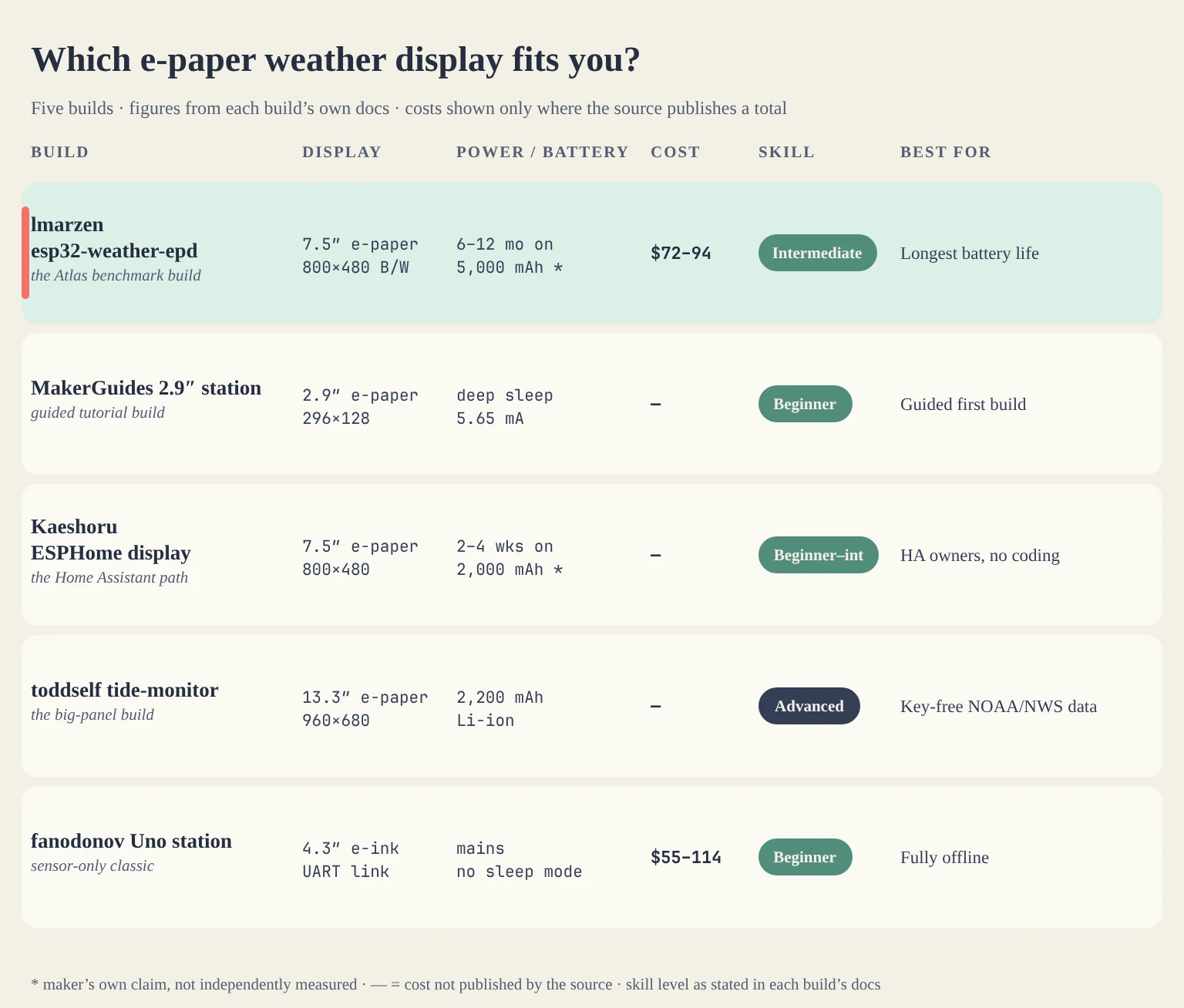
Here's the short version before the table. Want a guided first build with copy-paste code? Take the MakerGuides tutorial. Want the longest battery life and a polished parts list? That's lmarzen's esp32-weather-epd — it's the build we host a full project page for. Already run Home Assistant? Kaeshoru's display needs no code at all. And if you want to see where this hobby leads, the two remaining builds — a 13.3-inch tide-and-forecast wall display and a fully offline Arduino Uno station — show both ends of the road.
The one question that decides it: what do you want from it?
"I want my first build to hold my hand." Take the MakerGuides tutorial. It's a step-by-step article with complete code, and it's really two projects in one: a local sensor-only station and an internet version. Nothing here is friendlier to a complete beginner.
"I want to charge it twice a year, not twice a month." Build lmarzen's esp32-weather-epd. Its combination of a low-power board (~14 µA asleep, the maker's figure) and a big battery is the reason the README claims 6–12 months between charges. Caveat below on what "claims" means.
"I already run Home Assistant and don't want to write firmware." Kaeshoru's eink-weather-display is configured, not coded — ESPHome and your HA server do the work. The catch is setup effort elsewhere: about twenty helper entities to create in HA before the screen shows anything.
"I don't want to make another account." Two answers. The local version of the MakerGuides station reads its own sensor and never talks to the internet at all. And toddself's tide monitor pulls free NOAA tide predictions and National Weather Service forecasts — no API key, no signup, no account.
"I want the simplest machine to understand, end to end." fanodonov's Uno station is fully offline and beginner-tagged — but read its caveat below: untouched since 2018, and it's a mains-powered build, not a battery one.
The comparison table
| Build | Display | Effort | Battery story | Weather data |
|---|---|---|---|---|
| lmarzen esp32-weather-epd | 7.5in 800×480 | Intermediate | ~14 µA asleep (maker's figure); 6–12 months on 5,000 mAh claimed | OpenWeatherMap (free tier needs an account) |
| MakerGuides station | 2.9in 296×128 | Beginner | Board draws 5.65 mA asleep; no life figure given | Local BME280, or OpenWeather via library |
| Kaeshoru eink-weather-display | 7.5in 800×480 | Beginner–intermediate | ~10–20 µA asleep, 2–4 weeks on 2,000 mAh (maker's claims) | Home Assistant |
| toddself tide monitor | 13.3in 960×680 | Advanced | Sleep current not stated; wakes every 15 min by default | NOAA tides + NWS forecast, no key |
| fanodonov Uno station | 4.3in e-ink | Beginner | Mains-powered, no sleep mode | Local BME280, fully offline |
Every build in this table is an indoor device — none of the five projects claims any outdoor weatherproofing.
lmarzen's esp32-weather-epd: best for battery life
This is the benchmark build of the bunch, and the one we host a full project page for. A 7.5-inch 800×480 black-and-white Waveshare panel driven by an ESP32 — the README recommends DFRobot's FireBeetle 2 ESP32-E — with a BME280 indoors feeding temperature and humidity, and OpenWeatherMap supplying the forecast. The firmware follows the same wake-render-sleep pattern as everything else here, but the details are what make it the pick: ~14 µA in deep sleep against ~83 mA for roughly fifteen seconds during a refresh, which is why the author reports six to twelve months on a 5,000 mAh battery with 30-minute updates. Those are the maker's own numbers from the README, not our measurements — but they're the numbers the board choice is built around.
The parts story is equally grown-up: the 7.5-inch Waveshare v2 panel was $56.99 on Waveshare's own store when we checked on 2026-11-12, and the project's parts list totals $72–94 before case, wire and solder (totals on the project page). There's a 3D-printable frame and stand in the README plus at least four community enclosures on Printables, and the repo was last updated in July 2026. Two honest notes: the weather comes from OpenWeatherMap's One Call 3.0 API, which needs its own subscription — the free tier allows 1,000 calls a day, plenty for one display — and if you fit the optional BME680 sensor, the firmware still reads only temperature and humidity, so don't pay for gas sensing you can't use yet.
Verdict: build this one if battery life is the point — you want the months-between-charges e-ink weather station, you're happy following an intermediate-level build, and one weather-API account doesn't scare you. Start from the project page.
MakerGuides' weather station: best for a guided first build
The MakerGuides tutorial (published 2024, revised February 2026) is the friendliest door into the hobby: a 2.9-inch 296×128 e-paper module with its own embedded controller, wired to an ESP32 and a BME280 that reads temperature, humidity and pressure. Full code, both versions, one page. The local version is the simplest internet weather station alternative there is — it never connects to anything, so no API key, no account, nothing to sign up for. The internet version uses G6EJD's ESP32 e-paper weather library, which is itself actively maintained.
One electrical caveat worth understanding as a beginner, because it explains a lot of battery-life confusion in this hobby: the article's chosen "ESP32 lite" board draws 5.65 mA at 5 V while "asleep" — milliamps, not microamps. That's the dev board's always-on regulator and USB circuitry, not the ESP32 chip itself, and it's roughly 700× the sleep draw of the FireBeetle-class board in the build above. The article doesn't state a battery-life figure, and we won't invent one — just don't expect the two builds' battery runtimes to be comparable, because their boards' sleep draws aren't. It's a breadboard or perfboard project with no enclosure designed.
Verdict: start here if this is your first e-paper anything — you want every step written out, and the no-account local version is the gentlest possible first build.
Kaeshoru's eink-weather-display: best if you already run Home Assistant
If a Home Assistant server already runs your home, this build is nearly codeless: an ESP32 dev board with the same 7.5-inch Waveshare v2 panel as the lmarzen build, running ESPHome firmware you configure rather than program. The screen shows up to six room temperature/humidity sensors plus the weather from your HA server — the device itself carries no sensors at all. The repo reports roughly 10–20 µA asleep and 2–4 weeks on a 2,000 mAh battery, the author's claims as published, not independent tests.
"Nearly codeless" still means real setup work — you'll create around twenty helper and template entities in Home Assistant before the display shows a single number, and the battery-percentage readout needs manual calibration: you measure the battery's full and empty voltages yourself and edit a calibration line in the config. The repo suggests a board or 3D-printed case but ships no files. Cost isn't totaled in the repo, so we don't quote one; the panel is the same $56.99 Waveshare unit the lmarzen build uses.
Verdict: build this one if Home Assistant is already your weather source — zero firmware coding, your existing sensors on a wall-mounted e-ink screen, and you don't mind an evening of HA configuration.
toddself's tide monitor: the big panel with no accounts
This 13.3-inch wall display — tides and forecasts on a 960×680 Waveshare panel — is the most ambitious build here, and it's included as much as an inspiration as a recommendation. Its standout feature for the account-fatigued: all data comes from free US government feeds, NOAA tide predictions and National Weather Service forecasts, with no API key and no signup, and the location is set entirely by environment variables when you flash it. Power engineering is equally serious: a 2,200 mAh lithium cell through a PowerBoost charger board, with battery voltage sensed by the MCU through a resistor divider, waking on a default 15-minute cycle. The README doesn't state the deep-sleep current, so we don't quote one.
It's also the project that teaches why panel size and memory interact: a full two-bit-per-pixel frame for this panel is about 159 KB, which doesn't fit the largest free memory block on the no-PSRAM ESP32 driver board it uses (~110 KB), so the firmware renders the picture in two bands. Building it demands PlatformIO, build-time environment-variable configuration, a just/mise toolchain, optional Rust asset tooling and a custom PCB — this is solidly advanced. And note: the repo carries no license file, so treat it as something to learn from and link to, not fork and republish.
Verdict: file this one under "where this road leads" — if you fall for e-paper the way its author clearly has, this is your future wall. It's not a first build, and its maker would be the first to say so.
fanodonov's Uno station: simplest to understand, fully offline
The one non-ESP32 build here, already covered on our Arduino Uno e-ink weather station page: a Waveshare 4.3-inch e-ink screen on a classic Uno, with a BME280 sensor and a real-time clock generating a local pressure-trend forecast. No Wi-Fi, no accounts, no data leaves the room — as a machine for understanding what a weather station actually is, it's unbeatable, and we estimate the parts at $55–114 (as of 2026-10-16). It's honest to say what it isn't: the Uno has no sleep mode here, so it's a mains-powered desk device rather than a battery build, and the repo hasn't been touched since 2018. The MakerGuides local station covers similar ground on newer, deep-sleep-capable hardware — but if the Uno is the board you already own, this is your build.
Verdict: build it to understand, not to forget — the purest learning machine of the five, at the cost of battery life and currency.
So which one should you build?
"Guided first project, everything written out." → the MakerGuides tutorial — local version if you want zero accounts, internet version for real forecasts.
"Months between charges, best-documented parts list." → lmarzen's esp32-weather-epd.
"I run Home Assistant and refuse to write firmware." → Kaeshoru's eink-weather-display.
"No accounts ever, and I'm ready for a challenge." → toddself's tide monitor.
"I want to understand every wire, offline, with an Uno I already own." → fanodonov's station.
Whichever you pick, the e-paper panel and BME280 pages cover the two parts every build here shares.
Sources
lmarzen/esp32-weather-epd power figures, panel, board recommendation, BOM total, enclosures, OpenWeatherMap details — project README fetched 2026-11-16, plus our project entry (parts pricing checked 2026-11-12); repo last pushed 2026-07-22
MakerGuides article (2.9in station, both versions, 5.65 mA board draw, published 2024-07-20 / modified 2026-02-10) — makerguides.com, fetched 2026-11-16; G6EJD library repo status via GitHub API 2026-11-16
Kaeshoru/eink-weather-display power figures, HA entity count, battery calibration — README and INSTALLATION.md fetched 2026-11-16; repo MIT-licensed, pushed 2026-05-11
toddself/weather-esp32-eink panel, RAM/band rendering, power chain, 900 s wake default, NOAA/NWS data source, no-license status — README fetched 2026-11-16; repo metadata via GitHub API 2026-11-16
fanodonov/weatherstation hardware, offline forecast, cost estimate — our project entry (as of 2026-10-16); repo untouched since 2018
E-paper standby/refresh behaviour — our e-paper panels page; BME280 sleep current — Bosch datasheet via our BME280 page
By Connie, MCU Atlas editor. MCU Atlas is an independent educational site — we are not affiliated with or endorsed by any maker named here. Battery-life and power figures are the makers' own published claims, not our measurements. Prices are as checked on the dates given and change often; always confirm on the seller's current listing.