CoyoPedal: a guitar amp modeler on the ESP32-S3
A guitar amp and effects pedal on an ESP32-S3 board: it runs full Neural Amp Modeler captures at 48 kHz, and the same firmware plays in your browser first.
What it is
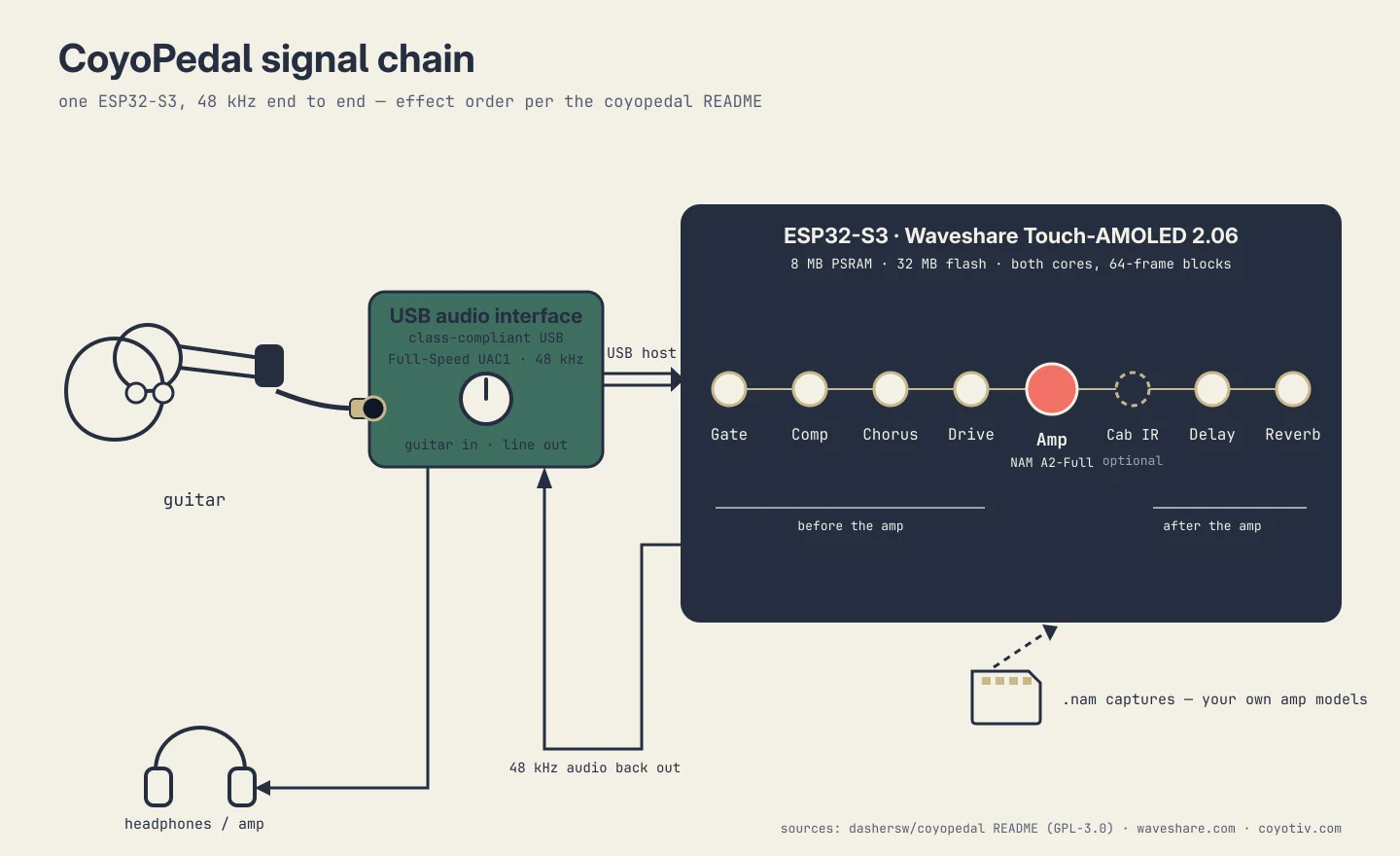
An open-source guitar amp and effects pedal in firmware: the ESP32-S3 runs full-size Neural Amp Modeler A2 captures in real time at 48 kHz, hosts a class-compliant USB audio interface for guitar in and audio out, loads your own .nam captures from microSD — and the identical firmware runs in the browser as WebAssembly.
What you need
- Waveshare ESP32-S3-Touch-AMOLED-2.06 the reference build — squircle AMOLED touchscreen, microSD
- ESP32-S3-DevKitC-1 (N16R8) the no-screen build — BOOT button is the footswitch
- USB audio interface class-compliant; XTONE Pro or iRig HD 2 tested
- microSD card your .nam captures (AMOLED build; a folder in the browser build)
How hard
Two ladders in one. The browser demo is beginner level: open the link, pick a folder of captures, play through an audio interface — no install. The pedal build is advanced: the Gea/ESP-IDF toolchain, board flashing and USB audio wiring, though no soldering — the headless DevKitC build is a board, an interface and a USB cable.
Key Facts
- Open-source guitar amp and effects pedal firmware by Armagan Amcalar / Coyotiv — GPL-3.0, verified from the LICENSE file: open firmware you can build on — fork it, change it, ship your own variant under the same terms. A stripped-down release of the Taurus effects processor firmware, first released 2026-09-19; third-party components keep their own licences and the Espressif binary components carry one additional permission
- Runs full-size Neural Amp Modeler A2 ("A2-Full") captures in real time at 48 kHz on the ESP32-S3: 23-layer eight-channel WaveNet in block floating point, hand-written Xtensa kernels, both cores, 64-frame blocks
- Effects chain: noise gate, compressor, chorus and drive before the amp; digital delay and stereo spring reverb after; three CC0 factory cabinet IRs plus user IRs from SD; presets and an output-muting tuner
- Loads your own .nam captures from microSD and prepares them on the device — no desktop converter; only 48 kHz eight-channel A2-Full WaveNets are accepted, other NAM architectures and rates are rejected
- Acts as USB host to class-compliant audio interfaces over Full-Speed USB (tested: XTONE Pro, iRig HD 2 via a UAC1 profile; iRig HD X needs custom firmware); the ESP32-S3 cannot use High-Speed USB
- Reference board is the Waveshare ESP32-S3-Touch-AMOLED-2.06 (2.06-inch 410x502 squircle AMOLED); the same firmware builds headless for the ESP32-S3-DevKitC-1 N16R8 with the BOOT button as footswitch — any target needs 8 MB of PSRAM
- The identical firmware compiles to WebAssembly: try amp, effects and presets in the browser with an audio interface before buying any hardware (Chrome/Edge read-write, Safari/Firefox read-only); the demo needs a live input signal to make sound
- Factory captures from Lum's VoLum collection (Diezel Herbert ch. 1, Ampete One ch. 4 — cabinet and amp-only) ship in the firmware under MIT; first-hand MCU Atlas verification 2026-11-21: the project's host test suite passes end-to-end from a fresh clone — no hardware testing or audio playback done by us, on-device figures are the project's own measurements, attributed
Which variant do you have?
Which Waveshare board is which? The reference CoyoPedal board is the ESP32-S3-Touch-AMOLED-2.06: a 2.06-inch 410x502 squircle (rounded-rectangle) AMOLED touchscreen, microSD slot, AXP2101 PMIC and 32 MB of flash. Our catalog's round Waveshare AMOLED is the 1.75C — a different and smaller board with a different display and no microSD slot; it is not a substitute and this page does not link it as one. The README's optional panels are the AMOLED-2.41 (V1) and the Touch-LCD-3.5B / 3.5B-C (16 MB flash); our catalog's ESP32-S3-Touch-LCD-3.5 is the plain 3.5 — another different board, also not linked here. Before buying, check the one hard requirement: 8 MB of PSRAM (that is where the A2 model lives) — the ESP32-S3-DevKitC-1 N16R8 we link is the exact headless target; an N8R2 DevKitC-1 lacks the PSRAM and will not work. After buying, the README's board table is the source of truth for what each target supports.
About This Project
An ESP32-S3 — a chip that costs less than a set of guitar strings — running a full neural network copy of a tube amp, in real time, on the pedalboard. CoyoPedal is Armagan Amcalar's open-source guitar amp and effects processor: "our open-source ESP32-S3 guitar amp and effects processor, released under GPLv3" in the maker's words — a stripped-down release of the firmware behind Coyotiv's Taurus pedalboard. It plays the same full-size Neural Amp Modeler captures guitarists use on their computers, at 48 kHz, on a board you can hold in one hand. And before you buy or build anything, you can play the exact same firmware — same UI, same DSP, same amp model — in your browser: "No board required to try it, and nothing to install."
What CoyoPedal is
A complete amp-modeling pedal in firmware. The amp block runs full-size Neural Amp Modeler A2 ("A2-Full") captures — the 23-layer, eight-channel WaveNet the NAM ecosystem trains from real amps — at 48 kHz. Getting that network to fit on an ESP32-S3 is the project's core engineering feat: it runs in block floating point with hand-written Xtensa kernels, split across both cores, processed in 64-frame blocks. The project measured the no-screen build using 91% and 94% of its 1,333 µs per-block budget across the two cores, with no missed deadlines (their measurement, not ours — see below).
Around the amp sits the effects chain, in a fixed and sensible order: noise gate, compressor, chorus and drive before the amp; digital delay and stereo spring reverb after it. Presets store amp, controls and effects together, named with an on-screen keyboard. A tuner shares the screen and mutes the output while you tune. Three cabinet impulse responses ship built in (CC0), and you can add your own IRs from the SD card. The touchscreen UI is written in TypeScript/TSX and compiled to native C++ — the README is emphatic that "there is no JavaScript engine on the device."
Two ports define the hardware: the S3 acts as a USB host to a class-compliant audio interface (your guitar in, audio out), and your own .nam captures load from a microSD card. The pedal parses, validates and prepares captures on the device — "There is no desktop conversion step, and the original capture stays untouched." The first preparation of a capture can take tens of seconds; the result is cached beside the file so later loads are fast.
Why it's on MCU Atlas
Because it fills the one corner of the DIY audio bucket nothing on the site covers yet. Our audio lane so far is playback (the squeezelite-esp32 multi-room player, /projects/squeezelite-esp32-multi-room-audio-player-on-esp32/), synthesis (PicoSynth on a Pico 2, /projects/picosynth-polyphonic-wavetable-synth-on-raspberry-pi-pico-2/) and voice (the ESP32 walkie-talkie, /projects/esp32-walkie-talkie-over-udp-or-esp-now/). Real-time guitar amp modeling — neural DSP on a microcontroller — is a different discipline again, and CoyoPedal is the most complete open implementation of it we have seen on this class of chip: not a demo of a tiny model, but the full A2 architecture, an effects chain, presets, and a tested USB audio stack. It is also the friendliest possible on-ramp: the browser build means a curious reader can hear a neural amp model on their own guitar in minutes with hardware they already own. That try-the-firmware-before-you-build-it pattern is one we would like to see more of, and this page exists partly to point at it.
The boards: reference AMOLED, or no screen at all
The reference build is the Waveshare ESP32-S3-Touch-AMOLED-2.06, and the README's board table is the honest map of what each target gives up. The AMOLED 2.06 has the 2.06-inch 410x502 squircle AMOLED touchscreen (a rounded rectangle, not a round display), the microSD slot and battery-capable power management (an AXP2101 PMIC) in one package, with 32 MB of flash holding two 8 MB OTA slots, factory models, factory presets and your imported captures. The optional panels trade down: AMOLED 2.41 (V1) and Touch-LCD 3.5B/3.5B-C carry 16 MB of flash and their own layouts; on the LCD 3.5B-C the project has verified the display, touch gestures, OTA updates and simultaneous USB/speaker audio on real hardware.
The other end of the table is the interesting one for catalog readers: the same firmware builds for a bare ESP32-S3-DevKitC-1 N16R8 (/parts/esp32-s3-devkitc-1/) with no panel, no PMIC and no SD slot. The amp, the effects and the presets are all the same, the BOOT button becomes the footswitch (tap to engage or bypass, hold 1.5 s for maintenance mode), and everything the touchscreen would do — captures, presets, configuration — happens over the maintenance API instead. It runs the same DSP at the same 48 kHz, and it is where the project's headroom figures above were measured. Two things the README is blunt about: the board must have 8 MB of PSRAM (that is where the A2 model lives), and a bare module has no battery path, so unlike the AMOLED it cannot feed power to your USB interface — the interface needs its own supply.
The AMOLED 2.06 now has its own catalog page (/parts/waveshare-esp32-s3-touch-amoled-2-06/) — the squircle 2.06, not the smaller round 1.75C in our catalog, which is a different board with no microSD slot. The Touch-LCD-3.5B is likewise not our catalog's 3.5. The DevKitC-1 link above is exact: N16R8, 16 MB flash, 8 MB PSRAM.
Try it in the browser first
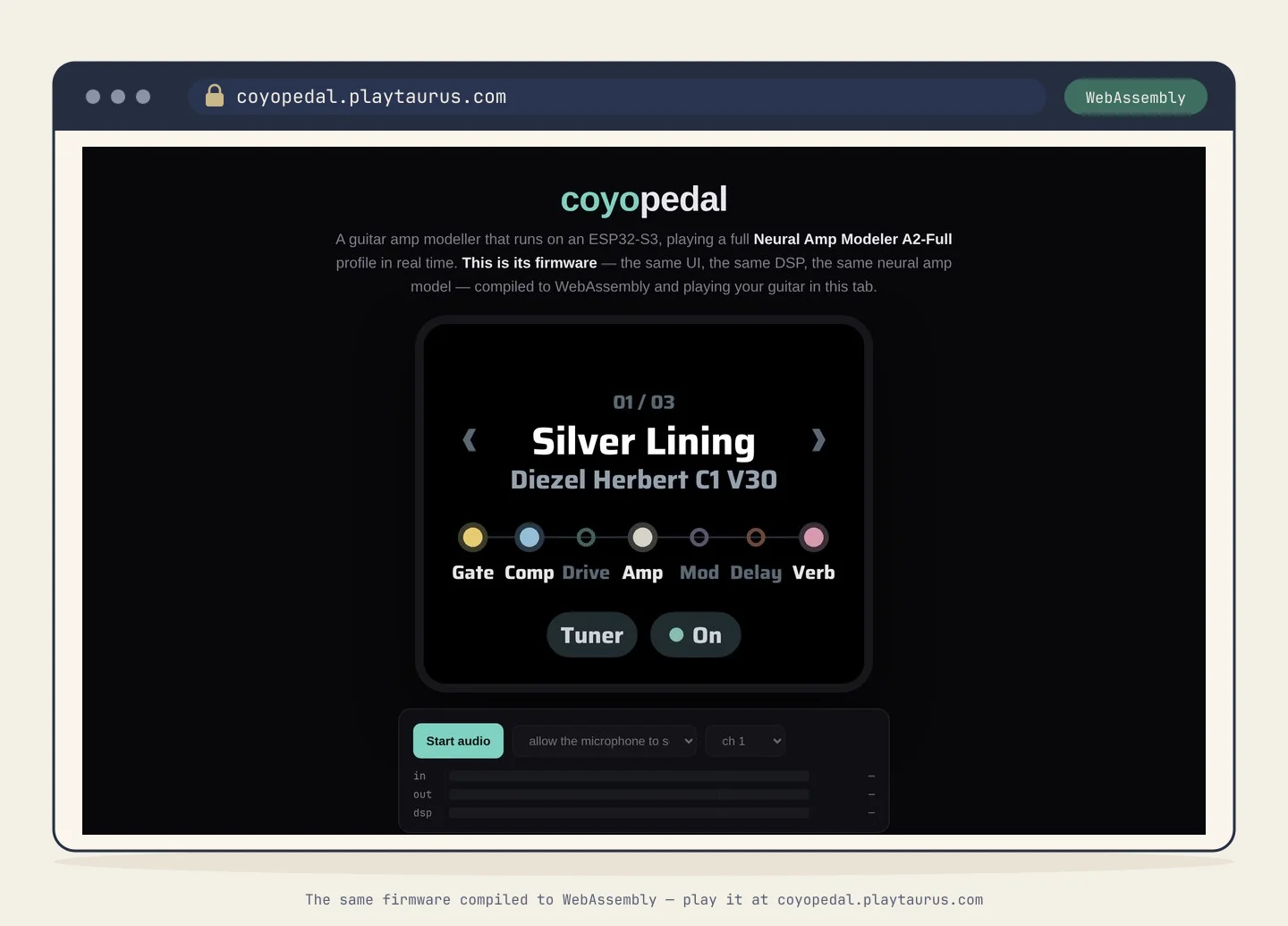
The deploy at coyopedal.playtaurus.com is not a simulation or a marketing page — it is the pedal's actual firmware compiled to WebAssembly, running the same UI, the same DSP and the same neural amp model. Instead of an SD card it asks for a folder of captures, and it answers the firmware's SD-card calls from that folder: your captures appear under SD card in the amp browser with the same names they would have on hardware, presets are mirrored into the folder as coyopedal-presets.json, and a folder you fill in the browser can be copied to a real card and read by the board without re-preparing anything. Connect an audio interface to your computer and play your guitar through it — the demo needs a real input signal to make sound, and with a silent input the output stays silent (we ran the demo live: the engine starts and the on-screen DSP load meter moves in real time, but a silent microphone gave us nothing to hear). The maker's caveat is worth keeping: browser audio latency depends on your computer, browser and interface. Chrome and Edge can write back to the folder you picked; Safari and Firefox only allow reading, so there the writes stay in browser storage.
Where it sits on the DIY audio ladder
1. Browser, ten minutes, free: open the demo, point it at a folder (or use the factory captures), and play a guitar or other line source through an audio interface — a silent input yields silence, so bring a signal. No install, nothing beyond what you already own.
2. No-screen pedal, an evening: an ESP32-S3-DevKitC-1 N16R8 (/parts/esp32-s3-devkitc-1/), a USB audio interface the README's tested list covers (XTONE Pro or iRig HD 2), the Gea toolchain, and the s3-devkit target. The BOOT button is your footswitch.
3. The reference pedal, a weekend project: the Waveshare AMOLED 2.06 board, a microSD card of captures, an enclosure — touchscreen, presets, tuner, OTA updates, and (on the AMOLED) an optional internal speaker.
What we verified, and what we didn't
Verified by MCU Atlas (2026-11-21): the repo, LICENSE (full GPL-3.0 text), README and every URL cited on this page fetched live and saved (all 200; repo pushed 2026-10-23, not archived); the demo page serves a real WebAssembly application, and an independent live browser session confirmed it actually runs — the WASM module fetched and instantiated, audio started, and the on-screen DSP load meter moved between readings in real time — though no audible output was heard because the test machine's microphone sat in a silent room; and the project's own host test suite passes from a fresh clone at commit 0bea4c7: every C++ suite green, including the recorded USB descriptor fixtures for XTONE Pro and the iRig HD X topology and the NAM prepared-model bit-exactness sweep against both factory captures, 20/20 node test cases, 35/35 Python unit tests (two expected skips that need an ESP-IDF/firmware build), TypeScript checks clean.
What we did not verify: we built no firmware for a board and played no guitar. Every on-device number — the 48 kHz operation, the 91%/94% core-loading figures, effect behavior, battery behavior, the "tens of seconds" capture preparation — is the project's own claim from its README, attributed as such, and the maker's engineering post is the primary source for the measurement methodology.
Source & Attribution
Illustration
Flash the pedal (or just try it in the browser)
Parts Needed
- ESP32-S3 board with 8 MB PSRAM — Waveshare ESP32-S3-Touch-AMOLED-2.06 (reference) or ESP32-S3-DevKitC-1 N16R8 (headless)
- Class-compliant USB audio interface (XTONE Pro and iRig HD 2 tested; iRig HD X needs custom firmware)
- microSD card for .nam captures (AMOLED build)
- USB cable, guitar cable — and an enclosure for a finished pedal
Steps
- 1
Install Node.js and the Gea CLI
Node.js 22.13 or newer, then npm i -g @geastack/cli. Gea is Coyotiv's app stack — the same toolchain compiles the pedal's TSX interface to native C++ and to WebAssembly.
- 2
Install the ESP32-S3 toolchain
Run gea setup --esp-idf and let the CLI install ESP-IDF 6.0.2 with the ESP32-S3 toolchain.
- 3
Clone and install
Clone the repo, then npm ci.
- 4
Wi-Fi config (optional)
npm run remote:configure -- --ssid YOUR_WIFI. The file is gitignored because it holds credentials; a build without it simply has no radio at all — no maintenance mode, no OTA, about 400 KB less flash. Skipping it is a valid choice for a pedal that stays on the bench.
- 5
Register the board
gea setup with the board attached over USB registers it. Pick "Waveshare ESP32-S3 Touch AMOLED 2.06" (alias amoled); s3-devkit for the headless DevKitC build, amoled-241 / lcd-35b for the optional panels.
- 6
Build and flash
gea build --board amoled, then gea flash --board amoled for the first flash — it writes the partition table and factory data as well as the firmware. Later updates can go over Wi-Fi OTA from maintenance mode.
- 7
No board yet? Run the checks
npm test compiles the USB, effects, presets and NAM engine suites against your desktop toolchain, and npm run check lints and type-checks. CI runs both on every push and builds the firmware image and web module too. Or skip all of it and play the browser demo at coyopedal.playtaurus.com — bring an input signal.
Bill of Materials
Parts list
4 parts · 2 linked
Heads up: some Buy links are affiliate links. If you buy through one, MCU Atlas may earn a small commission at no extra cost to you. It never changes which parts we list. How this works
1× Waveshare ESP32-S3-Touch-AMOLED-2.06
Waveshare lists $29.99-$31.99 for the SKU pair (without / with MX1.25 lithium battery) (checked 2026-11-21)

1× Class-compliant USB audio interface (XTONE Pro, iRig HD 2 class)
1× microSD card for .nam captures
Not included: Guitar and cables, An enclosure for a finished pedal (a weekend-project item on the reference build), Power supply for the USB interface on headless builds — a bare DevKitC-1 module cannot feed it
Learn
Docs & guides
Read these before you buy. These pages explain things; they don't sell anything.
- Play it in your browserThe pedal's actual firmware compiled to WebAssembly — no board, nothing to install; needs a live input signal to make soundDocs
- Maker's intro postHow CoyoPedal came to be — from the Mindy build question to the full A2 model on the S3Docs
- USB interface compatibility notesWhich class-compliant interfaces work, and the Full-Speed USB constraintsDocs
- VoLum capture collectionLum's NAM captures — the factory models plus the full rig library (MIT)Docs
Related Projects