ESPKVM: an open-source IP-KVM on the ESP32-P4
ESPKVM turns an ESP32-P4 and an HDMI-to-CSI bridge into an open-source IP-KVM: browser console, H.264 video, and USB keyboard and mouse control.
What it is
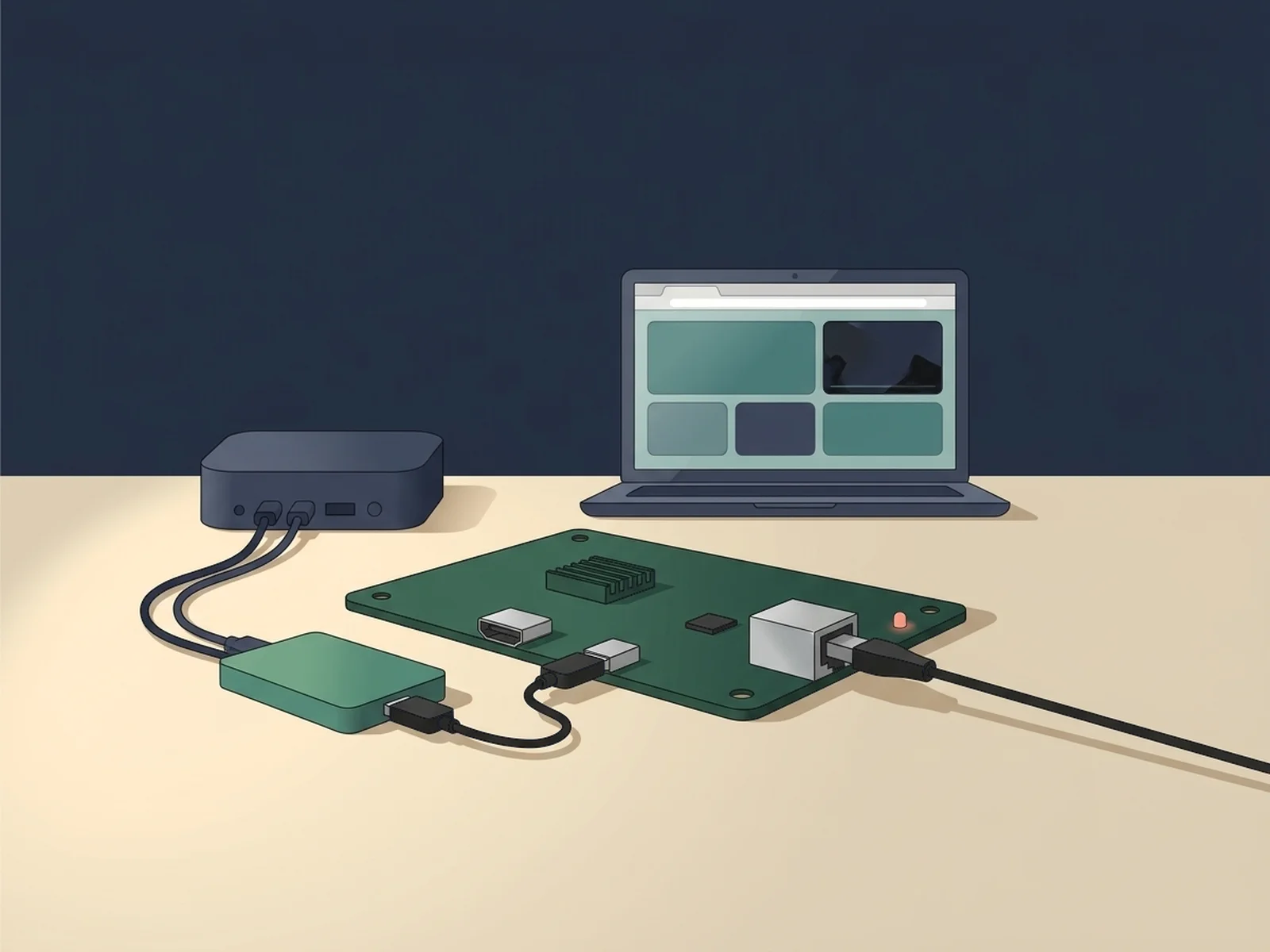
An open-source IP-KVM built from two boards: an ESP32-P4 and a TC358743 HDMI-to-CSI bridge, joined by a camera ribbon. It serves the target's screen over HTTPS to any browser and emulates its keyboard and mouse over USB.
What you need
- Waveshare ESP32-P4-ETH rev 1.x or 3.x; the tested board
- TC358743 HDMI-to-CSI bridge Geekworm C790 or Waveshare HDMI-to-CSI adapter
- Camera ribbon joins the two boards
- microSD card optional - virtual media and recordings
- PC817 optocoupler optional - power/reset control
How hard
Intermediate. No soldering in the core build: a ribbon joins the two boards and you flash from Chrome or Edge. Power/reset control adds an optocoupler and light wiring.
Key Facts
- Open-source IP-KVM on the ESP32-P4 by Dexif; Apache-2.0 (verified from the LICENSE file, 2026-11-20); active repo, first published July 2026
- Two-board core — ESP32-P4 + TC358743 bridge joined by a camera ribbon; no soldering in the core build
- Screen over HTTPS to any browser — laptop, phone or tablet; nothing to install
- MJPEG ~20 fps at 1080p; H.264 25-27 fps on rev 3.x with ~60 ms pointer lag over WebRTC (needs HTTPS) — maker's figures, not ours
- USB keyboard/mouse emulation, virtual media (microSD, flash, web server or the browser), power/reset/Wake-on-LAN (needs an optocoupler or relay), serial console, recording
- Flash from Chrome or Edge at espkvm.io/flash — no toolchain needed
- Security: login, 2FA, TLS, signed checksums — but no external review and secure boot/flash encryption off; keep it off the public internet, use the built-in Tailscale/WireGuard
- Built on Jonathan Rowny's p4kvm; the microcontroller sister-option to our PiKVM page
About This Project
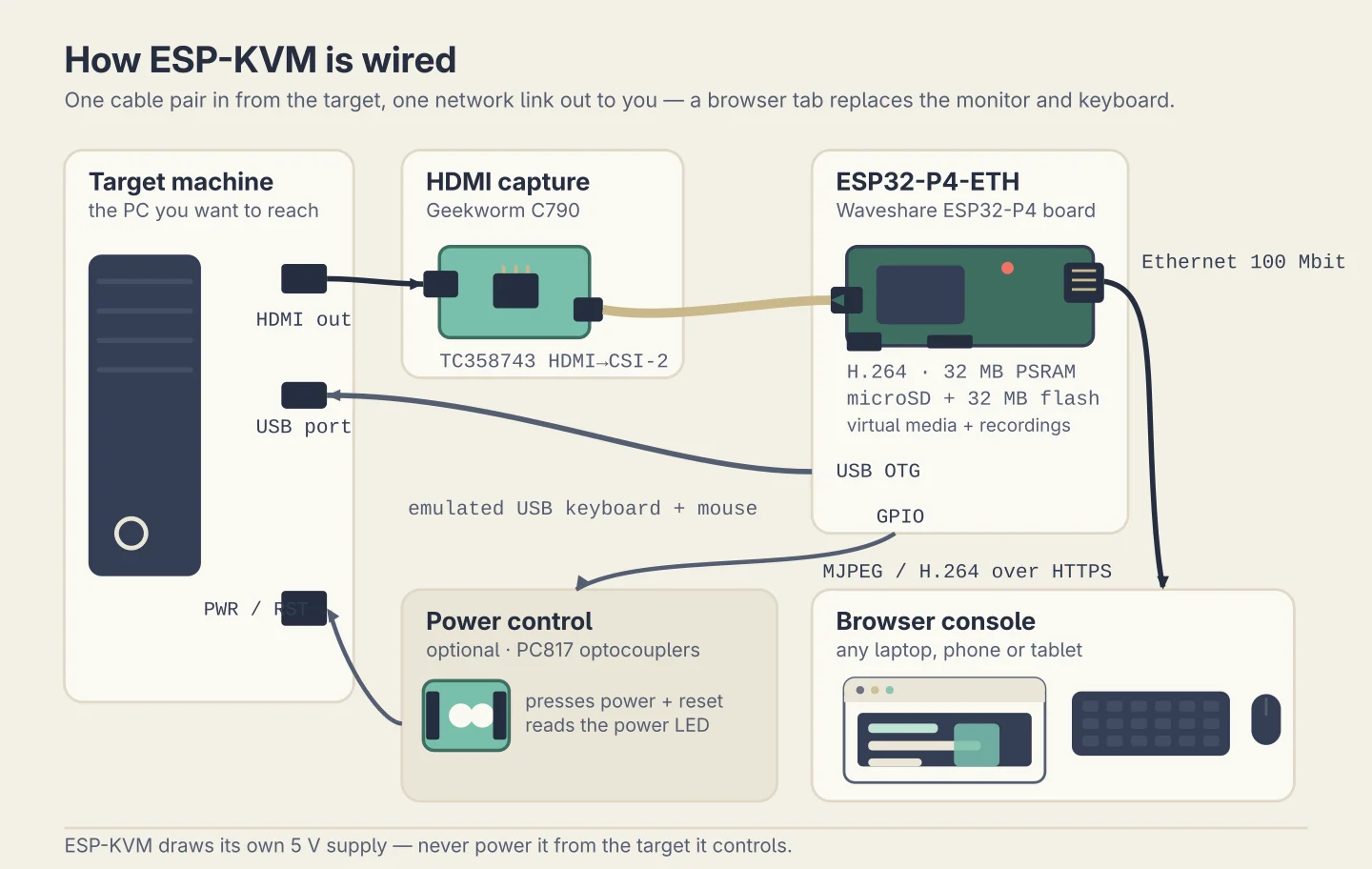
Like remote desktop, except it does not run on the machine. ESPKVM plugs into a computer's HDMI output and a USB port and serves its screen, keyboard and mouse to a browser — so it still works where remote desktop cannot: a BIOS screen, a boot menu, a kernel that will not come up, a machine with no operating system on it at all.
ESPKVM is Dexif's open-source IP-KVM built from an ESP32-P4 and a Toshiba TC358743 HDMI-to-CSI bridge, Apache-2.0 (verified from the LICENSE file). Hackaday, which featured it: "It captures the video output, while presenting itself as a standard keyboard and mouse device." The target sees an attached monitor, keyboard and mouse; you drive them from a web page over HTTPS. Two boards, and it "costs a fraction of a commercial KVM-over-IP." It stands on Jonathan Rowny's p4kvm proof of concept, which pulled frames off a TC358743 through the P4's CSI receiver; ESPKVM "tries to be a KVM you would leave installed."
The P4 can do every job at once: its MIPI CSI-2 receiver reads the TC358743's stream from your target's HDMI, its hardware JPEG and H.264 encoders compress the picture, and its USB port presents a keyboard, two pointers and a disk to the target. Maker's figures: "At 1080p, MJPEG runs at about 20 fps on any board; H.264 at 25-27 fps on rev 3.x and about 7 on rev 1.x", with pointer lag of "about 60 ms on rev 3.x" — that is H.264 over WebRTC at 1080p50; MJPEG measures nearer 160 ms. Rev 3.x silicon "runs H.264 three times faster at 1080p" — check the chip revision before buying.
Do not put this on the public internet. The maker's words: "It has a login, two-factor sign-in and TLS, and has had a security review of my own but not an external one. Secure boot and flash encryption are off." Release checksums are signed and checkable before flashing, but the maker's rule stands — "Keep it on a network you trust, or reach it over the Tailscale or WireGuard built into it". The built-in VPN clients (off by default) are the sanctioned remote path.
The console is one ~70 KB gzipped page with nothing fetched from outside, and "the machine you drive the target from can be a laptop, a phone or a tablet - nothing to install on either end." Touch gets a trackpad and on-screen keyboard.
The core is two boards and a ribbon: the P4, the TC358743 capture board (a Geekworm C790 or Waveshare HDMI-to-CSI adapter), and "a camera ribbon joins the two. That is all it takes" — an optocoupler for the power button and a small status screen are optional.
The firmware covers the KVM checklist: MJPEG or H.264 video that follows the target's resolution (H.264 needs HTTPS); USB keyboard, mouse and media keys; virtual media — boot the target from an image "from microSD, the device's flash, a web server or the browser's computer"; recording and screenshots to microSD; power, reset and Wake-on-LAN ("power needs an optocoupler or a relay"); the serial console, macros, runbooks, updates with rollback. Flashing needs no toolchain: from Chrome or Edge you "flash the code right in your browser" at espkvm.io/flash, or write the merged image with esptool. A Wi-Fi board with no cable opens a setup hotspot.
Editorial read: intermediate. If you have finished a Cheap Yellow Display project or handled an ESP32-P4 board, nothing here will scare you — the core is plug-together, the same ladder from CYD to P4. The one supported board we catalog: the tested Waveshare ESP32-P4-ETH (Ethernet, rev 1.x or 3.x) — /parts/waveshare-esp32-p4-eth/ — plus the capture board at /parts/hdmi-csi-bridge-tc358743/. The README's table lists 16 more, from PoE options to the JetKVM Mini finished box.
We already cover PiKVM (/projects/pikvm-open-source-ip-kvm-on-raspberry-pi/), the Raspberry-Pi-based IP-KVM — and our beginner explainer covers what a KVM over IP actually does (/guides/what-is-a-kvm-over-ip/). ESPKVM is the microcontroller answer: no Linux, a two-board parts count, browser flashing in minutes — against PiKVM's maturity and bigger community. Newcomer worth watching, or battle-tested today?
Related: /projects/pikvm-open-source-ip-kvm-on-raspberry-pi/ · /projects/cheap-yellow-display-community-hub-for-the-esp32-2432s028-touchscreen/ · /projects/lakeshark-a-lora-chip-turned-handheld-radio-scanner-on-the-lilygo-t-display-p4/
Not affiliated: Toshiba, Waveshare, Geekworm, JetKVM and PiKVM are trademarks of their owners.
Source & Attribution
Illustration
Bill of Materials
Parts list
3 parts · 1 linked
Heads up: some Buy links are affiliate links. If you buy through one, MCU Atlas may earn a small commission at no extra cost to you. It never changes which parts we list. How this works

1× Camera ribbon joining the two boards
Not included: The target computer - its HDMI output and a USB port are all ESPKVM plugs into, An optocoupler (e.g. PC817) and a little wiring for power/reset control (optional), A microSD card for virtual media and recordings (optional)
Related Projects