Meshtastic Sniffer: decode nearby Meshtastic traffic with a cheap RTL-SDR
A passive, standalone C receiver that watches every Meshtastic channel an SDR can see at once, decodes the traffic and, with the channel key, decrypts it. It ships in DragonOS and runs on a cheap RTL-SDR dongle; a wider SDR such as a HackRF One hears more of the band.

What it is
A passive SDR receiver that listens to every Meshtastic channel your radio can cover at once and decodes it, so you can find active channels, map nodes or see what a default-key channel gives away.
What you need
- RTL-SDR dongle (e.g. RTL-SDR Blog V3) a HackRF One is an optional upgrade that hears far more of the band
- LoRa antenna (regional band)
- A Linux PC with DragonOS, Ubuntu or Debian
How hard
Advanced. No soldering, but you build a C project from source, pick SDR gains, and read JSON or a web dashboard. You need to know your region's band and which keys you are allowed to use.
Photos
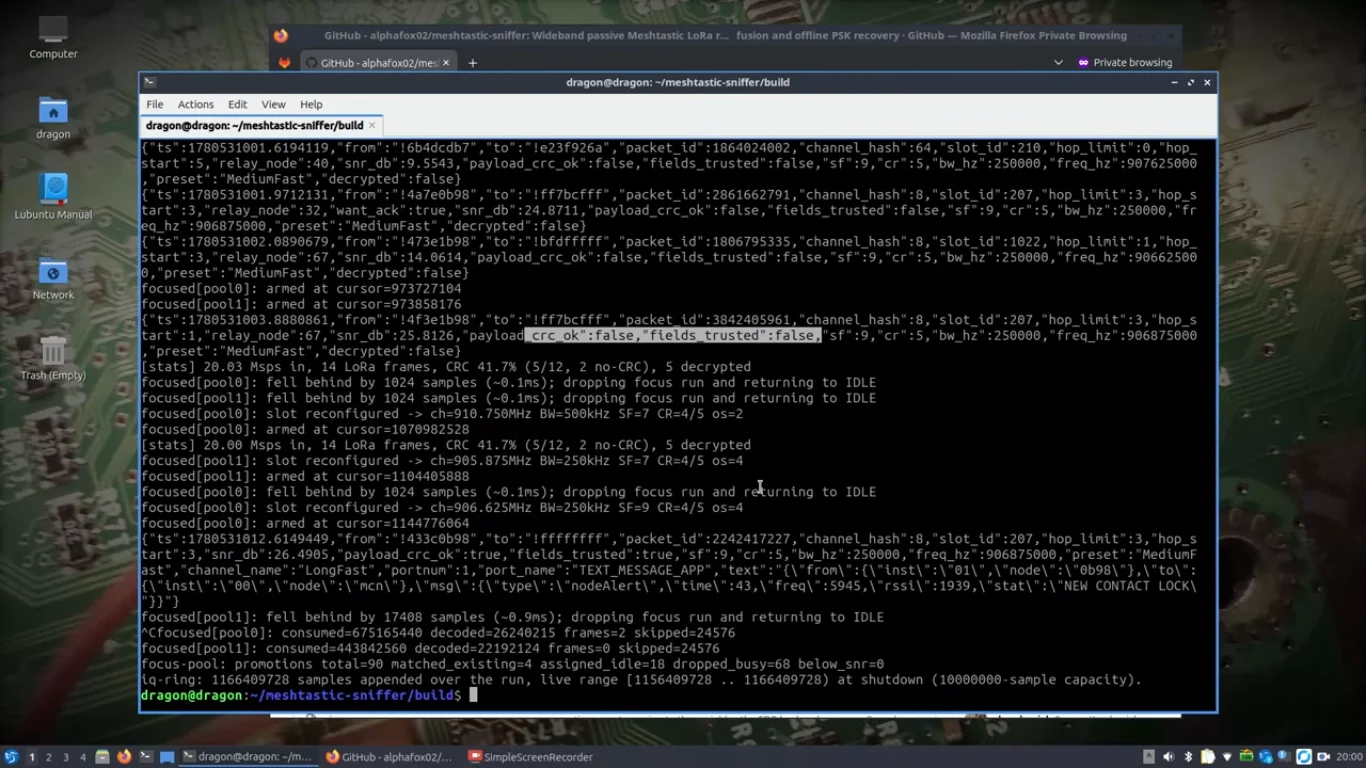
Photos: cemaxecuter via Hackaday
Key Facts
- Language: standalone C binary, no GNU Radio
- Distro: built into DragonOS; also builds on Ubuntu/Debian
- SDRs: HackRF, RTL-SDR, Airspy, SDRplay, BladeRF, USRP, SoapySDR, IQ files
- RTL-SDR dongle (2 MHz): ~8 US LongFast slots; HackRF One (20 MHz) upgrade: ~73-80 (README)
- Decrypts with the default key or channel-share URLs you supply
- Outputs: JSON, MQTT, ZMQ, CoT, pcap, web dashboard
- License: GPL-3.0-or-later
About This Project
meshtastic-sniffer is a passive Meshtastic LoRa receiver written in C by cemaxecuter (CEMAXECUTER LLC, the DragonOS developer). It takes one wide slice of spectrum from a single software-defined radio and runs a LoRa decoder for every Meshtastic channel slot that fits inside it, all at once, without GNU Radio. Hackaday covered it on October 19, 2026: with DragonOS running and a HackRF One attached, it spotted his own node right away and showed its details in the terminal, and Hackaday suggests it for finding where conversations are happening, wardriving, and locating other networks. How much of the band you hear depends on the radio. The README says a HackRF One (20 MHz) covers roughly 73 to 80 US LongFast slots and the full EU_868 and EU_433 bands, a USRP B205mini or B210 at 26 Msps covers all of US 902-928 MHz, and an RTL-SDR dongle (2 MHz) covers about 8 LongFast slots. The cheapest way in is an RTL-SDR dongle such as the RTL-SDR Blog V3, run with --rtlsdr: it hears one band group, which is enough to see your own node and the traffic on a default LongFast channel. A HackRF One is the upgrade if you want most of the US band in one stare. It also supports BladeRF, SDRplay, Airspy, SoapySDR devices, VITA-49 network IQ and IQ file replay. With keys supplied, either the public default LongFast key or a channel-share URL from the Meshtastic app, it decrypts text, GPS, NodeInfo, telemetry and other standard ports. Frames that pass CRC are tagged as trusted, and decoded fields only appear when the key is known, the CRC passed and the payload parsed. Outputs include JSON, MQTT, ZMQ, CoT for ATAK, pcap, a daily archive and a web dashboard with live map, activity and topology tabs. Companion tools cover offline key recovery from captures, multi-station TDOA fusion and mobile wardriving with GPS. On DragonOS Noble the SDR libraries are already installed, so you clone, cmake and make; on Ubuntu or Debian you apt install the build tools and the libraries for your SDR first. The takeaway for everyone on a default channel: anyone with an SDR and this tool can read LongFast traffic, so use your own channel keys for anything private, and only decrypt traffic you are entitled to.
Source & Attribution
Parts Needed
- RTL-SDR dongle (e.g. RTL-SDR Blog V3); a HackRF One is an optional upgrade
- Antenna for your Meshtastic band
- Linux PC with DragonOS Noble, Ubuntu or Debian
Steps
- 1
Build it
On DragonOS Noble: git clone the repo, mkdir build && cd build, cmake .. && make -j$(nproc). Don't apt install SDR libraries on DragonOS; it ships tuned versions. On Ubuntu/Debian, install build-essential, cmake, pkg-config, libfftw3-dev, libssl-dev and the libraries for your SDR first.
- 2
Check the radio
Run ./meshtastic-sniffer --list to confirm your SDR shows up, and --selftest to run the built-in tests.
- 3
Listen
./meshtastic-sniffer --rtlsdr --keys=default --web=8888 listens on the US region with the default LongFast key and opens a dashboard on port 8888. The RTL-SDR covers about 8 LongFast slots around the default channel; with a HackRF One, use --hackrf instead to hear most of the US band. Add --trusted-only to hide CRC-failed frames.
- 4
Add your keys
Paste a channel-share URL from the Meshtastic app with --share-url, or add it in the dashboard's Config tab, to decrypt your own private channel.
- 5
Tune
If a nearby node shows high SNR but many failed CRCs, move the antenna away, add an attenuator, or lower the SDR gain (on a HackRF One: --hackrf-lna=8).
Bill of Materials
Parts list
3 parts · 2 linked
Heads up: some Buy links are affiliate links. If you buy through one, MCU Atlas may earn a small commission at no extra cost to you. It never changes which parts we list. How this works


Not included: A Linux PC or laptop running DragonOS Noble, Ubuntu or Debian
Related Projects