Mural 2.0: a Wall-Drawing Pen Plotter on an ESP32
Mural 2.0 hangs two pancake steppers on one belt and draws wall-sized art with markers — a FluidNC ESP32 board and Wi-Fi web UI that takes SVG or a photo.
What it is
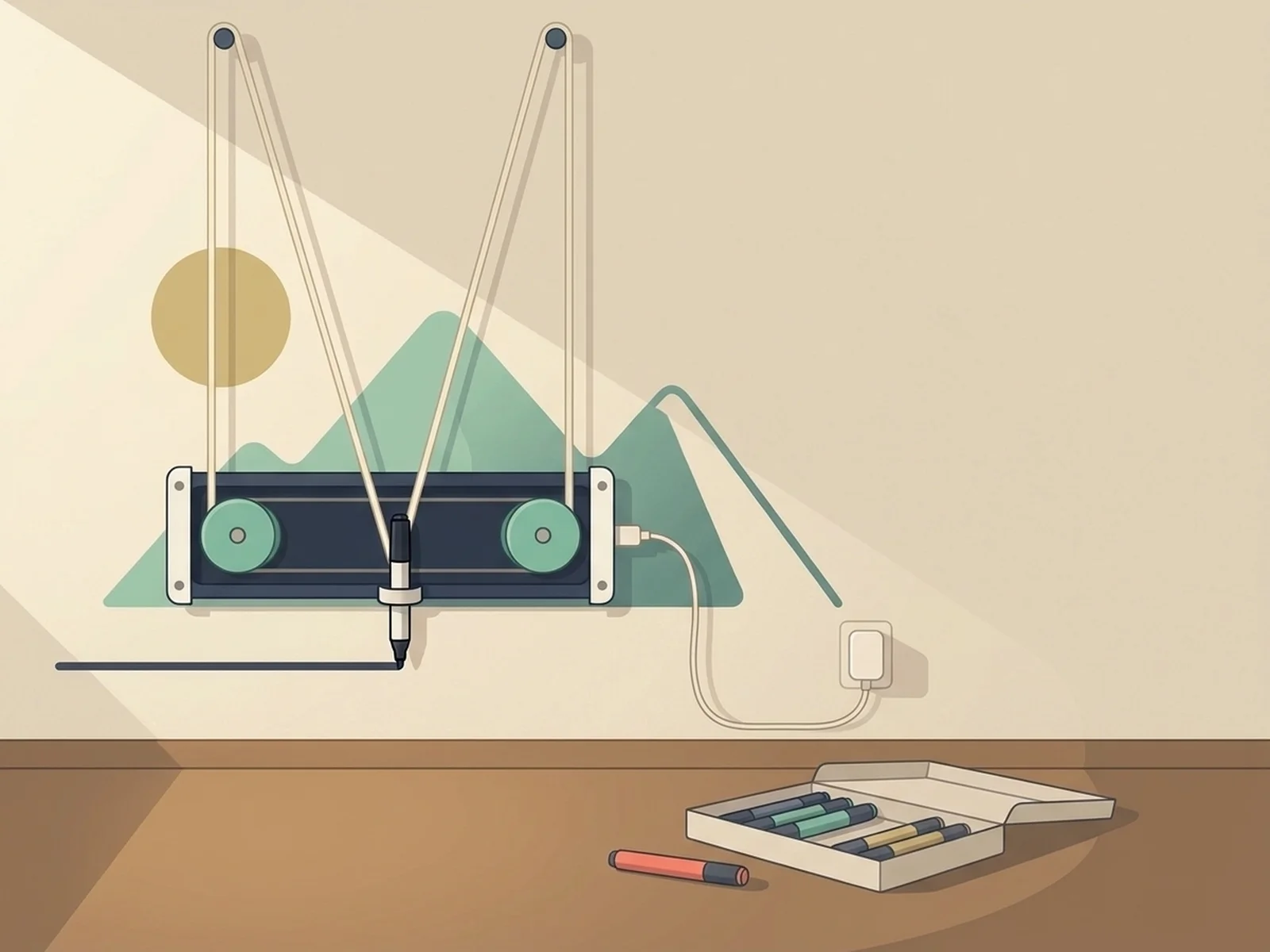
A ceiling-anchored wall plotter by Nik Ivanov (CC BY-NC 4.0): two NEMA 17 pancake steppers ride the gondola and winch it around the wall on a single GT2 belt, driven by a FluidNC ESP32 + TMC2209 controller whose Wi-Fi web UI takes SVG or a photo, estimates the pen path length before drawing, and offers four render modes — a wall-sized portrait appears stroke by stroke from an ordinary washable marker.
What you need
- TMC2209 FluidNC controller the one hard-to-buy part — out of stock at Elecrow when we checked; see issue #103 and the MKS DLC32 port
- 2× NEMA 17 pancake steppers (1 A, 17 N·cm) short pancake bodies keep the gondola light climbing the belt
- GT2 belt + 16-tooth pulleys 16-tooth only — not the 20-tooth version from Mural v1
- 3D-printed case v2 STEP and ready-to-print 3MF files ship in the repo; you need printer access
- Washable markers the real consumable — plan on roughly 500 m of line per pen
How hard
Beginner, per Hackaday ('a very easy build that you could do with your nieces and nephews'): no soldering, browser-based flashing, Wi-Fi setup from a phone, and art instead of G-code. Honest caveats kept in the page: you need 3D-printer access, the controller board is currently out of stock at its listed vendor, and an open issue warns the board may top out at 16 V.
Key Facts
- License is CC BY-NC 4.0 (verified from the repo's LICENSE file): free to build for yourself, not free to sell — the project is never described as open source without the non-commercial qualifier
- Controller is 'a FluidNC board based on an ESP32 and TMC2209 stepper drivers' (Hackaday) — the ESP32-native branch of the grbl G-code lineage; the firmware flashes from a browser tab (Chrome/Edge 89+), then the machine opens a Wi-Fi hotspot named Mural and answers at mural.local
- Drivetrain: two NEMA 17 pancake steppers (1 A, 17 N·cm) ride the gondola and pull themselves up the wall on a single GT2 belt anchored at two ceiling thumbtacks; a metal-gear MG90S servo lifts the marker between strokes
- Drawing area: the repo's README sets a 25% top margin and 20% side margins of the anchor distance, so the usable width is 60% of the horizontal span — Hackaday rounds it the same way
- The Wi-Fi web interface processes both SVG and raster images through four render modes (Path Tracing, Outline Trace, Raster Zig-Zag, Finitecurve.com) and gives you the pen path length in advance, before the pen touches the wall
- Marker life is the real consumable cap — the maker cautions that past about 500 m of line the pen weakens; a 'pause and replace pen' routine is in the works and the BOM lists a multicolor marker pack for the upcoming multi-color update
- We compiled the firmware at the repo's current main commit (PlatformIO Core 6.2.0, espressif32 6.12.0, esp32dev): RAM 48,740 of 327,680 bytes (14.9%), flash 1,156,133 of 1,228,800 bytes (94.1%) — the stock firmware nearly fills its 4 MB partition, so custom builds have little headroom
- Controller availability: the BOM's Elecrow board is out of stock ($40.00, checked 2026-11-26, matching repo issue #103); a community port to the MKS DLC32 has a first working prototype (issue #107, PR #108); an open issue also warns the control board may top out at 16 V
- Power arrives over USB-C from a 100 W supply (the BOM notes '60W should be OK as well'), with a 0.91-inch I2C OLED on the case for status
- Cost: the four dated prices we verified — controller $40.00, pancake steppers $10.50 each, markers about $9, USB-C supply $27-55 — sum to roughly $97 before the commodity hardware; no source states a V2 total, and the 'under $100' figure belongs to the earlier 2022 V1 NodeMCU build only (Hackaday, 2025-03-24)
About This Project
What it is
Most CNC projects meet you with a wall of g-code before anything moves. Mural 2.0 asks a friendlier question: what should the robot draw on your wall? It is, we think, the most beginner-legible CNC project we have covered — the tool is a marker, the work surface is your living room, and the output needs no explaining. Hackaday introduced it exactly that way in November 2026: "this is a large format pen plotter made to draw, well, murals." Maker Nik Ivanov has built wall plotters since the original Mural in 2022; Hackaday calls this version "considerably improved from the original version."
His own pitch, verbatim: "Open source, low cost, high precision wall plotter made of readily available parts enclosed in a 3D printed case" — with one qualifier we carry everywhere: the project is open-source under a non-commercial Creative Commons license (CC BY-NC 4.0). Free to build for yourself; not free to sell.
The demo is the pitch: feed it a photo or a line drawing and a wall-sized portrait appears, stroke by stroke, from an ordinary washable marker — the build/demo video below shows the machine mid-mural, two motors creeping down the wall as the image fills in. The wow is not the parts count; it is the scale.
Known upstream issueMCU Atlas is not affiliated with Nik Ivanov or the Mural project. ESP32 is a trademark of Espressif Systems; Crayola and other product names are trademarks of their owners.
How it hangs and moves
Mural inverts every CNC you have met: nothing sits on a table. The machine hangs from two thumbtacks in the ceiling, and the motors ride on the machine. Hackaday explains the geometry: "the steppers are on the machine and must pull themselves up against gravity using the single belt that is anchored at ceiling level." Two short NEMA 17 pancake steppers winch the gondola around the wall on that one belt; a tiny metal-gear servo lifts the marker between strokes. The pancakes are not a corner-cut — less mass to haul up the wall — and the drivetrain lives in a 3D-printed case (the STL and STEP files ship in the repo).
The belt-and-tacks geometry has one honest cost: you do not get the whole wall. The repo's README says "The top margin is 25% of that distance" between the anchor points, and "Each side also has a 20% margin, so you'll get total of 60% of the horizontal distance" as your drawing width; Hackaday rounds it the same way — "you lose 20% at the edges." Space the thumbtacks generously and even sixty percent of a room's width is a big canvas. Power arrives over USB-C from a 100 W supply (the BOM notes "60W should be OK as well"), with a 0.91-inch OLED on the case for status.
The friendly firmware
This is where Mural earns its beginner badge. The controller is "a FluidNC board based on an ESP32 and TMC2209 stepper drivers," per Hackaday, and the whole firmware flashes from a browser tab. After flashing, the machine opens a Wi-Fi hotspot named "Mural"; you join it once, hand it your home Wi-Fi, and from then on it answers at mural.local from your phone or laptop. No IDE, no drivers, no serial console.
The web interface is the whole workflow. It "can even process both SVG and raster images," as Hackaday puts it — vector art or a photo — through four render modes with refreshingly plain descriptions, in the project's own words: Path Tracing ("Works well for most drawings"), Outline Trace ("Preserves stroke width"), Raster Zig-Zag ("Converts a photo to zig-zag scan lines — darker areas = taller zig-zags") and Finitecurve.com ("One continuous stippled line, denser where the image is darker").
The feature that saves beginners the most heartbreak: before the pen touches the wall, the interface calculates the travel ahead and "gives you that path length in advance." That matters because the real consumable is the marker — the maker cautions that "past about 500 m of line things can start to get a bit weak as the pen dries out." A pause-and-replace-pen routine is on the way — he is, per Hackaday, "working on a 'pause and replace pen' routine for the next firmware version" — and the BOM already lists a multicolor marker pack "For the upcoming multi-color update."
The grbl connection
If you have read our grbl page, you already know this machine's family tree. grbl is the classic G-code interpreter that made hobby CNC practical on an Arduino Uno, and when we covered it we pointed at its 32-bit successors — including FluidNC, the ESP32-native branch. Mural's controller is exactly that jump, made real: FluidNC describes itself as "the next generation of firmware from the creators of Grbl_ESP32," "100% compatible with the day to day operations of running gcode with a sender." So our grbl starter build pairs an Uno with DRV8825/A4988-class drivers while Mural pairs its ESP32 with TMC2209 drivers — different boards, one motion-control lineage, the same G-code family a generation apart. For the ground-floor version of what Mural's board does, start at /projects/grbl-high-performance-cnc-motion-control-on-arduino-uno/.
Why a first-timer can finish it
Hackaday's verdict on the build is the quote to keep: "a very easy build that you could do with your nieces and nephews." What earns it is the software, not the screws — the firmware is designed so the kids can keep drawing when you are not around: flash from a browser, configure over Wi-Fi from a phone, upload a picture instead of writing G-code, check the path estimate before committing ink, draw with markers that wash off. The honest prerequisites: access to a 3D printer (or a printing service), a ceiling you may put two thumbtacks in, and a controller board you can actually buy — next section.
Building it, step by step
The project's own site walks the build in four steps — buy the parts, 3D-print the case, flash the firmware, follow the v2.0 assembly video — and we invent no different ones. Our step-by-step walkthrough below adds the browser-flash and thumbtack-spacing details a first-timer needs.
One warning the BOM flags: the GT2 pulleys must be the 16-tooth version — "Make sure you don't use the 20 teeth version from Mural v1."
Where it falls short
The controller is the catch. The BOM's TMC2209 FluidNC board was out of stock at its listed vendor when we checked (2026-11-26), and builders report the same everywhere — as one issue puts it, "the TMC2209 Pen/Laser FluidNC CNC Controller from the BOM is out of stock everywhere I looked (Elecrow, Tindie, V1 Engineering)." A community port to the MKS DLC32 board is in active progress ("I have a first working prototype of Mural V2 running on the MKS DLC32 (PoC firmware port)") with the pull request open — read the repo's open issues before buying anything. A safety-relevant note deserves the same read: an open issue warns the control board may only handle up to 16 V.
The machine has honest limits: marker life caps long jobs at roughly 500 m of line, as above; the geometry surrenders the top quarter and the side margins of the anchor span; and we quote no build time, because no source states one. The license is non-commercial — build it, gift it, draw on your own walls, just not a product for sale.
Honesty split
What we verified first-hand this session (2026-11-26): every quote and number above traces to saved source bytes (the Hackaday article, the repo README and BOM, the getmural.me home/BOM/flasher pages, the FluidNC README — claim map in CONNIE-WRITE.md); we re-checked the Elecrow controller listing live (price and out-of-stock status as stated above); and we compiled the repo's firmware at its current main commit with PlatformIO Core 6.2.0 (espressif32 6.12.0, esp32dev target). It built clean — RAM 48,740 of 327,680 bytes (14.9%), flash 1,156,133 of 1,228,800 bytes (94.1%) — that last figure meaning the stock firmware nearly fills its 4 MB partition, so expect little headroom for custom builds. We did not run the machine on hardware, did not measure drawing speed or accuracy, and verified no store price beyond the four dated BOM figures. Everything about margins, marker life, render modes and build ease is the maker's and Hackaday's own reporting, attributed as such throughout.
Sources
Nik Ivanov's Mural repository (github.com/nikivanov/mural, CC BY-NC 4.0) carries the README with the geometry margins, BOM.md, the STL/STEP case files and the firmware sources; getmural.me hosts the step-by-step build page, the BOM with buy links, and the browser firmware flasher. Hackaday featured Mural 2.0 as "A Pen Plotter To Draw You Up (on) The Wall" (Tyler August, 2026-11-17), and covered the original version in March 2025 — the earlier article is where the builder's own under-a-hundred-dollar estimate for that first NodeMCU-based build comes from. FluidNC's README documents the grbl lineage quoted above. The project runs a Discord server (linked from the README), and the repo's open issues are unusually useful reading: #103 on controller availability, #107 and PR #108 on the MKS DLC32 port, #101 on the 16 V warning, and #14, "Post your drawings here!", where the community posts its murals.
Source & Attribution
Illustration
How to Build It
Parts Needed
- One TMC2209 Pen/Laser FluidNC CNC controller — out of stock at Elecrow ($40.00) when checked 2026-11-26; read issue #103 and the MKS DLC32 port (#107, PR #108) before ordering
- Two STEPPERONLINE NEMA 17 pancake stepper motors, 1 A / 17 N·cm (about $10.50 each, checked 2026-11-26)
- One 10 m GT2 belt roll, 16-tooth pulleys (not the 20-tooth v1 version), 623ZZ bearings
- The 3D-printed case — v2 STEP and ready-to-print 3MF files ship in the repo
- A 100 W USB-C power supply, PD trigger module and a USB-C data cable (the BOM notes 60W should be OK as well)
- Washable markers — the real consumable (a black pack, plus the multicolor pack for the upcoming multi-color update)
Steps
- 1
Buy the parts
Buy the parts from the project's BOM page or the repo's BOM.md: one controller, two pancake steppers, one belt, and a short list of commodity hardware. Before ordering the controller, read the repo's open issues — the BOM's TMC2209 FluidNC board was out of stock at its listed vendor when we checked (2026-11-26), and issue #103 plus the MKS DLC32 port (#107, PR #108) track the alternatives.
- 2
3D print the case
3D print the case: the repo ships the v2 STEP file plus ready-to-print 3MF part sets. No printer of your own? A printing service works too.
- 3
Flash the firmware from a browser
Flash the firmware from the browser flasher (Chrome or Edge 89+ over a USB data cable), then join the 'Mural' hotspot it opens and hand it your home Wi-Fi — from then on the machine answers at mural.local from your phone or laptop. No IDE, no drivers, no serial console.
- 4
Assemble and hang it
Assemble following the project's v2.0 assembly video, then hang it from two thumbtacks spaced for your intended mural, allowing the margins — the top 25% and 20% per side of the anchor distance, so space the thumbtacks generously. One warning the BOM flags: the GT2 pulleys must be the 16-tooth version — 'Make sure you don't use the 20 teeth version from Mural v1.'
- 5
Draw your first mural
Open mural.local, upload art, pick a render mode, read the path-length estimate, and load a fresh marker — past about 500 m of line the pen weakens, and the estimate is there so you know before committing ink.
Bill of Materials
Parts list
19 parts · 4 linked
Heads up: some Buy links are affiliate links. If you buy through one, MCU Atlas may earn a small commission at no extra cost to you. It never changes which parts we list. How this works
1× TMC2209 Pen/Laser FluidNC CNC Controller
$40.00 at Elecrow, Out of stock (checked 2026-11-26) — see repo issue #103 for alternative-board discussion and #107 / PR #108 for the MKS DLC32 port in progress.

2× STEPPERONLINE Nema 17 Pancake Stepper Motor 1A 17Ncm
The BOM specifies the short pancake body (1 A, 17 N·cm) — the catalog page covers the NEMA 17 family; listed around $10.50 each on Amazon (checked 2026-11-26).
2× GT2 Timing Belt Pulley 16 Teeth, 5mm Bore, for 6mm Width Belt
BOM.md warning: 'Make sure you don't use the 20 teeth version from Mural v1'.
2× 623ZZ ball bearings
1× 3D Printing GT2 Timing Belt, 10m length, 2mm pitch, 6mm width
1× MG90S 9g Metal Gear Micro Servo
Variant note: the metal-gear MG90S is the BOM item — the catalog's micro-servo page is the plastic-gear SG90 sibling, so buy the metal-gear part via the creator's BOM page.
1× USB-C Power Delivery trigger module
1× M3 bolt kit
1× Threaded Heat Set Inserts Kit M3x4x5
1× M3 thumb screw
1× 100W USB-C power supply
Roughly $27-55 depending on brand (checked 2026-11-26); BOM.md: '60W should be OK as well.' The catalog's USB wall charger is a plain 5 V charger — wrong product for a USB-C PD brick.
1× 10FT USB-C cable

4× 20CM M-F Dupont Wire
1× 18AWG wire
2× Thumbtacks
1× Crayola Ultra Washable Markers, Black
About $9 per 12-pack on Amazon (checked 2026-11-26; BOM item is the Ultra Washable family).
1× Crayola Ultra Washable Markers, Multicolor
Not included: A computer with a browser (Chrome or Edge 89+) and a USB data cable for the firmware flasher — not a BOM part, Access to a 3D printer or a printing service for the case — the STL/STEP files ship in the repo, A wall and ceiling you may put two thumbtacks in, spaced for your intended mural
Learn
Docs & guides
Read these before you buy. These pages explain things; they don't sell anything.
- Project repo (GitHub)nikivanov/mural — firmware, web UI, BOM, STL/STEP case files (CC BY-NC 4.0)Docs
- Project siteThe maker's own build site — steps, demo video, BOM with buy linksDocs
- BOM pageThe creator's bill of materials with his buy links (Elecrow, Amazon)Docs
- Browser firmware flasherFlash the firmware from Chrome or Edge 89+ — no IDE, no driversDocs
- Hackaday feature'A Pen Plotter To Draw You Up On The Wall' by Tyler August, 2026-11-17Docs
- FluidNC projectThe controller's firmware lineage — 'the next generation of firmware from the creators of Grbl_ESP32'Docs
- Mural DiscordThe project's community server, linked from the READMEDocs
- Repo issues — build notesUnusually useful reading: controller availability (#103), the MKS DLC32 port (#107), the 16 V warning (#101), and community murals (#14)Docs
Related Projects