ESP32 AdBlocker: network-wide ad blocking, no Raspberry Pi
One ESP32-S3 N16R8 board becomes a Pi-hole-style DNS ad blocker for your whole home network — every device covered, with reports to your phone.
What it is
One ESP32-S3 N16R8 board becomes a Pi-hole-style DNS ad blocker for your whole home network — every device covered, with reports to your phone.
What you need
- ESP32-S3-DevKitC-1 (N16R8) the only variant that runs it — 8 MB octal PSRAM is a hard requirement
- USB data cable (USB-C) power + flashing; one you likely own
How hard
Beginner, and almost appliance-like: no wiring, no soldering, no Linux to administer. Flash the prebuilt binary from a phone-era captive portal, change one router setting. The single threshold is buying the right board variant (N16R8) — the wrong ESP32-S3 simply won't run the firmware.
Key Facts
- Free, AGPL-3.0-licensed firmware by Garionhk; blocklist engine and DNS responder derive from s60sc/ESP32_AdBlocker (also AGPL-3.0) — the license note and its practical read are in the section below
- Needs the ESP32-S3 N16R8 variant specifically: 16 MB flash and 8 MB octal PSRAM are a hard requirement (blocklist arena, 768-slot DNS cache and 6,000-entry query log live in PSRAM)
- 2.4 GHz Wi-Fi only — no 5 GHz radio
- Default blocklist Hagezi Multi PRO, about 210,000 domains; up to 4 merged lists, about 250,000-domain capacity; subdomain blocking on by default
- DNS-over-TLS upstream by default (one.one.one.one:853; Quad9/Google selectable), certificates verified against the ESP-IDF x509 CA bundle — with a disclosed plaintext fallback (over 0.9 s or >~200 new lookups/s) so never 'always encrypted'
- Real TTLs and full CNAME chains preserved; native test suite 265/265 passed on our host-side re-run (test/run.sh, 2026-11-19)
- Sized for a home, not an office: author-measured ~1–10 people / 50–80 devices (dnsload.py on v1.0.3); bursts clean to ~20 simultaneous lookups, steady state ~800 answers/s blocked
- Firmware v1.0.3 ships four prebuilt flash binaries (UART and native-USB) plus SHA256SUMS; setup from your phone via captive portal
About This Project
Ads follow every device in your house through one door: the router's DNS setting. This build puts a blocker in that doorway using one ESP32-S3 board — no Raspberry Pi, no server to babysit.
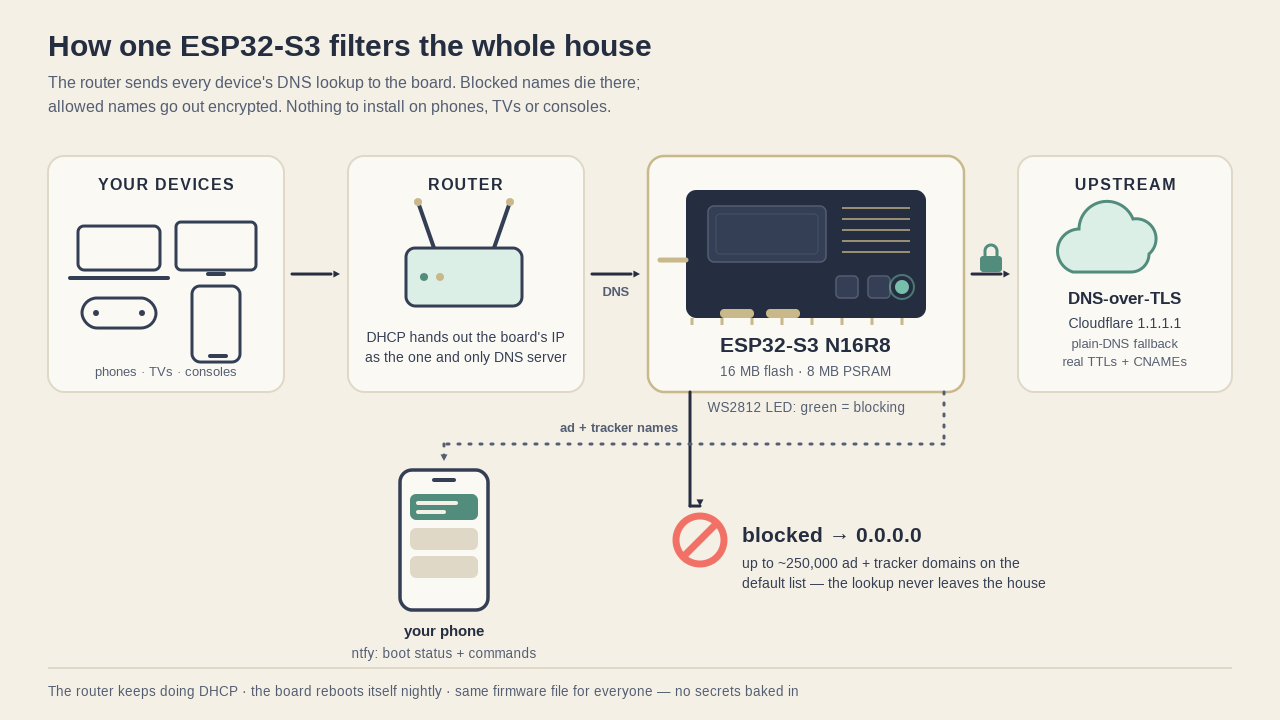
ESP32-AdBlocker-N16R8 is free, AGPL-3.0-licensed firmware by Garionhk that turns a single ESP32-S3 N16R8 board into a Pi-hole-style DNS ad blocker for your whole home network. The board runs a real DNS server: blocked names get a dead-end answer, everything else is resolved upstream. Once your router hands out the board as its DNS server, every phone, laptop, TV and smart bulb gets the same blocking — no per-device setup, no browser extensions.
It ships the Hagezi Multi PRO list — about 210,000 domains by the author's count — and can merge up to four HOSTS, Adblock-style or plain lists, with room for roughly 250,000. Subdomain blocking is on by default, matching how Pi-hole treats Adblock-style lists.
Honesty split, per our house rule. What MCU Atlas verified first-hand on 2026-11-19, without flashing hardware: the repository and its AGPL-3.0 license file, the feature claims against the source code, and the project's native test suite re-run host-side (test/run.sh, 2026-11-19) — 265 of 265 checks passed. Every on-device behavior claim below is the project's own README and code, cited in our claim map.
The N16R8 part is not a suggestion
The README's hardware line is blunt: "ESP32-S3 N16R8: 16 MB flash, 8 MB octal PSRAM. The PSRAM is required". That is a hard requirement: the blocklist arena, the 768-slot DNS cache and the 6,000-entry query log all live in PSRAM, so an ESP32-S3 board without 8 MB of octal PSRAM won't run it. The 16 MB of flash is used too — "one 4 MB app slot, the rest LittleFS", says the partition table. Buy the N16R8 variant specifically; a cheaper ESP32-S3 with less memory is a false economy here. It's also 2.4 GHz Wi-Fi only — no 5 GHz radio.
Why it fits: the one-board version of a Pi-hole
Our full Pi-hole guide does this with a Raspberry Pi, but it asks you to administer a little Linux server: an SD card to image, updates to track, a box that stays on. This project gets the same core idea — network-wide blocking at the DNS layer — on one board that draws pocket-change power and needs zero administration. Flash it once; the only thing you touch again is your router's DNS setting.
That also makes it a great first network project: no wiring, no soldering, no Linux console, no per-device configuration. If you've flashed a dev board before, you have every skill this build needs.
How it blocks — and where it refuses to cut corners
The DNS server answers UDP and TCP, IPv4 and IPv6. What gets through is treated properly: in the README's words, "the upstream reply is passed back unchanged: every record type, every address, CNAME chains and real TTLs". Real TTLs keep short-lived records — load balancers, DNS failover — from going stale, and preserved CNAME chains mean every alias in a chain is checked against the blocklist, catching trackers hiding behind one. The design's own summary is four words: "Everything else is relayed".
Allowed lookups leave over DNS-over-TLS (RFC 7858) — an encrypted, authenticated connection to the resolver: Cloudflare's one.one.one.one:853 by default, Quad9 or Google selectable in the web UI. Certificates are genuinely verified against the ESP-IDF's x509 CA bundle once the clock is set via NTP.
One honest edge, by design: if the encrypted link is down or slow (over 0.9 seconds), or load spikes past roughly 200 new upstream lookups per second, those lookups fall back to plain DNS — encrypted by default, not encrypted without exception — and the status report always says which path is in use. Any page promising more is overselling; this one won't.
Reports and control from your phone
The board keeps a long-lived encrypted connection to an ntfy push server and messages you when it boots — IP, upstream mode, blocklist size, block rate, free memory. You can talk back: passphrase-gated commands cover status, top domains, checking, blocking and unblocking, reloading, and rebooting; a wrong passphrase gets no reply at all. Host your own ntfy server or use a token; on the public ntfy.sh, the topic name is the only secret — use a long random one.
Read this before you build
It is sized for a home, not an office. The author measured capacity with the in-repo dnsload.py tool on v1.0.3 (Wi-Fi, default list, DNS-over-TLS on): "About 1–10 people, or 50–80 devices, without noticeable delays", typical answers 7 ms blocked or cached and 20–25 ms upstream. Hard edges, documented: bursts stay clean only to ~20 simultaneous lookups (50 at once loses 6–24% — a compiled-in 32-deep buffer, not fixable in firmware); steady state is clean to ~800 answers per second blocked, or 400 cached or upstream. A household sits far below all of these; a small office does not.
It is a very young project. The repository went up on 2026-10-26 and has been pushed six times by one contributor, most recently 2026-11-06 as we checked. There's an author walkthrough video and prebuilt binaries, but no issue-tracker history — expect to read the README, not search a forum. The trade: an early, working project, not an ecosystem.
It is not a full Pi-hole. The README's own comparison is fair: no regex rules, no built-in DHCP server, no DNSSEC validation on the board (your encrypted upstream does validate), and the query log caps at 6,000 entries and clears on reboot. For home ad-and-tracker blocking, none of that gets in the way; for anything fancier, the Raspberry Pi route still exists.
The license is AGPL-3.0. The blocklist engine and original DNS responder derive from s60sc/ESP32_AdBlocker, also AGPL-3.0. The practical read for a DIYer: flashing and running it at home — even modified — triggers nothing; offering a modified version as a network service requires offering those users your source.
Related project
Want the fuller-featured version — regex rules, a DHCP server, a big community? Our guide to network-wide ad blocking with Pi-hole on a Raspberry Pi (/projects/pi-hole-network-wide-ad-blocking-on-raspberry-pi/) covers it. Pi-hole is a trademark of Pi-hole LLC; this page and MCU Atlas are not affiliated with it.
Verdict
The simplest way we've covered to put Pi-hole-style ad blocking in front of every device you own: one ESP32-S3 N16R8, one flash, one router setting — sized honestly for a home, and young enough to read the README first.
Source & Attribution
Illustration
How to Build It
Parts Needed
Steps
- 1
Power the board
Any ESP32-S3 N16R8 and a USB cable — that's the entire parts list.
- 2
Flash it
esptool write-flash 0x0 adblocker-v1.0.3-esp32s3-n16r8.bin — release v1.0.3 ships four prebuilt binaries (UART and native-USB) plus SHA256SUMS. No secrets are compiled in; settings live in NVS.
- 3
Configure it from your phone
Join the AdBlocker-Setup-XXXX network the board broadcasts; the captive portal at http://192.168.4.1 takes your Wi-Fi details, blocklists and ntfy topic.
- 4
Point the router at it
Set the board as your router's only DHCP DNS server. Every device that joins then gets its DNS — and its ad blocking — from the board. Don't list a second resolver alongside it, or devices will route around the blocker.
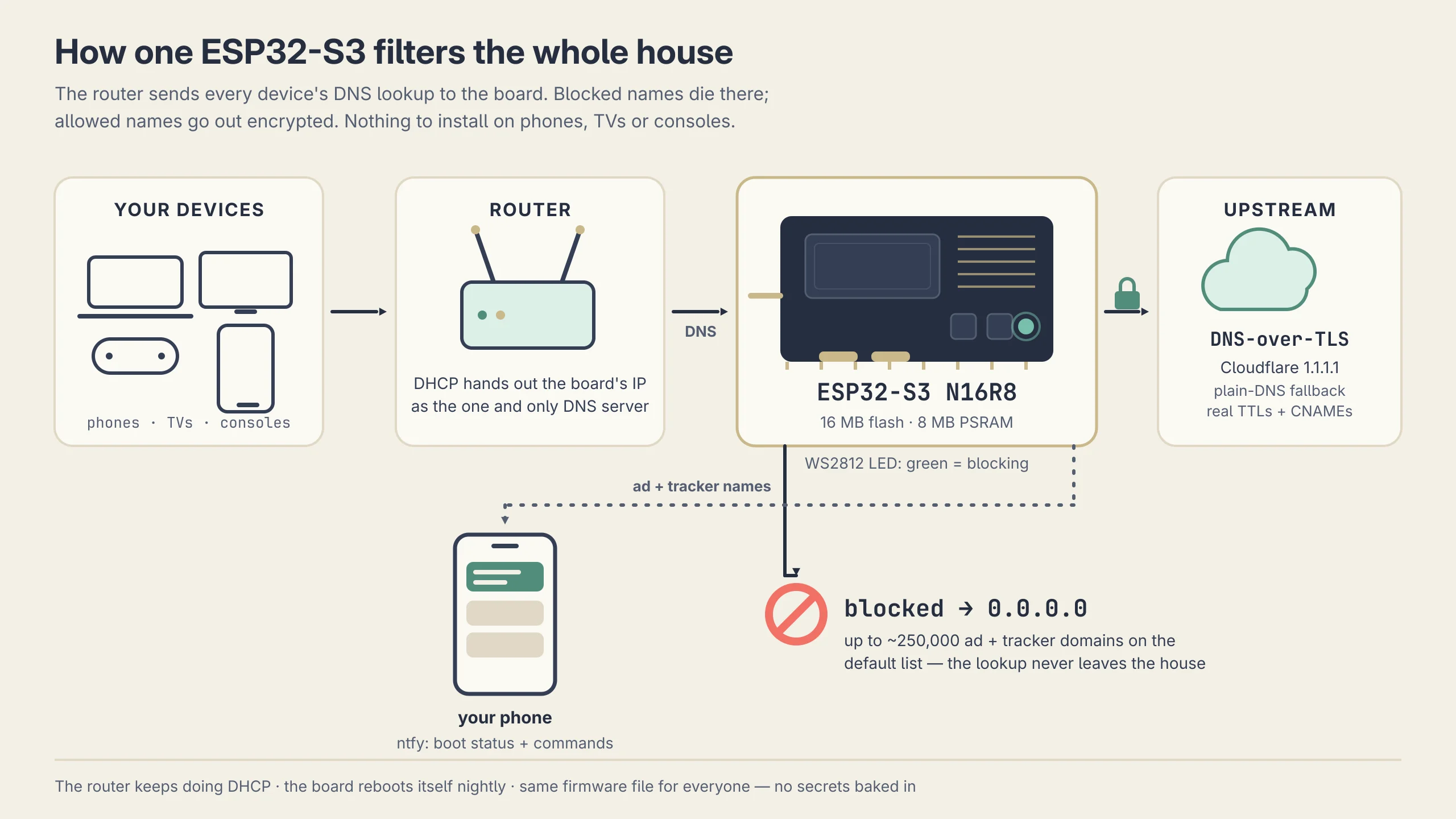
How the board sits in the network: router DNS → ESP32-S3 → blocked or encrypted upstream, with ntfy reports to your phone. Diagram by MCU Atlas.
Bill of Materials
Parts list
2 parts · 0 linked
Heads up: some Buy links are affiliate links. If you buy through one, MCU Atlas may earn a small commission at no extra cost to you. It never changes which parts we list. How this works
Learn
Docs & guides
Read these before you buy. These pages explain things; they don't sell anything.
- Source: Garionhk/ESP32-AdBlocker-N16R8 (AGPL-3.0 firmware)The project: README and setup guide, releases with prebuilt v1.0.3 binaries (UART and native-USB) plus SHA256SUMS.Docs
- Upstream engine: s60sc/ESP32_AdBlockerThe AGPL-3.0 blocklist engine and DNS responder this firmware derives from.Docs
- Video: the author's walkthroughGarionhk's own video walkthrough of the build and setup.Docs
- Service: ntfy push notificationsThe push service the board reports through — self-host it or use a long random topic on the public server.Docs
Related Projects