The Cheap Yellow Display ("CYD") is a family of low-cost ESP32 development boards from Sunton that put a colour touchscreen, microSD slot and USB-serial chip on one printed circuit board — the PCB is literally yellow. The nickname comes from Brian Lough's community project ESP32-Cheap-Yellow Display [1], and strictly speaking "a CYD" means its board, the 2.8-inch ESP32-2432S028 [1]; everything else on the same yellow PCB is a CYD-family board. The family now spans 2.4 to 4.3 inches, two chip generations and three touch technologies, sold under model numbers that differ in ways a listing photo won't show you. This guide decodes those numbers, compares every variant, and tells you which one to buy for your situation.
How to read a Sunton model number
Sunton's model numbers look like gibberish until you know the code — then they tell you the resolution, screen size and touch type at a glance [3]:
First four digits = resolution shorthand. 2432 = 240×320, 3248 = 320×480, 4827 = 480×272, 8048 = 800×480.
S0xx= screen size in inches. S024 = 2.4", S028 = 2.8", S035 = 3.5", S043 = 4.3".The last letter = touch. N = none, R = resistive (XPT2046), C = capacitive (CST820 on small panels, GT911 on larger ones).
One more code to know: a JC prefix (JC2432W328, JC3248W535) means the board is a Guition product, not a Sunton one — same naming scheme, different pinouts, and NOT pin-compatible [3]. If a tutorial is written for an ESP32-2432S028, a JC board is not that board.
The CYD family at a glance
| Model | Size / resolution | LCD driver IC (bus) | Touch IC | USB | Price band (checked 2026-11-10) |
|---|---|---|---|---|---|
| ESP32-2432S024 (N/R/C) | 2.4" 240×320 | ILI9341, some batches ST7789 (SPI) | XPT2046 (R) / CST820 (C) | micro USB | ~$15–21 AliExpress single (re-checked 2026-11-23 [10]) |
| ESP32-2432S028R ("the CYD") | 2.8" 240×320 | ILI9341 (SPI); see the USB-revision pitfall below | XPT2046 resistive | micro USB (revisions: USB-C and dual) | ~$10–18 AliExpress; $17–22 Amazon single, $28–30/2-pack |
| ESP32-2432S032 (N/R/C) | 3.2" 240×320 | ST7789 (SPI), IPS | XPT2046 (R) / GT911 (C) | micro USB | not price-checked |
| ESP32-3248S035R/C | 3.5" 320×480 | ST7796 (SPI) | XPT2046 (R) / GT911 I²C (C) | micro USB | ~$18–26 AliExpress |
| ESP32-4827S043 (N/R/C) | 4.3" 480×272, TN panel | ST7262 (16-bit parallel RGB), ESP32-S3 + 8 MB PSRAM | XPT2046 (R) / GT911 (C) | USB-C | ~$36 AliExpress (480×272/800×480 listing) |
| ESP32-8048S043 (N/R/C) | 4.3" 800×480, IPS | ST7262 (16-bit parallel RGB), ESP32-S3 + 8 MB PSRAM | XPT2046 (R) / GT911 (C) | USB-C | ~$27–45 AliExpress |
Sources for every row: [2] [3] [4] [5] [6] [9] [10]. Price bands move — treat them as ballparks, not quotes.
Identifying a board you already own rather than choosing one to buy? The CYD family variants table covers every family member including the 4.0, 5.0 and 7.0-inch S3 boards, with the display-driver and touch-chip detail that decides whether 2.8R tutorial code transfers.
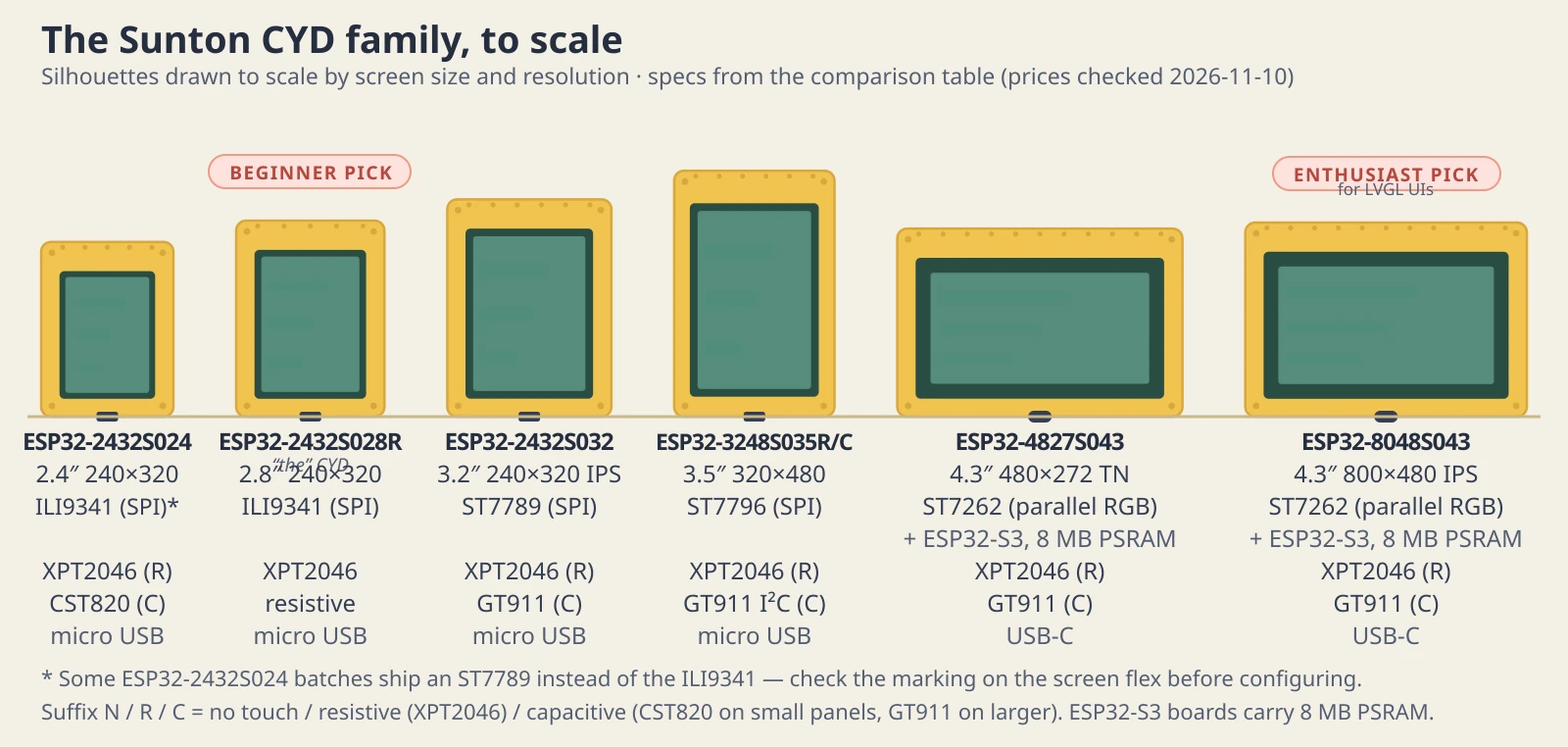
Resistive (R) or capacitive (C)? Resistive touch (the XPT2046 chip) is the classic CYD experience: it works with a fingernail or stylus, needs a one-time calibration, and is the cheaper option. Capacitive touch (CST820 on 2.4" panels, GT911 on 3.2" and up) feels like a phone screen — multitouch-smooth, no calibration — but it talks to the ESP32 over a different bus (I²C on the bigger panels) with different pins, so example code written for one simply won't find the other [2] [3] [4]. If a tutorial you want to follow uses resistive touch, buy the R version of that board.
Which one should you buy?
If this is your first CYD: ESP32-2432S028R with a single micro-USB port
Buy the board the whole community is built around: the 2.8-inch ESP32-2432S028R. It has the biggest community (the ESP32-Cheap-Yellow-Display project is written around it [1]), the most tutorials and pinout diagrams [7], the cheapest street price, and it is the variant our Cyd community hub and every CYD walkthrough assume. atomic14's advice for newcomers points at exactly this board: huge community, lots of examples [3].
Buyer's checklist — listings mix revisions under one name, so check before you pay:
The photo shows one micro-USB port (why this matters is the #1 pitfall below).
The listing or board marking says ILI9341.
The model number ends in R (resistive touch — what the beginner tutorials use).
Once it arrives, our first project on a Cheap Yellow Display walkthrough takes you from the box to a working touchscreen demo, no prior ESP32 experience needed.
If you want a bigger screen without changing toolchains: ESP32-3248S035
The 3.5-inch ESP32-3248S035 is the natural step up: 320×480 resolution (double the pixels of the 2.8"), still a classic ESP32 with micro USB, so your Arduino setup, libraries and habits carry over. Choose the R version if you want every CYD tutorial to keep working, or the C version for a phone-style capacitive screen driven by a GT911 over I²C [4] — around $18–26 on AliExpress at check time [9]. Two honest warnings: its display config differs from the 2.8" (a ST7796 driver at 320×480, with the touchscreen on different pins [4]), so you cannot reuse a 2432S028 TFT_eSPI config verbatim; and on some C boards the GT911's interrupt pin is tied to ground, making touch poll-only [3] — a firmware detail, not a broken board.
If you're building smooth LVGL interfaces: ESP32-8048S043C
For bigger or smoother UIs — LVGL with custom fonts and images — atomic14's recommendation is to move up to a 4.3-inch 8048S0xx board: an ESP32-S3 with PSRAM and a parallel RGB display, for the memory and bandwidth that framework needs [3]. That's the ESP32-8048S043C: 800×480 IPS panel, GT911 capacitive touch, USB-C, ESP32-S3 with 8 MB PSRAM [2], roughly $27–45 on AliExpress [9]. Two notes for this tier: prefer it over the similar-looking ESP32-4827S043, whose 480×272 TN panel has noticeably narrow viewing angles — atomic14 calls the 8048S043 the better 4.3" board [3]; and if you'd rather keep the classic-ESP32 toolchain, the 3248S035C above is the cheaper step-up with the same capacitive GT911 touch [3].
If what you actually want is capacitive touch without config archaeology
Every pick above is still a Sunton board, and the capacitive ones each need their own bus config. If phone-style touch out of the box — or a kit that ships cables, a speaker and a mic — is the point, read our Freenove FNK0104 and Waveshare ESP32-S3 comparison: the S3 kits start at $23.99 with capacitive touch and no calibration (checked 2026-11-18).
Pitfalls to know before you click Buy
Three USB revisions hide inside "ESP32-2432S028". The original has a single micro-USB port. Later boards carry the same model number with a USB-C port or two ports — and the two-port "CYD2USB" revision ships with inverted colours, a gamma issue, and a USB-C port without CC resistors, so USB-C-to-USB-C cables don't work (use a USB-C-to-USB-A cable or adapter) [1]. Dual-port boards may even use a different display driver (ST7789 instead of ILI9341) that needs different config [2]. The fix is to buy by port count: one micro-USB port = the beginner board.
A white or garbled screen usually means wrong driver config, not a broken board. Driver chips vary by production batch even under one model number (ILI9341 vs ST7789 on the 2432S024; a same-name 3248S035 revision with an ILI9486 exists too) — check the marking on the screen flex before configuring [5] [6].
Inverted colours on USB-C/dual-port 2.8" boards are a known revision trait with a one-line fix in the display setup, not a defect [1] [7].
Touch can be rotated relative to the screen — taps land mirrored or upside-down until you set the touch controller's rotation in firmware [7]. Calibrate before you conclude anything is broken.
R and C firmware don't mix. Flash the example that matches your touch type; capacitive boards use a different bus and pins, so resistive-touch examples just won't find touch at all [3].
Look-alike boards aren't the same board. Guition's JC-prefix boards look identical but have different pinouts [3]; listings occasionally mislabel the driver chip (treat listing driver claims as unverified until the board is in your hand) [3]; and two visually identical boards can differ in driver batch, touch controller or backlight polarity [1].
The 4827S043's TN panel has narrow viewing angles — if you're spending 4.3"-board money, get the 8048S043 [3].
Few free GPIO pins on the small SPI boards once display, touch, SD card and LEDs take theirs — if your project needs lots of sensors, check the pin budget before choosing the 2.4–3.5" models [3].
Don't overpay for the nickname. The same board sells across AliExpress, Amazon and eBay at very different markups; the $17–22 Amazon single vs ~$10–18 AliExpress band for the 2.8" is typical, and two-packs often halve the per-board cost [9]. Pick the seller you trust, not the first listing.
Where to go next
New to all of this? The first project on a Cheap Yellow Display walkthrough starts at unboxing.
Browse what the community builds on these boards in our Cheap Yellow Display community hub.
Beyond the CYD: the Freenove FNK0104 vs CYD comparison covers the ESP32-S3 kits and Waveshare alternatives when capacitive touch or a bundled speaker is what you're after.
Variant details and buying links: ESP32-2432S028R (2.8") and ESP32-3248S035 (3.5").
Prices checked 2026-11-10; the 2.4in S024 band re-checked 2026-11-23; bands move. MCU Atlas is an independent site, not affiliated with Sunton, Guition or the ESP32-Cheap-Yellow-Display project.
Sources
Brian Lough (witnessmenow), ESP32-Cheap-Yellow-Display — README, cyd.md revision guide, issue #391. github.com/witnessmenow/ESP32-Cheap-Yellow-Display
Robert van den Elzen (rzeldent), platformio-espressif32-sunton board matrix. github.com/rzeldent/platformio-espressif32-sunton
atomic14, CYD family page — model-code decoder, variant picks, gotchas. atomic14.com/esp32/boards/cheap-yellow-display/
gin66, SUNTON-ESP32-3248S035 board README — 3.5" R/C pins and touch bus. github.com/gin66/ESP32_projects
displayengineer, ESP32-2432S024 — ILI9341/ST7789 batch variation. displayengineer.com/compatible/esp32-2432s024
lcdultrapro, Sunton ESP32-2432S028 and ESP32-3248S035 board pages — pins, revisions, ILI9486 note. lcdultrapro.com
Random Nerd Tutorials, Cheap Yellow Display series — touch rotation, colour inversion, calibration. randomnerdtutorials.com
chipguyhere, ESP32-CYD-Resistive_display — touch auto-detect, 3248S035C quirk. github.com/chipguyhere/ESP32-CYD-Resistive_display
Price checks 2026-11-10: Maker Advisory CYD price tracker; Amazon search results; AliExpress item listings and the 4.3" wholesale page (per research notes §9).
S024 price re-check 2026-11-23: AliExpress listings 1005008690761836 ($18.57, resistive) and 1005009393607969 ($16.26, no touch), regional AliExpress wholesale renders ($14.92 multi-piece to $20.74 capacitive single); Amazon US DIYmalls ESP32-2432S024C B0CLGD2DG6 ($20.98). Claim map: /workspace/qa/cyd-s024-price-reconcile/.