E-paper (also sold as "e-ink") is the friendliest display technology in hobby electronics: the image is made of charged pigment particles, it stays on the screen with no power at all until you refresh it, it reads like paper in bright light, and a battery-powered project can run for months between charges [4][5]. The catch is that "an e-paper module" is not one product. A 1.54 inch watch panel, a 7.5 inch wall dashboard panel and a recycled retail shelf label are all e-paper, and they could not be more different to buy and drive.
Rather than survey the whole market, this guide covers the three modules our own e-ink builds actually use — the display in the Watchy smartwatch, the 7.5 inch panel in our low-power ESP32 weather display, and the second-hand shelf labels behind OpenEPaperLink — because those are panels we have wired, powered and put on a wall, not spec sheets. Pick by what you want to end up with:
Quick pick: which e-paper module for which job?
| If you want… | Buy | Size / resolution | Interface | Wiring effort | Checked price |
|---|---|---|---|---|---|
| A complete first project, one box, no display wiring | Watchy kit (Good Display 1.54in module inside) | 1.54in, 200×200 | SPI via the watch board's 24-pin FPC connector | None — panel plugs in | $59 kit (checked 2026-11-12) [4][8] |
| A big, readable wall dashboard | Waveshare 7.5in e-Paper V2 | 7.5in, 800×480 | SPI via driver HAT or DESPI-C02 | Moderate — FPC to adapter board, jumper wires to the ESP32, likely some soldering | $56.99 (checked 2026-11-12) [2][7] |
| Many small, battery-powered displays for the least money | Second-hand shelf labels (e.g. SoluM ST-GR29000) | 2.9in, 296×128 | 802.15.4 wireless — no wires to the display at all | None to the display; flashing tags needs a pogo-pin jig (advanced) | Not price-checked: second-hand listings vary wildly [6][7] |
Prices are the maker's own store prices on the day we checked them — treat them as ballparks and expect movement.
The 1.54 inch module: the one that arrives attached to a project
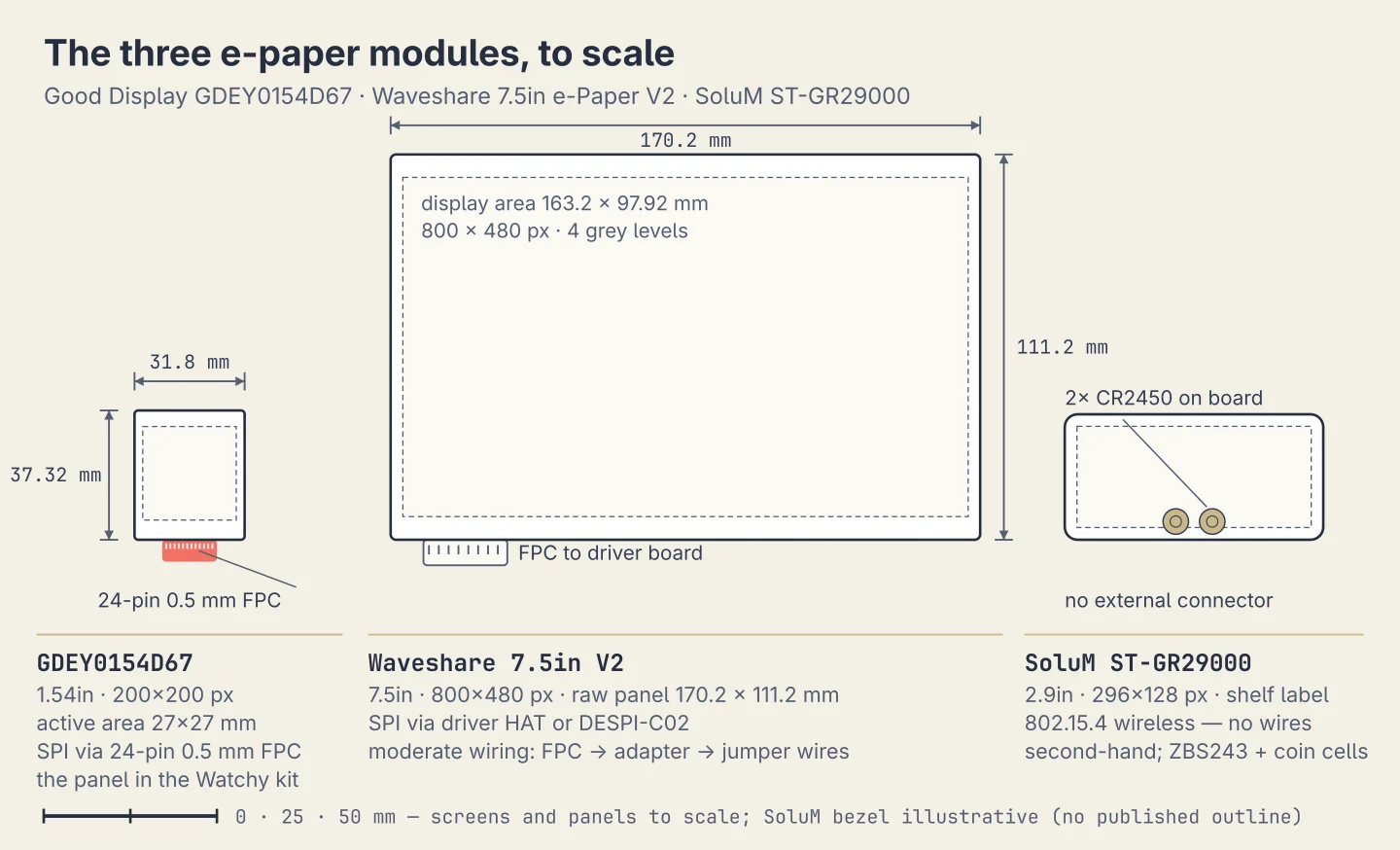
The smallest module here is the panel inside Watchy, our most-visited e-ink project: a 1.54 inch, 200×200 pixel black-and-white panel made by Good Display (part GDEY0154D67 in current revision 3.0 kits; earlier revisions used the GDEH0154D67) [4]. Its driver IC is a Solomon Systech SSD1681, it talks SPI at 3.3V, and it connects to the watch board through a 24-pin 0.5mm FPC flex connector — no soldering, it clicks into a ZIF socket on the PCB [4][5]. A full refresh takes about 2 seconds, a fast refresh 1.5 seconds, and a partial window refresh 0.3 seconds [5].
Why it suits a beginner: you never buy or wire the panel separately. The kit arrives with the display, battery, case and strap together, and the Watchy library's display driver already knows this exact panel [4][8]. You spend your first afternoon on watch faces, not on wiring diagrams. The trade-offs are the small 27×27mm active area [5], a black-and-white image only, and that this specific panel is effectively sold as part of the kit — SQFMI sells a replacement screen, and a bare 1.54in 200×200 module from Waveshare ($5.99 at last check, checked 2026-11-12) is the from-scratch route if you'd rather build the watch board yourself [8].
Deep sleep is where this module earns its keep: the panel keeps the last image with zero power, so the watch only wakes to redraw — Watchy's ESP32 sleeps between refreshes on a small LiPo, and the maker describes runtimes of days per charge [4][8].
The 7.5 inch module: a wall dashboard in one panel
The weather display uses the Waveshare 7.5in e-Paper V2: 800×480 pixels in black and white, with a 170.2×111.2mm raw panel and a 163.2×97.92mm display area — genuinely readable from across a room [1][2]. It connects over SPI and runs at 3.3V or 5V, with one rule beginners trip on constantly: the logic level must match the supply voltage, so an ESP32's 3.3V goes with a 3.3V supply [2]. A full refresh takes about 4 seconds and flickers while it runs (that flicker is normal e-paper behaviour, not a fault); partial refresh is 0.4 seconds [2].
Unlike the watch panel, this module is a bare glass-and-FPC part: it needs a driver adapter board (a DESPI-C02 or a Waveshare driver HAT) between the panel's flex cable and your microcontroller [7][8]. Wiring is four to six jumper wires plus the flex cable — plan on some soldering unless you pick the firmware's solder-free component options [7]. The weather firmware's creator specifically recommends the DESPI-C02 and notes that Waveshare HAT revisions 2.2 and 2.3 are not recommended, so check the adapter's revision before ordering [7].
Power is the reason to choose this size: our weather display's ESP32 wakes, fetches a forecast, redraws and sleeps again — the creator measures about 14µA asleep and about 83mA during a roughly 15-second refresh, which works out to a claimed 6–12 months on a 5000mAh battery with 30-minute updates [7]. The panel itself draws nothing between refreshes, and its standby current is under 0.01µA [2].
One buying trap: the "7.5in Waveshare" name covers a V1 panel at 640×384 and the V2 at 800×480 [2]. The weather firmware wants the V2 (or Good Display's equivalent GDEY075T7); the higher-resolution HD panels and the 4-colour version are not supported by that firmware [7][8].
Second-hand shelf labels: e-paper for pennies, patience required
The cheapest e-paper in hobby use isn't sold as a module at all. Retail electronic shelf labels — the price tags on supermarket shelves — are small e-paper displays with a radio and a coin-cell power supply, and the OpenEPaperLink project replaces their proprietary firmware so you can drive them over the air from an ESP32-S3 access point. The classic starter tag is the SoluM 2.9in ST-GR29000: a 296×128 pixel display driven by an SSD1619 or UC8151 controller (both variants exist!), powered by two CR2450 coin cells, common in second-hand supply, and made in versions with and without NFC [6]. Supported tags now span 1.54in to 13.3in across several radio families [6].
This is the cheapest path per screen and the least wired — the display has no cable to your microcontroller at all. But it is an advanced beginner's path, honestly: you buy tags second-hand in job lots, only specific models work (check the project's supported-tags list before buying anything), and getting the new firmware onto a tag means a flashing jig with pogo pins wired to the tag's test pads [6][8]. The access point itself currently wants an ESP32-S3 with 16MB flash and 8MB PSRAM [8].
Deep sleep is the tags' whole existence: they sit on coin cells for their whole service life, waking only to receive and redraw — that is what makes a fleet of little displays around the house practical [6][8].
Common beginner pitfalls (all three modules)
Mismatched logic levels. Waveshare driver boards run at 3.3V or 5V, and the IO level must match the supply — a 5V-fed board talking to a 3.3V microcontroller is a classic dead-screen cause [2].
Panicking at the flicker. A full refresh on these panels flashes black-and-white for a few seconds. That is how e-paper clears ghosting; it is not a bug [2][3].
Refreshing too often. Waveshare recommends refresh intervals of at least 180 seconds, at least one refresh every 24 hours, and clearing the screen to a blank state before storing a panel — skipping this can leave permanent ghost images [2].
Buying the wrong revision. The 7.5in V1 (640×384) and V2 (800×480) share a name; the firmware you follow will name exactly one [2][7]. Driver-HAT revisions matter too — 2.2/2.3 are not recommended for the weather build [7].
Assuming "same tag" means "same driver". The ST-GR29000 ships with either an SSD1619 or a UC8151 depending on model and vintage, and the NFC models using UC8151 have a known display-glitch problem with the newest firmware on one access point design — a fix exists but a wireless downgrade can soft-brick the tag [6]. Check the model, not just the size.
Buying clones of the kit. Watchy clones circulate at lower prices; SQFMI reports a steady stream of faulty-clone complaints, and some clones omit the accelerometer entirely [8].
Cold weather. These panels are rated 0–50°C, and Waveshare warns that refreshing at low temperature can cause colour cast; an unheated shed or mailbox project needs a low-temperature panel (shelf-label low-temp variants exist for exactly this reason) [2][6].
Where to go next
Each module above has a full build write-up on this site: the Watchy smartwatch (beginner), the 7.5in e-paper weather display (intermediate), and reusing e-ink shelf labels with OpenEPaperLink (advanced). There is a fourth e-ink build now, too: InkCast, a battery-powered ESP32-S3 weather station on a 3.97in Good Display panel — a size the three modules above don't cover, but the same deep-sleep trick. Looking for the brain to drive your panel? Our beginner board guide covers the boards these builds use.
Sources, checked 2026-11-13:
Waveshare 7.5inch e-Paper HAT wiki manual — dimensions, voltage, refresh times. waveshare.com/wiki/7.5inch_e-Paper_HAT
Waveshare 7.5inch e-Paper HAT Manual (parameters, V1 vs V2, precautions). waveshare.com/wiki/7.5inch_e-Paper_HAT_Manual
Waveshare 1.54inch e-Paper Module Manual — parameters and connector details. waveshare.com/wiki/1.54inch_e-Paper_Module_Manual
SQFMI Watchy hardware documentation — revisions table, datasheets list (GDEY0154D67, display connector), dimensions. watchy.sqfmi.com/docs/hardware/
Good Display GDEY0154D67 product page — SSD1681, SPI, 3.3V, 24-pin FPC, refresh times, active area. good-display.com/product/388.html
OpenEPaperLink wiki — supported-tags lists and the 2.9″ ST-GR29000 tag page (ZBS243, SSD1619/UC8151, CR2450, NFC variants, glitch note). github.com/OpenEPaperLink/OpenEPaperLink/wiki
lmarzen, esp32-weather-epd README — panel-support table, DESPI-C02 recommendation, sleep/refresh current figures, battery-life claim. github.com/lmarzen/esp32-weather-epd
MCU Atlas project pages: watchy-open-source-esp32-e-ink-smartwatch, low-power-esp32-e-paper-weather-display-7-5in, openepaperlink-reuse-e-ink-shelf-labels-with-an-esp32-access-point (BOMs and day-checked prices, checked 2026-11-12). mcuatlas.com