Bevel OS: a Windows-95-style desktop OS on one ESP32-S3
Bevel OS boots a Windows-95-style desktop with apps and Doom on one ESP32-S3 and a VGA monitor. An AI agent wrote the code; every human touch is logged.
What it is
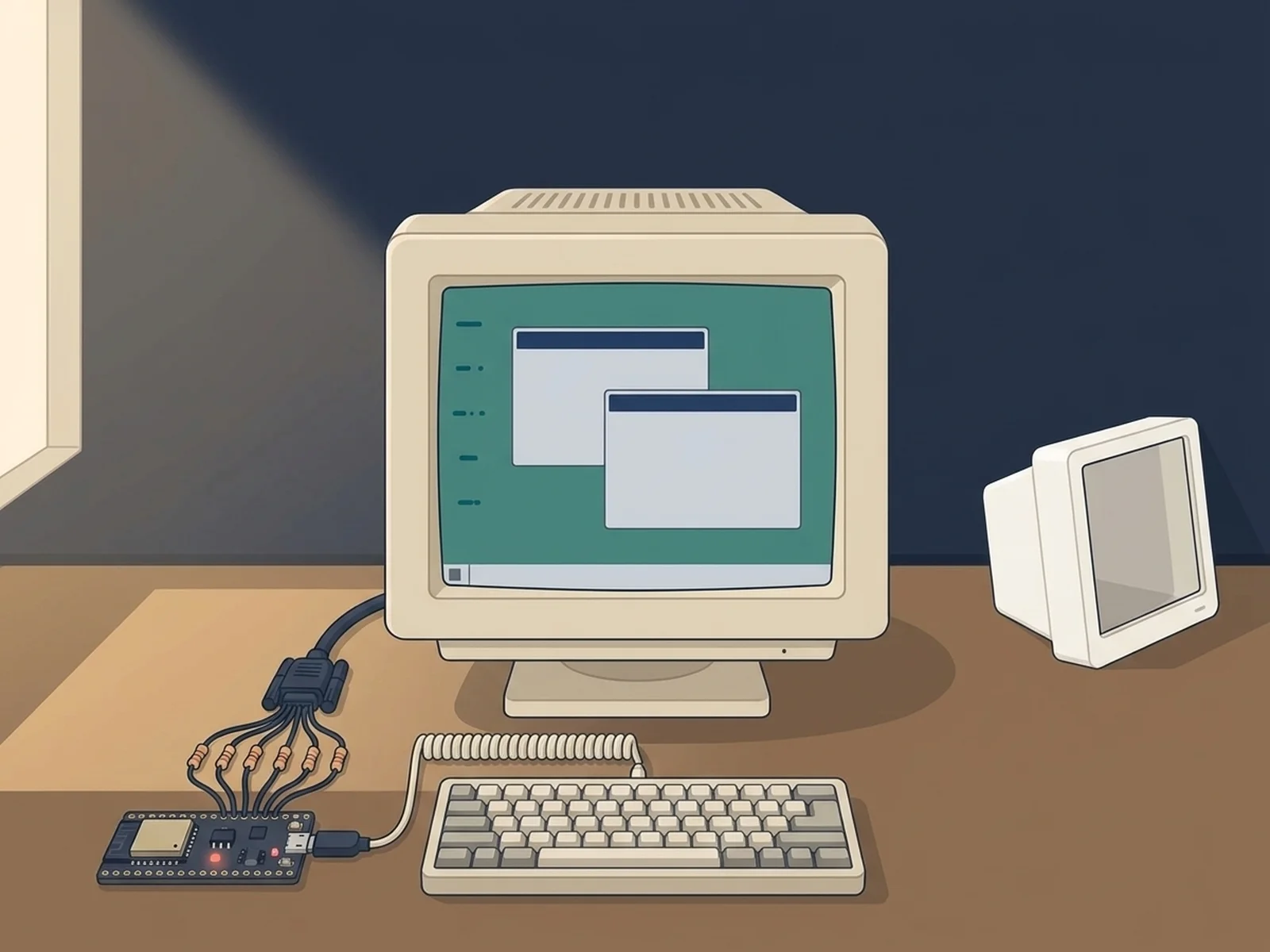
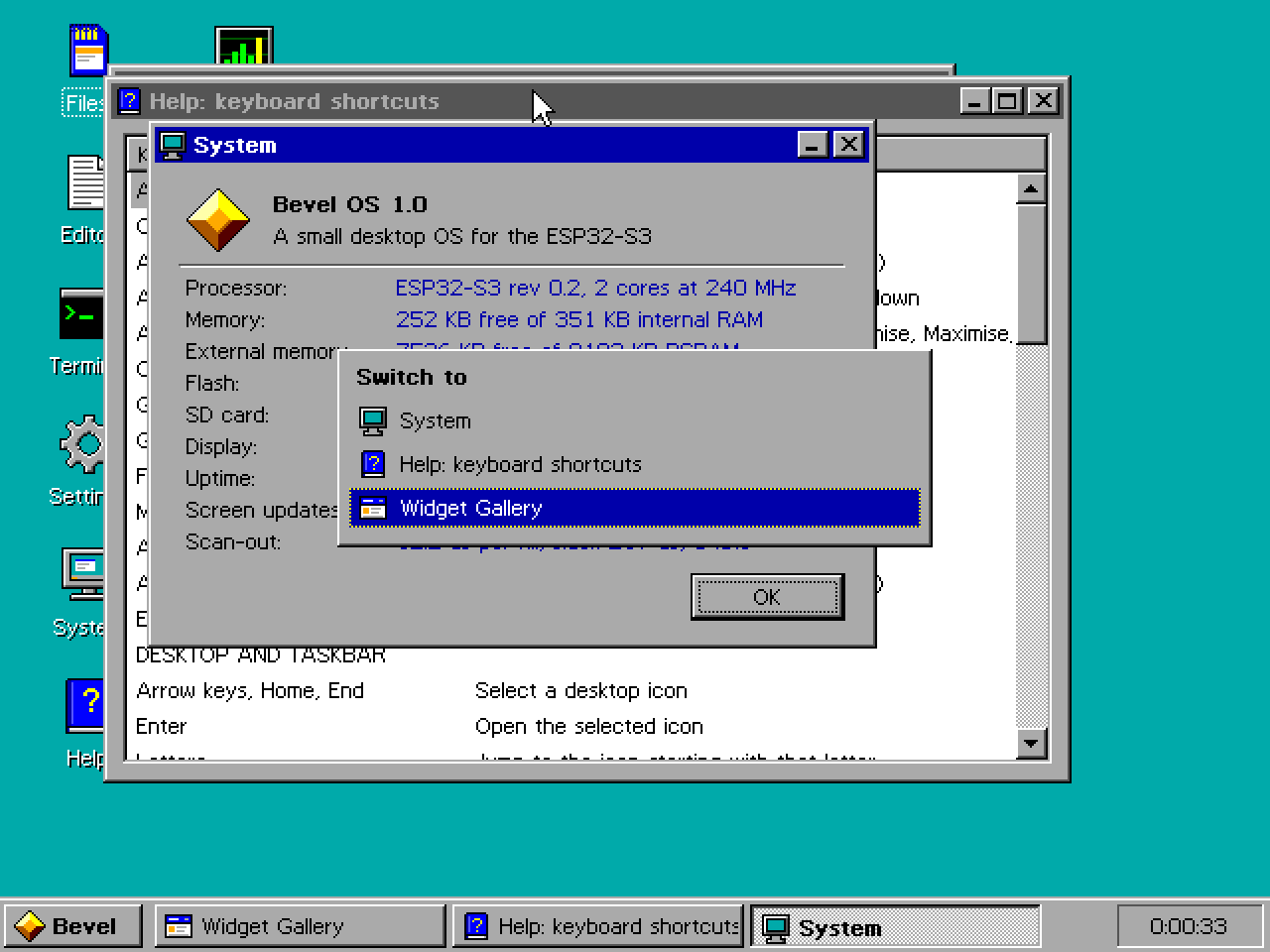
A Windows-95-style graphical desktop OS that boots on one ESP32-S3 and plugs into a VGA monitor: overlapping windows, taskbar, built-in apps, Wi-Fi with a text-rendering browser, and loadable ELF apps including Snake and Doom. An AI coding agent wrote the ~11,000 lines of C; every human touch is logged.
What you need
- ESP32-S3 N16R8 dev board (dual USB-C) COM for flash/power, AUX unplugged — variant trap, match N16R8 exactly
- 9 resistor bodies (3× 1 kΩ + 6× 220 Ω) the six-position VGA DAC
- VGA cable to cut open + VGA monitor ~20 solder joints; most monitors accept the 59.9 Hz refresh
- USB keyboard/mouse combo receiver two separate devices has never worked
- PC with ESP-IDF 5.5.3 the real hurdle — software, not wiring
How hard
Beginner for the wiring (our editorial call): ~20 solder joints on a cut VGA cable, no PCB, SMD or battery — more than tinytron's single header, none of cyber-badge's battery cautions. The real hurdle is the ESP-IDF 5.5.3 toolchain on the software side.
Photos
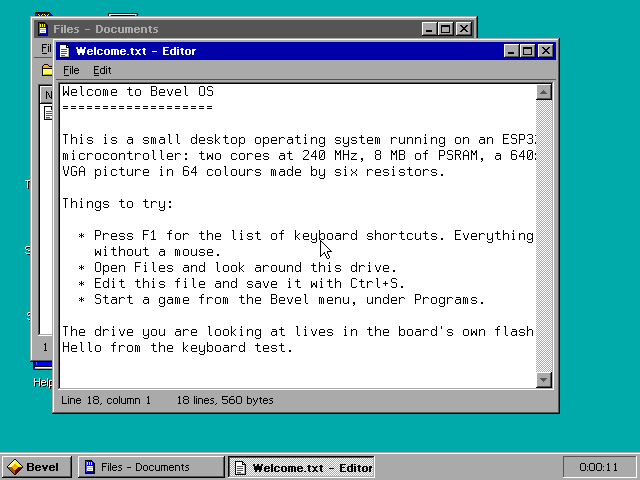
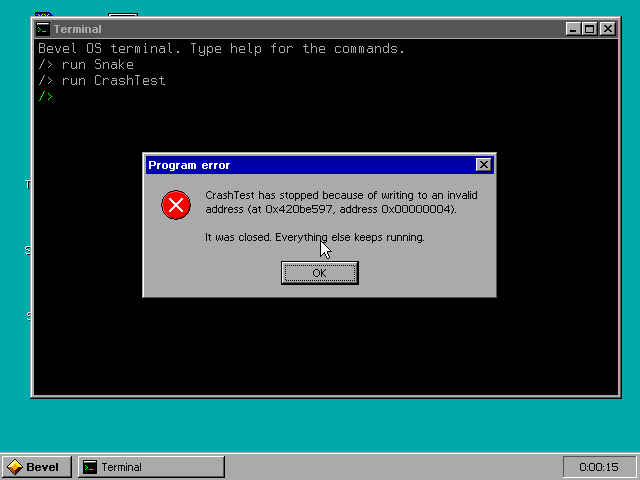
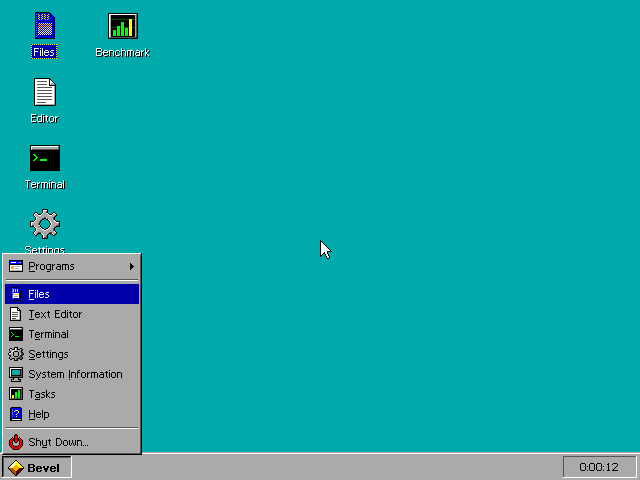
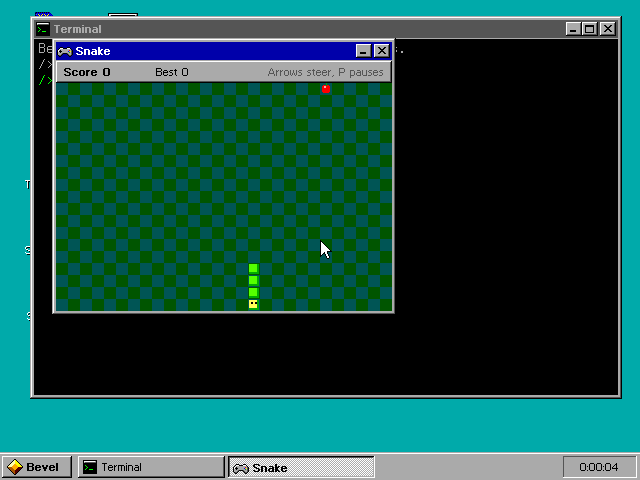
Photos: Andris Gauracs, bevel-os (MIT)
Key Facts
- Windows-95-style graphical desktop OS on a single ESP32-S3 (N16R8) — overlapping windows, taskbar, Alt+Tab, menus and dialogs
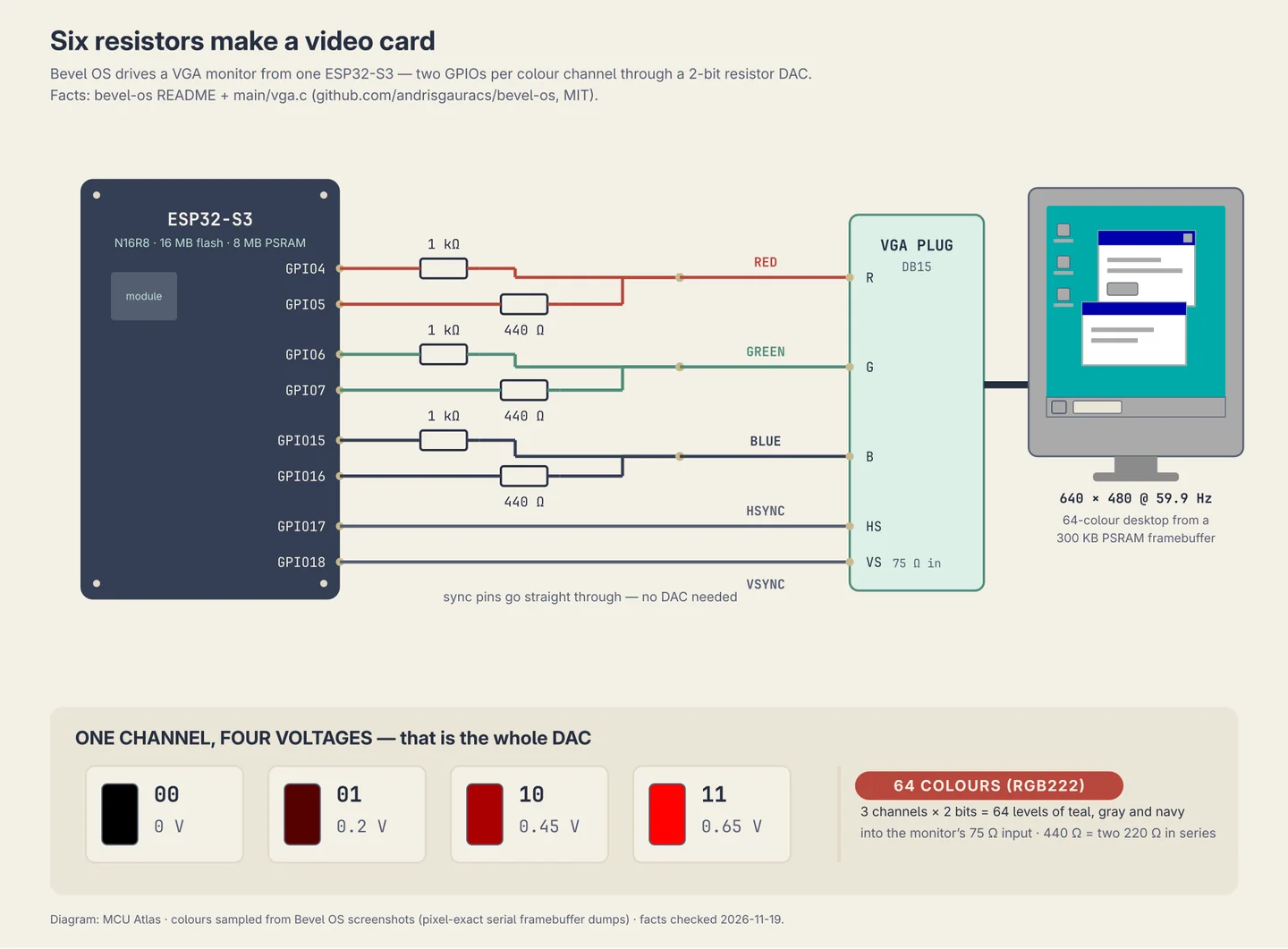
- 640×480 VGA in 64 colours (RGB222) through a six-resistor DAC; boots to desktop in 0.7 s (maker's measurement)
- Built-in apps: Files, Text Editor, Picture Viewer, Terminal, Settings, System Information, Tasks, Benchmark, Network, Browser
- Loadable ELF apps from a 12 MB FAT partition in the board's own flash (no SD card), each in its own task; Snake and Doom included
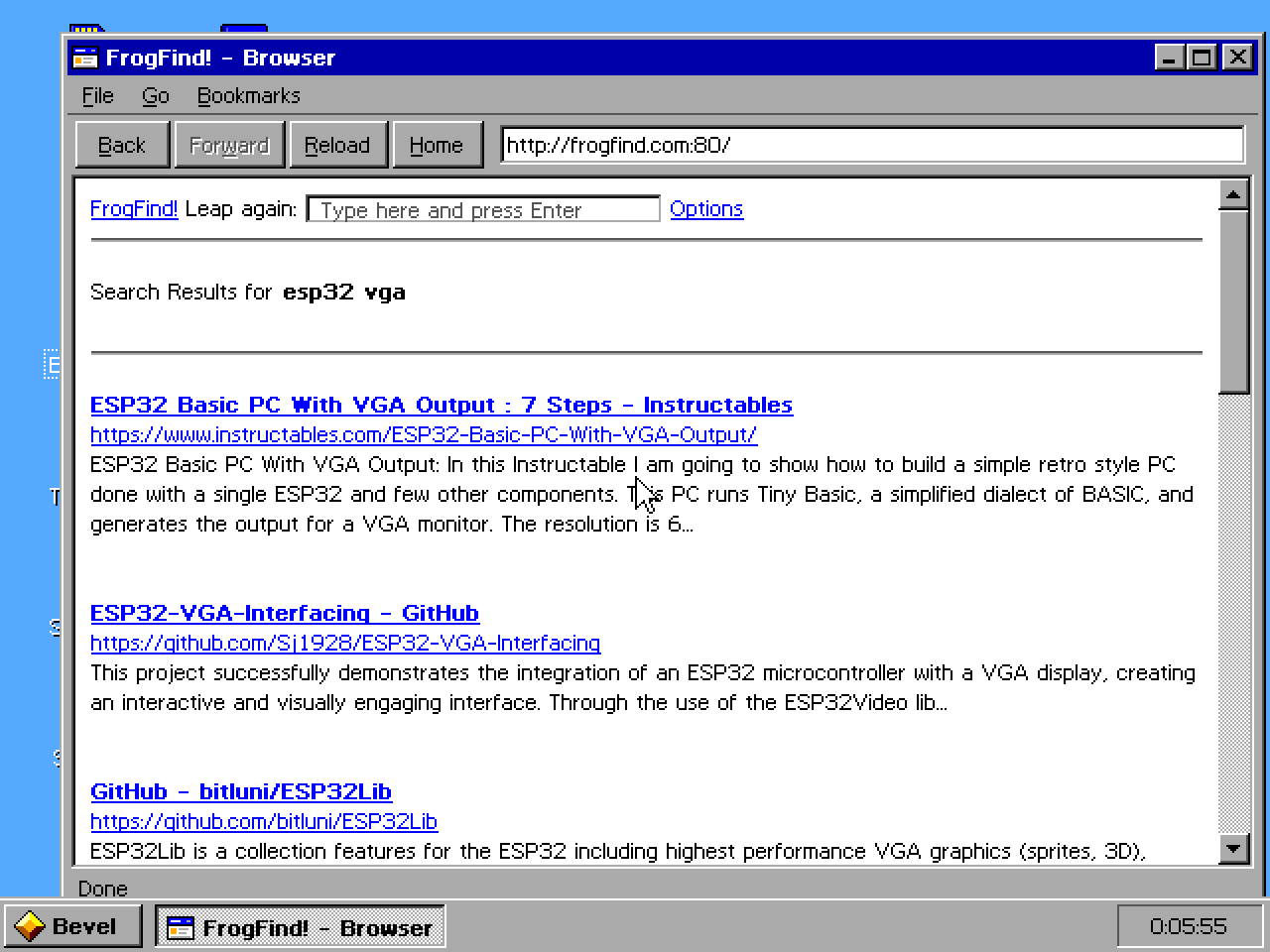
- Wi-Fi station + browser that renders pages as text (FrogFind search; no images/JS/CSS)
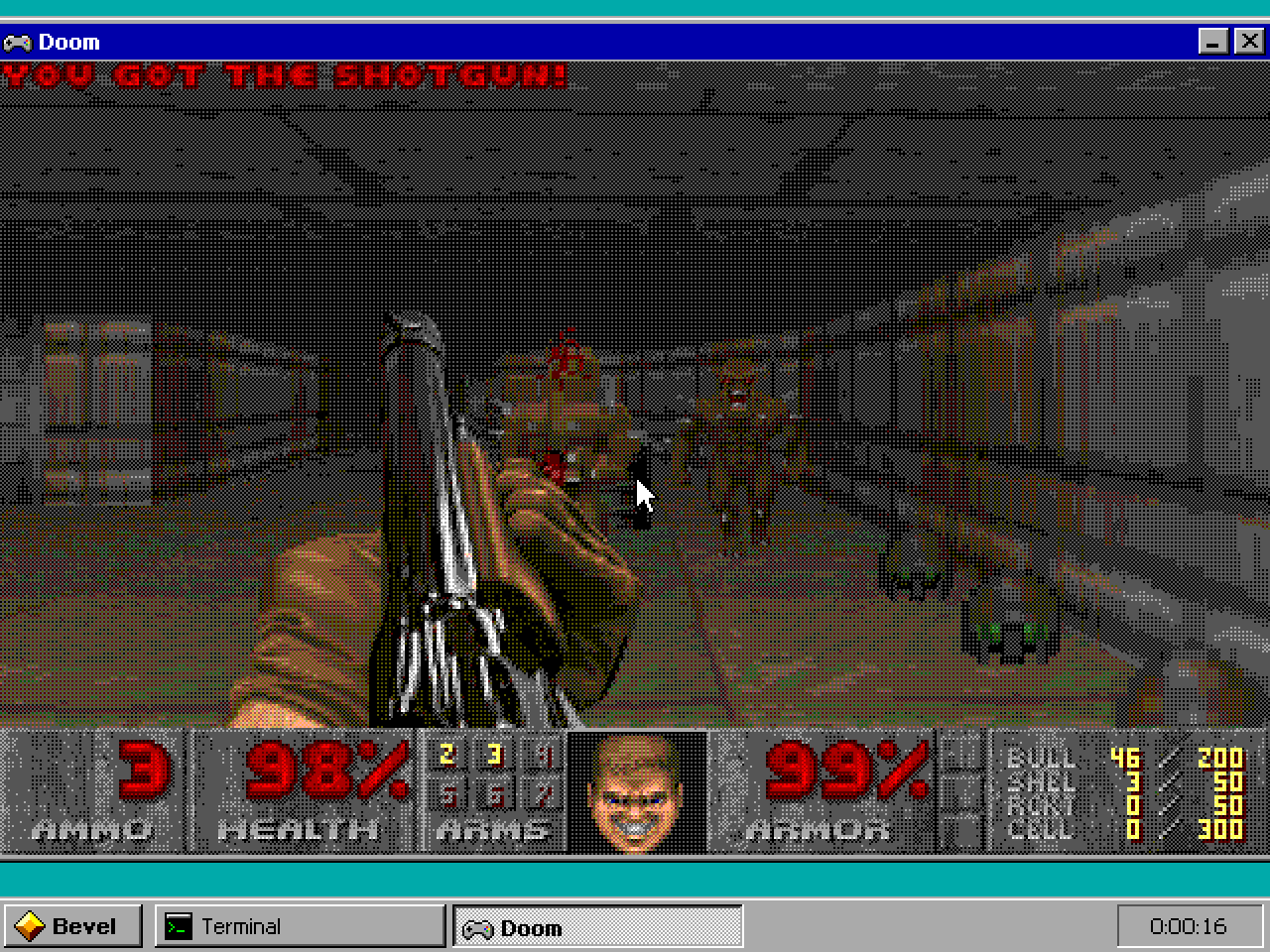
- Doom: ~32 FPS, keyboard-only, no sound, dithered to the 64-colour palette, shareware WAD fetched at build time, not bundled
- ~11,000 lines of from-scratch C on ESP-IDF/FreeRTOS (not bare metal); written by an AI coding agent (Claude Fable 5.2), every human intervention logged in INTERVENTIONS.md (39 rows)
- Low wiring wall: ~20 solder joints (cut VGA cable + resistors + two USB-C breakouts), no PCB/SMD/battery; printable enclosure files included; ESP-IDF 5.5.3 toolchain is the real hurdle
- MIT licence (Doom port GPL v2) by Andris Gauracs; repo is a one-day publish (2026-11-14), not actively developed
About This Project
Bevel OS is a Windows-95-style desktop that boots on one ESP32-S3 board and plugs into a VGA monitor: overlapping windows, taskbar, Alt+Tab, built-in apps — plus programs loaded from the board's own drive as ELF files, including Snake and Doom. The repo's description is "A small Windows-95-style desktop OS for a single ESP32-S3 on a VGA monitor, written by Claude Fable 5.2" — the last clause is the story. Video out is a six-resistor DAC (2 bits per colour channel): 640×480 in 64 colours. Boot to desktop: 0.7 seconds (maker's measurement).
Why it's impressive
This is real systems code: a window manager with true z-order/occlusion, and a damage-tracking compositor repainting just behind the scan-out beam into one 300 KB PSRAM framebuffer. No SD card: a 12 MB wear-levelled FAT partition lives in the board's own flash; apps are position-independent ELF files, each in its own task via a 24-function API; an app crash becomes an error dialog and the desktop survives. Wi-Fi brings a browser rendering pages as text (no images, JavaScript or CSS), searching via FrogFind. About 11,000 lines of C are from scratch, atop ESP-IDF/FreeRTOS — not bare metal. Maker-measured: 60 FPS pointer, 68 FPS drags, 76 FPS full redraws, scan-out 5.6% of one core. Doom runs at ~32 FPS — keyboard-only, no sound, dithered to the 64-colour palette, its game file fetched at build time.
Written by an AI, every human touch logged
Per the README, an AI coding agent (Claude Fable 5.2) wrote the OS; the human did the physical work. The story is INTERVENTIONS.md: all 39 manual actions the human took, logged with times and reasons, from wiring the DAC to typing the Wi-Fi password. "While the OS itself was built (renderer through Snake, tests and benchmarks), the human pressed no reset button, did no rewiring and plugged nothing in." The agent watched its own screen via serial framebuffer dumps (a PNG in 0.4 seconds); its build brief demanded an original OS inspired by 90s desktop style — no Microsoft names, logos or copied icons.
The parts and the wiring wall
One ESP32-S3 N16R8 board (16 MB flash, 8 MB PSRAM); COM port for flashing and power, AUX left unplugged — its pins are the USB host. Add nine resistor bodies (3×1 kΩ + 6×220 Ω; each 440 Ω leg is two 220 Ω), a VGA cable you cut open, two USB-C breakouts, a 5 V charger, and a keyboard/mouse or combined receiver (two separate devices has never worked). That cut cable is the wiring wall: ~20 solder joints, no PCB, SMD or battery. The 59.9 Hz refresh uses a non-standard pixel clock most monitors accept; a minority may refuse. The real hurdle is software — the ESP-IDF 5.5.3 toolchain. Enclosure files are in the repo.
The fun-desk lane
This sits between our tinytron retro TV and the cyber-badge: more soldering than tinytron's single header, none of cyber-badge's battery cautions — a weekend desk toy with an operating system on it.
Honesty split
MCU Atlas has not built Bevel OS; the claims are the maker's (code, captures, video) — consistent, but not independently replicated as of 2026-11-21. What we verified on 2026-11-21 by reading the source at commit f6202281 plus live GitHub and YouTube checks (our engineering fact-check): the VGA timing, 64-colour mode, compositor, ELF loader (real Xtensa binaries), Wi-Fi and browser code match the claims; the LICENSE file is MIT with a GPL v2 Doom carve-out. The repo is a one-day publish (both commits 2026-11-14) — a finished project, not an active one.
License and attribution
MIT licence (the Doom port is GPL v2), by Andris Gauracs. Source, docs, screenshots and printable enclosure: github.com/andrisgauracs/bevel-os. Not affiliated with Microsoft; Windows 95 is a Microsoft trademark — Bevel OS's look is original mid-90s-style artwork.
Source & Attribution
How to Build It
Parts Needed
- An ESP32-S3 N16R8 dev board with two USB-C ports (COM + AUX)
- Resistors: 3× 1 kΩ + 6× 220 Ω; a VGA cable to cut open; two USB-C breakouts
- A 5 V USB charger, a VGA monitor, and a USB keyboard/mouse combo receiver
- A PC with ESP-IDF 5.5.3
Steps
- 1
Get the right board and parts
Get an ESP32-S3 N16R8 board with two USB-C ports (COM + AUX) and the parts from the list above. The variant matters: 16 MB flash, 8 MB PSRAM, dual USB-C.
- 2
Wire the resistor DAC
Wire the resistor DAC per the README pin map — GPIO 4/5 red, 6/7 green, 15/16 blue, 17/18 sync — and solder the fan-out into the cut VGA cable; add the two USB-C breakouts.
- 3
Build and flash
Install ESP-IDF 5.5.3 and build/flash the firmware through the COM port; leave AUX unplugged — those pins are the USB host.
- 4
Connect monitor and input
Connect a VGA monitor (auto-adjust clears the thin side bars a capture device shows) and your keyboard/mouse or combo receiver.
- 5
Boot and go online
Boot to the desktop, join Wi-Fi from the Network panel, and try the browser via FrogFind.
- 6
Box it and add apps
Optionally print the enclosure STLs from enclosure/ and box it up; drop more ELF apps into /disk/Apps.
Bill of Materials
Parts list
9 parts · 0 linked
Heads up: some Buy links are affiliate links. If you buy through one, MCU Atlas may earn a small commission at no extra cost to you. It never changes which parts we list. How this works
1× ESP32-S3 N16R8 dev board, dual USB-C (COM + AUX)
Variant trap: must be N16R8-class (16 MB flash, 8 MB octal PSRAM) with two USB-C ports — COM for flashing/power, AUX pins are the USB host. No exact catalog match verified at assembly; verify the variant before buying.
9 (3 + 6)× Resistors: 3× 1 kΩ + 6× 220 Ω
The "six-resistor DAC" is six positions; 9 physical bodies as documented (each 440 Ω leg is two 220 Ω in series)
1× VGA cable (cut open)
The soldering step; you cut the cable and solder the DAC fan-out into it
2× 2× USB-C female breakout, 4-pad (V, G, D−, D+)
One for keyboard/mouse (USB host), one for 5 V power input
1× 5 V USB charger
Powers the input breakout; the board's 5 V pin is input-only behind a diode
1× VGA monitor (optional VGA→HDMI adapter)
59.9 Hz on a non-standard pixel clock: most monitors accept it, a minority may refuse
1× USB keyboard + mouse, or one combined receiver
Two separate devices at once has never worked (README Limitations) — use a combo receiver
1× 3D-printed enclosure
STLs + annotated assembly render in enclosure/ in the repo — files, not a purchase
1× PC with ESP-IDF 5.5.3
The actual hurdle; flashing and logs via the COM port
Not included: No prices verified at assembly (2026-11-21) — every line ships unpriced; costBand unknown by design, Doom's shareware WAD is not bundled — fetched at build time, Soldering iron + solder for the ~20 joints (the cut VGA cable is the wiring wall)
Learn
Docs & guides
Read these before you buy. These pages explain things; they don't sell anything.
Related Projects