Whistle: real speech-to-text entirely on an ESP32-S3, no network
Real speech-to-text entirely on an ESP32-S3, no network or cloud: hold a button and say a command in one of seven languages — the onboard LED obeys.
What it is
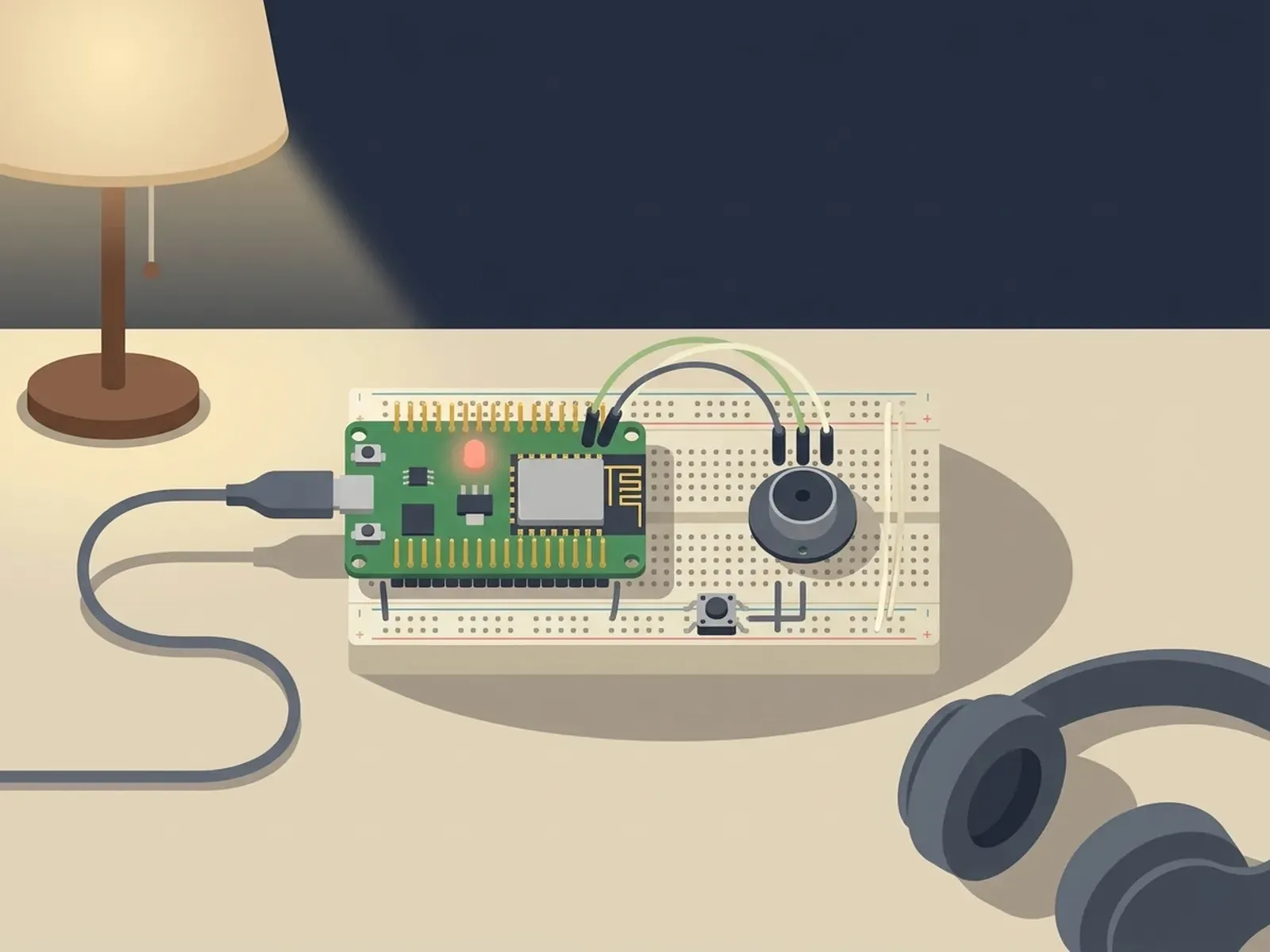
Hold a button, say "flash the light blue" — in English, French, Spanish, German, Italian, Dutch or Polish — and the board's onboard LED obeys. The speech-to-text runs entirely on an ESP32-S3: no network, no cloud, no API key.
What you need
- ESP32-S3 board, N16R8 16 MB flash + 8 MB octal PSRAM — smaller variants cannot hold the 14.5 MB model
- INMP441 I²S mic module the common round breakout; test it first
- Momentary push button any tactile switch — internal pull-up, no resistor
- Breadboard any breadboard works
- Jumper wires (~8) the wiring figure in the build steps shows every one; plus a USB data cable to the native USB port
How hard
Intermediate: no soldering (it is all breadboard and jumper wires), but you will install ESP-IDF v5.5+, build with idf.py, and flash the 14.5 MB model to a raw flash address with esptool. Every command is in the README.
Key Facts
- True transcription, not phrase matching: hold the button, speak, release — the firmware transcribes free speech and parses it for an LED command, auto-detecting the language across English, French, Spanish, German, Italian, Dutch and Polish
- Independent C99 engine with zero dependencies (Apache 2.0); weights are Whistle by Cactus Compute, downloaded from Hugging Face (model card also Apache 2.0); author checked it tensor by tensor against the official engine
- Board requirement: ESP32-S3 N16R8 (16 MB flash, 8 MB octal PSRAM) — the depth-4 model is 14.5 MB and even depth 2 is 10.7 MB, so 8 MB-flash boards (N8R2) fail at every depth; will not run on other chips
- The matmuls run int8 on the S3's PIE vector unit, 16 multiply-adds per instruction; int8 costs nothing measurable vs float (80% vs 78% command accuracy on 360 clips, author-measured)
- Accuracy limits (author-measured): ~78% command accuracy English, 80% Spanish, 72% French; Dutch weak at 42%; 11.7% word error rate on general speech
- Demo-grade speed (author-measured): ~6.3 s to process a 2-second English command at 240 MHz; 12.6 s for a 3.2-second French sentence
- We verified without hardware: 13/13 regression tests, zero-dependency host build, model download (sha256 b6e02f04…), depth-4 strip byte-exact at 14,515,887 B, end-to-end host recognition, and a clean ESP-IDF v5.5 firmware build
- Repo ships a generated wiring diagram, mic-test firmware, a PC host tool and 13 regression tests; Apache 2.0 throughout
About This Project
Andris Gauračs's whistle-esp32 ports Whistle, a speech-recognition model by Cactus Compute, onto a single ESP32-S3 board and an INMP441 microphone module. Hold the button, speak, let go: the firmware transcribes what you actually said — not a fixed list of phrases — auto-detects which of seven languages you spoke, and plays the resulting colour command out on the WS2812 LED already on the dev board. Cactus ships no ESP32 build and no engine source, so everything here is an independent C99 implementation with zero dependencies, checked tensor by tensor by the author against the official engine. The weights are not in the repo — setup downloads them from Hugging Face (model card also Apache 2.0). To fit the board, a strip tool keeps only four of the decoder's eight layers; even so the model is 14.5 MB, which is why the board must be the 16 MB-flash, 8 MB-octal-PSRAM N16R8 variant, with matrix math in int8 on the S3's PIE vector unit. It is a bench demo with honest, author-measured limits — roughly 78% command accuracy in English, weaker in Dutch, about six seconds per short command — not a dictation product. Everything checkable without hardware checked out for us: tests, host build, model download, strip size, end-to-end recognition.
Speech recognition with no API key to forget
Most edge-AI builds we cover still lean on someone else's computer. The Xiaozhi voice chatbot (/projects/xiaozhi-open-source-esp32-ai-voice-chatbot/) needs a model server to think; VA5's (/projects/va5-a-20-esp32-s3-voice-assistant-with-no-personality-until-you-write-one/) brain is the OpenAI Realtime API on your own key. Whistle is the durable end of that spectrum: the recognition is the board's problem. Nothing to sign up for and nothing that breaks when a free tier ends or a vendor changes its terms. If the internet disappears tomorrow, "flash the light blue" still works — and because the engine is dependency-free C99 under Apache 2.0, the same code runs on your PC for testing and on the chip for real.
What the board does
Six colours are understood in each of the seven languages — red, green, blue, yellow, purple and white — plus flash or blink, a blink rate and a duration, with numbers one to ten and "half" understood in every language; the default duration is three seconds. Two red blinks means the board heard only noise; one amber blink means it heard words but no colour. You don't need the board to experiment: the same C99 engine builds and runs on a PC (`host/wh_run`) with no dependencies — our end-to-end run turned spoken "Flash the light blue." into the transcript plus `led color=blue mode=flash`. The repo also ships a generated wiring diagram (`docs/wiring.svg`) and 13 regression tests, all passing.
The honest numbers: accuracy limits
Every figure below is the author's own measurement, not independently verified. On clean synthetic voices, the board gets colour-plus-mode commands right about 78% in English, 80% in Spanish, 72% in French, with German, Italian and Polish usable at 57–70% and Dutch weak at 42%; mixed with real microphone noise, English drops to about 76%. On general speech, the depth-4 model scores an 11.7% word error rate. Speed is demo-grade: about 6.3 seconds to process a two-second English command at 240 MHz, and 12.6 seconds for a 3.2-second French sentence. Two mitigations: full phrases beat bare words — "make it red" was recognised 86–93% of the time versus 44% for "red" alone — and the firmware biases decoding towards each language's colour and blink words, which is why this stripped board build scores higher on commands than the full model. Int8 quantisation costs nothing measurable: 80% command accuracy in int8 versus 78% in float.
Which board you need — and why other chips won't do
This project requires an ESP32-S3, and the N16R8 class in particular: it will not run on other chips. Two independent gates make it so. First, capacity: the depth-4 model is 14.5 MB and even the depth-2 strip is 10.7 MB, so no 8 MB-flash board can hold any depth of this model — the N8R2 DevKitC clones fail here — and the 8 MB PSRAM has to be the octal kind, with the wrong mode causing a silent boot loop. Second, compute: the matrix multiplies run as int8 on the S3's PIE vector unit, 16 multiply-adds per instruction — what makes on-board inference practical — and no other ESP32 variant combines that accelerator with this much memory. Set the CPU to its documented 240 MHz maximum; the ESP-IDF default of 160 MHz is roughly 1.5× slower.
Skill takeaway + sibling builds
The transferable win isn't the LED — it's proof that a real neural speech pipeline (log-mel front-end, conv stem, encoder/decoder transformer, 8199-token vocabulary) can live on a breadboard-budget board you can buy, wire, test and reprogram yourself, with the whole toolchain — tests, host runner, strip tool — in the open. When you choose a board, buy the N16R8 variant: the same 16 MB / 8 MB headroom is what VA5 (/projects/va5-a-20-esp32-s3-voice-assistant-with-no-personality-until-you-write-one/) asks for. For a conversational assistant rather than an offline command engine, start with Xiaozhi (/projects/xiaozhi-open-source-esp32-ai-voice-chatbot/); for speech with no cloud at all, this page is the one.
Source & Attribution
Illustration
How to Build It
Parts Needed
- An ESP32-S3 board, N16R8 (16 MB flash, 8 MB octal PSRAM) — DevKitC-1 or a clone; smaller variants cannot hold the model
- An INMP441 I²S microphone module (the common round breakout)
- A momentary push button (any tactile switch)
- A breadboard and ~8 jumper wires
- A USB DATA cable to the board's native USB port — charge-only cables will not work
Steps
- 1
Check the silkscreen first
The board must say N16R8; the common N8R2 DevKitC clones cannot run this project at any model depth.
- 2
Wire the mic and button
INMP441: VDD to 3V3, GND to GND, L/R to GND (the left channel the firmware reads), SCK to GPIO4, WS to GPIO5, SD to GPIO6. Button: GPIO7 to GND — the firmware enables the internal pull-up. Clone boards lay pins out differently, so go by GPIO numbers.
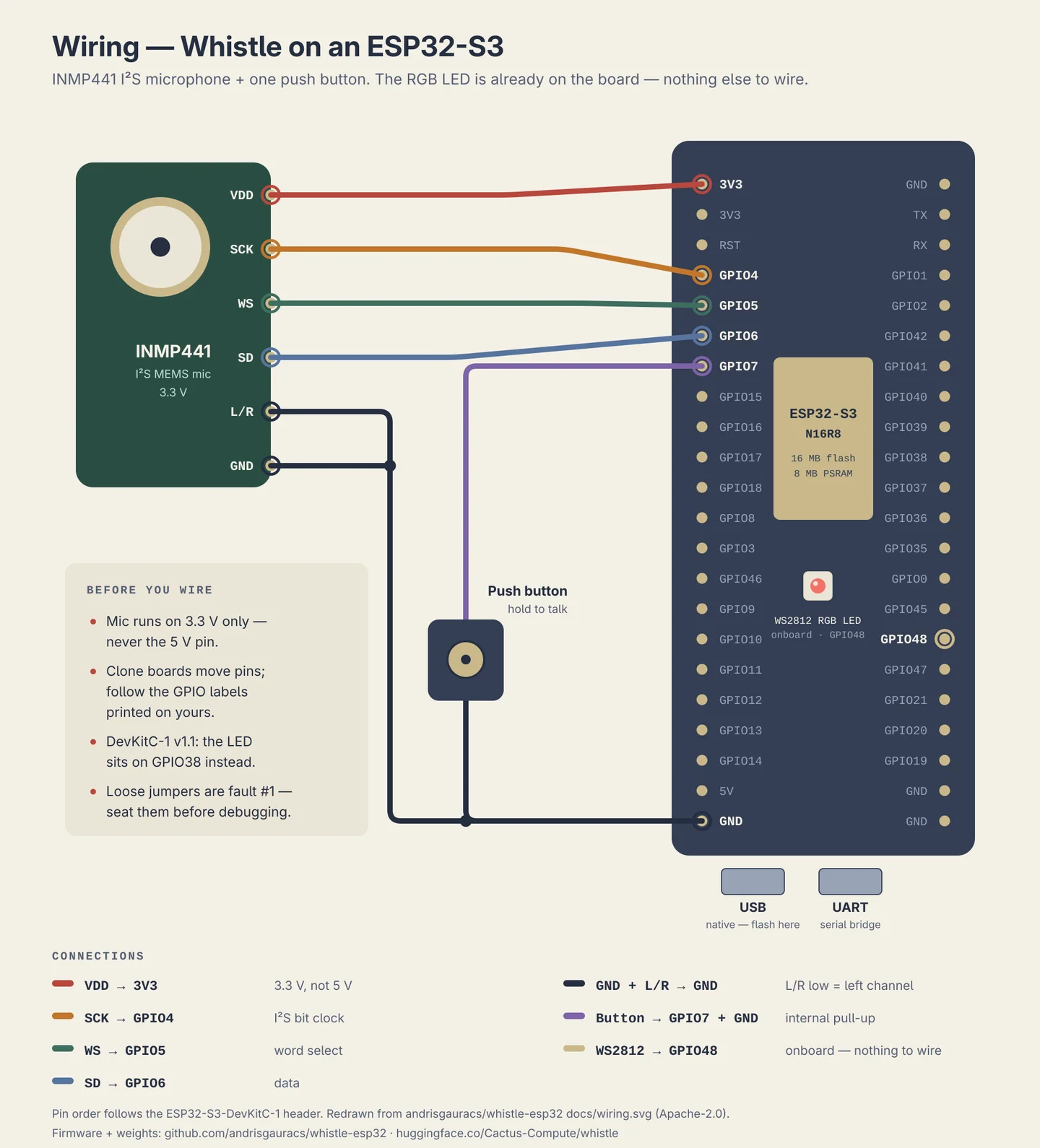
Wiring redrawn from andrisgauracs/whistle-esp32 (Apache-2.0). Tap for the full-size figure. - 3
Prove the mic works first
Flash the repo's mic_test firmware and run tools/mic_capture.py: speech should sit near −45 dBFS against a noise floor near −68. Loose jumper wires on the mic are the most common fault.
- 4
Fetch and strip the weights
Download whistle.cact (16.9 MB) from Hugging Face and run tools/whistle_strip.py at depth 4 — the result, 14,515,887 bytes, matches the firmware's flash partition exactly; we reproduced it byte-for-byte.
- 5
Build and flash with ESP-IDF v5.5 or newer
Build and flash with ESP-IDF v5.5 or newer, target esp32s3; the console lives on the board's native USB port. We rebuilt the demo firmware: it compiles clean, app partition 85% free.
- 6
Talk to it
Hold the button, say "flash the light blue", let go — and the onboard LED flashes blue for three seconds.
Bill of Materials
Parts list
5 parts · 1 linked
Heads up: some Buy links are affiliate links. If you buy through one, MCU Atlas may earn a small commission at no extra cost to you. It never changes which parts we list. How this works
1× Breadboard
Not included: A computer with ESP-IDF v5.5 or newer, Python 3 and CMake (all free downloads), A USB DATA cable to the board's native USB port — flashing and the console both use it; a charge-only cable will not work, No network, broker, account or API key needed — the whole point is that nothing leaves the board, Nothing else to buy — the WS2812 LED is already on the dev board, and there is nothing to solder
Learn
Docs & guides
Read these before you buy. These pages explain things; they don't sell anything.
Related Projects