ESP32-C5 Wi-Fi Jam Detector: interference on a touchscreen
A touchscreen ESP32-C5 that learns both Wi-Fi bands' normal noise floor and raises an alarm when interference appears — receive-only, no PC, no extra RF parts.
What it is
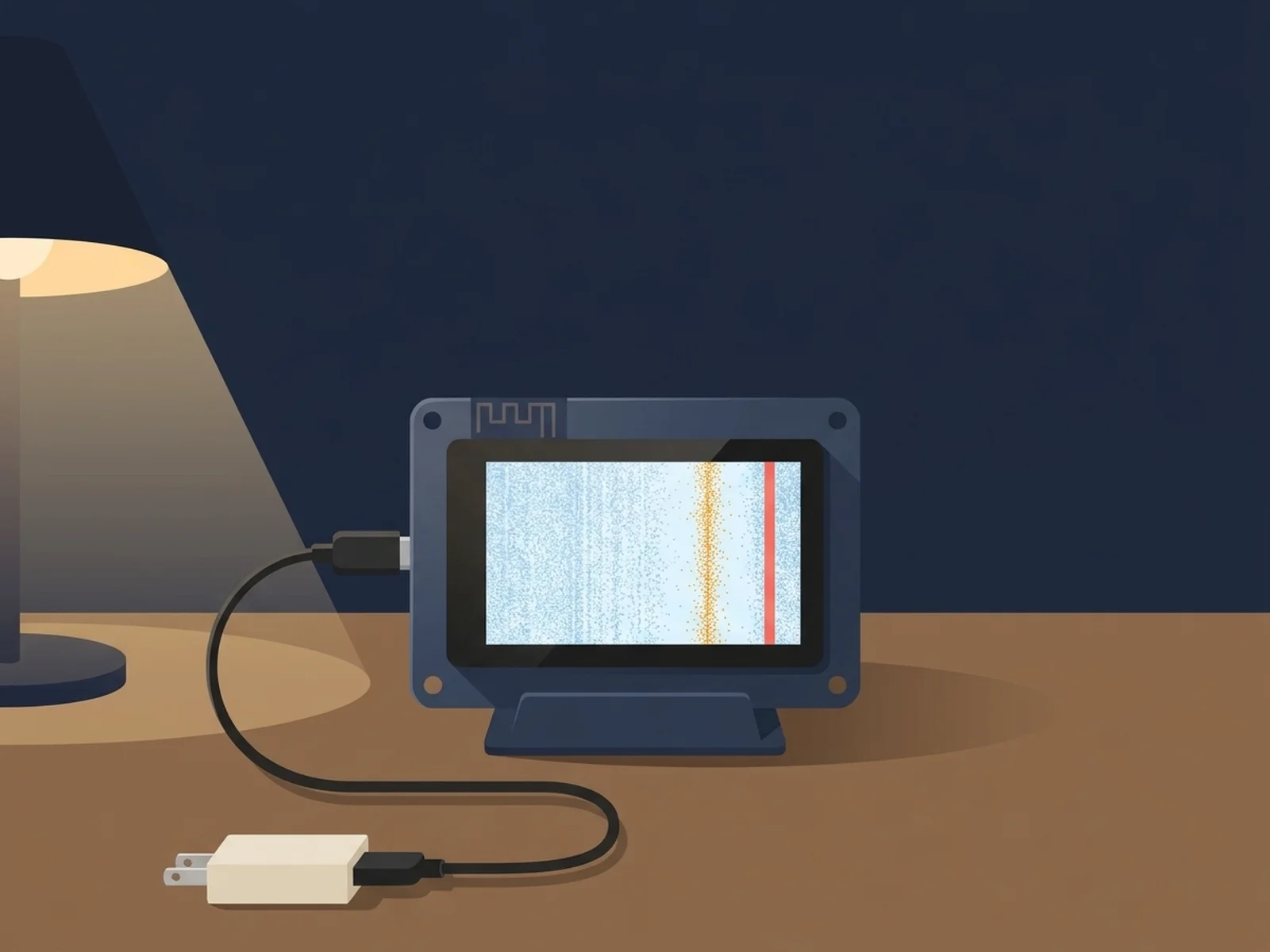
A receive-only 2.4 + 5 GHz interference detector for the Waveshare ESP32-C5-Touch-LCD-3.5: the board's own Wi-Fi radio becomes a snapshot SDR, and the touchscreen shows spectrum, waterfall and alarms against a learned 60-second baseline — standalone, no PC, no extra RF parts.
What you need
- Waveshare ESP32-C5-Touch-LCD-3.5 the only supported board — buy direct from Waveshare and check stock (listed Out of Stock at the 2026-11-22 check)
- USB-C data cable flashes the firmware; later bridges Home Assistant
- microSD card, FAT-formatted optional: event CSV + alarm waterfall snapshots
- 3.7 V Li battery optional; battery % via the AXP2101 fuel gauge
How hard
Beginner: no wiring, no soldering, no toolchain — flash one prebuilt binary with a single esptool command over USB-C, then let it learn the noise floor for 60 seconds on first boot.
Key Facts
- Receive-only 2.4 + 5 GHz interference detector on the Waveshare ESP32-C5-Touch-LCD-3.5 — standalone, no PC or network
- Snapshot SDR via ESPARGOS esp-sdr on the C5's own radio (only the C5 reaches 5 GHz): sweeps 2400–2483.5 and 5150–5895 MHz in 48 MHz slices at 80 MS/s, 312.5 kHz bins; ~4.5 sweeps/s; 60 s baseline; four detectors, NORMAL/SUSPECT/ALARM
- Uncalibrated (relative dB) and snapshot-based — events between snapshots can be missed
- Flash one prebuilt binary (v1.1.0) with one esptool command over USB-C — no toolchain, no soldering; baselines survive reflashes
- microSD logging (CSV + alarm waterfalls, JP8 pin 2); Home Assistant via the Jammer Detector Bridge add-on over USB → MQTT discovery — never Wi-Fi
- Beginner, one board: $31.99–$35.99 at Waveshare (checked 2026-11-22; Out of Stock at check time — re-check); GPL-3.0 by TheDigital1
About This Project
One buyable board, one flash over USB-C: a standalone dual-band spectrum monitor that learns your environment's normal RF noise — and tells you when something changes. ESP-WiFi-Jam-Detector by TheDigital1 is a receive-only RF interference detector for the Waveshare ESP32-C5-Touch-LCD-3.5. It turns the board's own Wi-Fi receiver into a snapshot SDR (via ESPARGOS esp-sdr) — no extra RF hardware: the radio listens, the touchscreen shows what it heard, standalone. Over USB it doubles as a Home Assistant jammer detector.
The name invites the question: this is a detector, not attack tooling. In the README's words, "It never transmits, injects or deauthenticates anything." And "It can show that the RF environment changed; it cannot prove intent" — a leaky microwave and a jammer look alike. Wi-Fi is off while it scans, and the SDR layer beneath ships no transmitter "at this time".
How it works
ESPARGOS found an undocumented ESP32 feature: firmware can bypass the Wi-Fi/BT modems and capture raw IQ samples from the modem ADC chain — signed 10-bit I+Q at up to 80 MSa/s, tunable 2.2–2.7 and 4.8–6.0 GHz; only the C5 reaches 5 GHz.
The detector sweeps 2400–2483.5 MHz and 5150–5895 MHz in 48 MHz slices at 80 MS/s, stitched into one spectrum per band at 312.5 kHz resolution — about 4.5 sweeps per second on 2.4 GHz (5 GHz: one every 0.83 s), roughly 12 per second 2.4-only.
First boot: it learns a 60-second per-bin picture of your normal noise floor, stores it in flash, and drift-tracks it. Against that baseline run four detectors — wideband floor, narrowband carrier, swept signal, pulsed energy — each band reporting NORMAL, SUSPECT or ALARM. The touchscreen shows status tiles, a ~10 fps spectrum with max-hold and baseline, a waterfall and settings; an alarm flashes red and beeps (built-in speaker).
Honest physics note: snapshot capture, not continuous monitoring — reception happens in bursts, missing low-duty events; dB is relative to the learned baseline, not absolute dBm.
The board
The Waveshare ESP32-C5-Touch-LCD-3.5 is the target: an ESP32-C5-WROOM-1U module (RISC-V up to 240 MHz, 8 MB PSRAM, 32 MB flash, dual-band Wi-Fi, Bluetooth 5 LE, 802.15.4/Zigbee/Thread) behind a 3.5-inch 320×480 IPS touchscreen. Its USB-C port flashes the firmware and later links Home Assistant; a microSD slot (DIP JP8 pin 2) does the logging; an AXP2101 chip reads battery % for an optional 3.7 V Li cell. Hackaday notes that, being open source, it should port to other devices — but this board is what ships today.
One board is the whole build
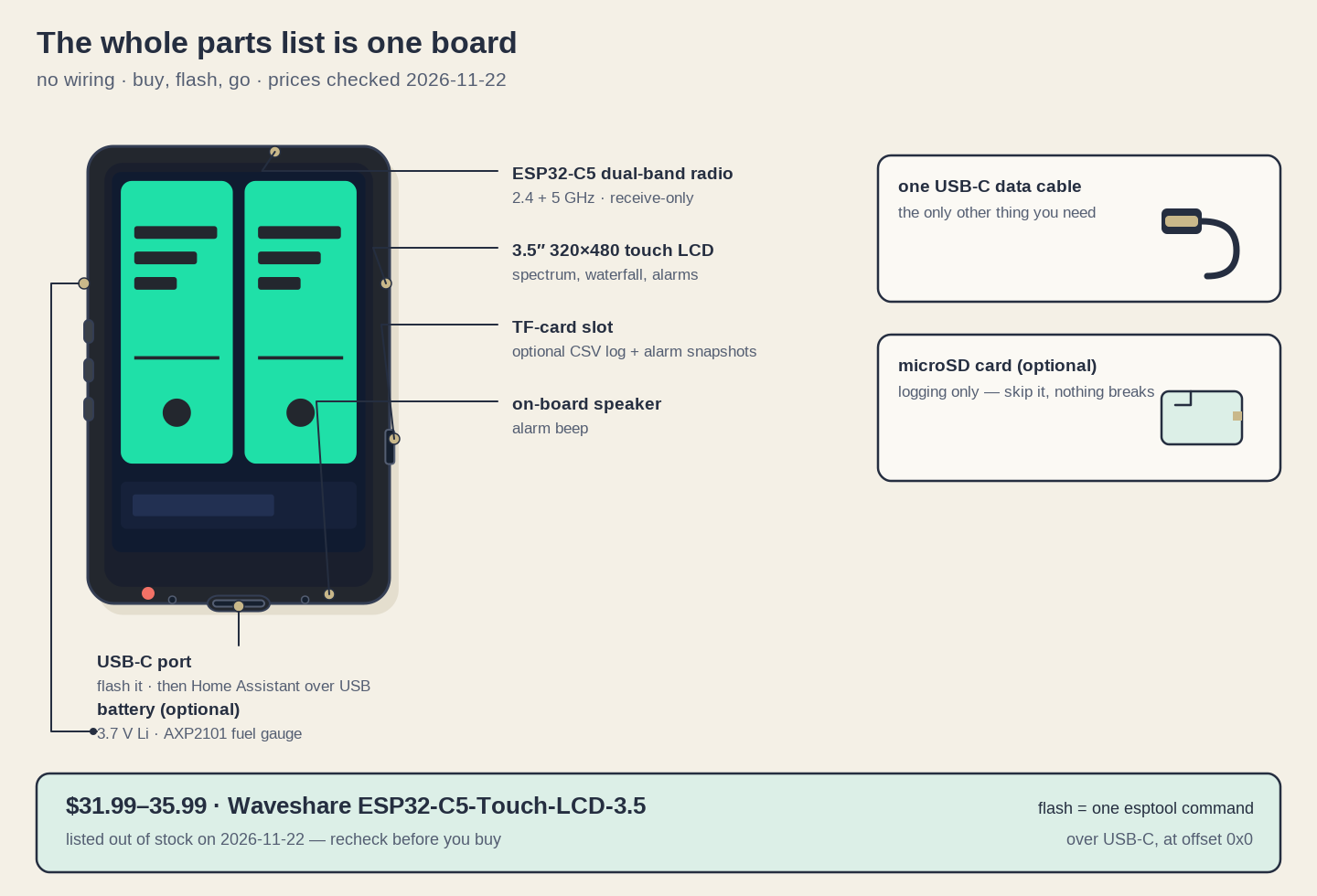
No SDR dongle, no antenna kit, no host computer — the "SDR" is the board's own radio. The only other thing you need is a USB-C data cable; a microSD card adds event logging, and an optional 3.7 V Li battery makes it handheld. The parts table carries the dated price and the stock note.
Getting started
There is no build step. Download the prebuilt merged binary from Releases, flash it at offset 0 with one esptool command over USB-C, then keep the RF environment normal through the 60-second first-boot learn. The merged image keeps settings and learned baselines across reflashes. Building from source is pinned to one exact ESP-IDF commit (a 6.2-dev tree); casual builders should stick to the binary. The full walk-through is in the tutorial below.
Standalone and with Home Assistant
Standalone is the default: everything happens on the touchscreen. With a microSD card in (JP8 pin 2 on), state changes log to CSV and each alarm gets a waterfall image; the repo's demo media includes a microwave-oven test — sometimes the interference is dinner.
Home Assistant arrives over USB, not Wi-Fi. With firmware 1.1.0 or later, add the project's repo as a Home Assistant add-on repository, install "Jammer Detector Bridge", and pick the detector on its Configuration tab (an Espressif USB JTAG serial debug unit). With an MQTT broker (Mosquitto is usual), entities appear via MQTT discovery — no YAML: per band an alarm sensor, state, interference kind, floor-rise dB, occupancy % and an event entity, plus battery, beep and threshold controls. As the README puts it, "The detector itself still never uses Wi-Fi"; the USB protocol is plain JSON lines, usable by any host.
Ethics and the law
This device only listens: it never transmits, injects or deauthenticates. Deliberately jamming other people's Wi-Fi is illegal in most jurisdictions — this project notices interference, never causes it; it detects that the environment changed, not who. We don't describe how attacks work.
Known limits
The README's own list, in prose: busy Wi-Fi can read SUSPECT; inverter microwaves may alarm; channel-width interference can look like a saturated link and go unflagged; fast-sweeping jammers can look wideband or pulsed; after moving the device, re-learn the baseline; logged alarm times are uptime, not wall clock.
The honesty split: MCU Atlas verified this project, its GPL-3.0 license, its Hackaday coverage and the board's specs from live sources on 2026-11-22; we have not built one — every behaviour above is the project's documentation, not our bench.
Difficulty
Beginner. Buy one board, flash one prebuilt binary — no soldering, no wiring, no toolchain, and no build step: the download, one esptool command, and the 60-second first-boot learn.
Credits, license and sources
Built by TheDigital1, licensed GPL-3.0 (the LICENSE file is GNU GPL v3; the README says GPL-3.0-or-later because it vendors ESPARGOS esp-sdr), with same-week coverage from Hackaday, Adafruit and rtl-sdr.com, November 2026. Not affiliated with Espressif or Waveshare.
Related reading
Related on MCU Atlas: our ESP-SDR page (/projects/esp-sdr-zephyr-2-4-ghz-software-defined-radio-on-the-esp32-s3/) covers the upstream ESPARGOS project, the ESP32 SDR beginner guide (/guides/esp32-sdr-beginner-guide/) gets you started, and the Meshtastic sniffer (/projects/meshtastic-sniffer-listen-to-the-whole-mesh-band-with-one-sdr/) is the same idea at LoRa frequencies.
Source & Attribution
Illustration
How to Build It
Parts Needed
- A Waveshare ESP32-C5-Touch-LCD-3.5 — the only supported board ($31.99–$35.99 direct from Waveshare, checked 2026-11-22; listed Out of Stock at check time — re-check before ordering)
- A USB-C data cable — flashes the firmware, then bridges Home Assistant
- Optional: a FAT-formatted microSD card for event CSV logs and alarm waterfall snapshots
- Optional: a 3.7 V Li battery — battery % via the AXP2101 fuel gauge
Steps
- 1
One board is the whole build
The entire bill of materials is the Waveshare ESP32-C5-Touch-LCD-3.5 ($31.99–$35.99 direct from Waveshare, checked 2026-11-22 — listed Out of Stock at check time, so re-check before ordering) plus a USB-C data cable. No SDR dongle, no antenna kit, no host computer: the board's own Wi-Fi radio is the receiver. Optional extras: a FAT-formatted microSD card for logging, and a 3.7 V Li battery if you want it handheld.
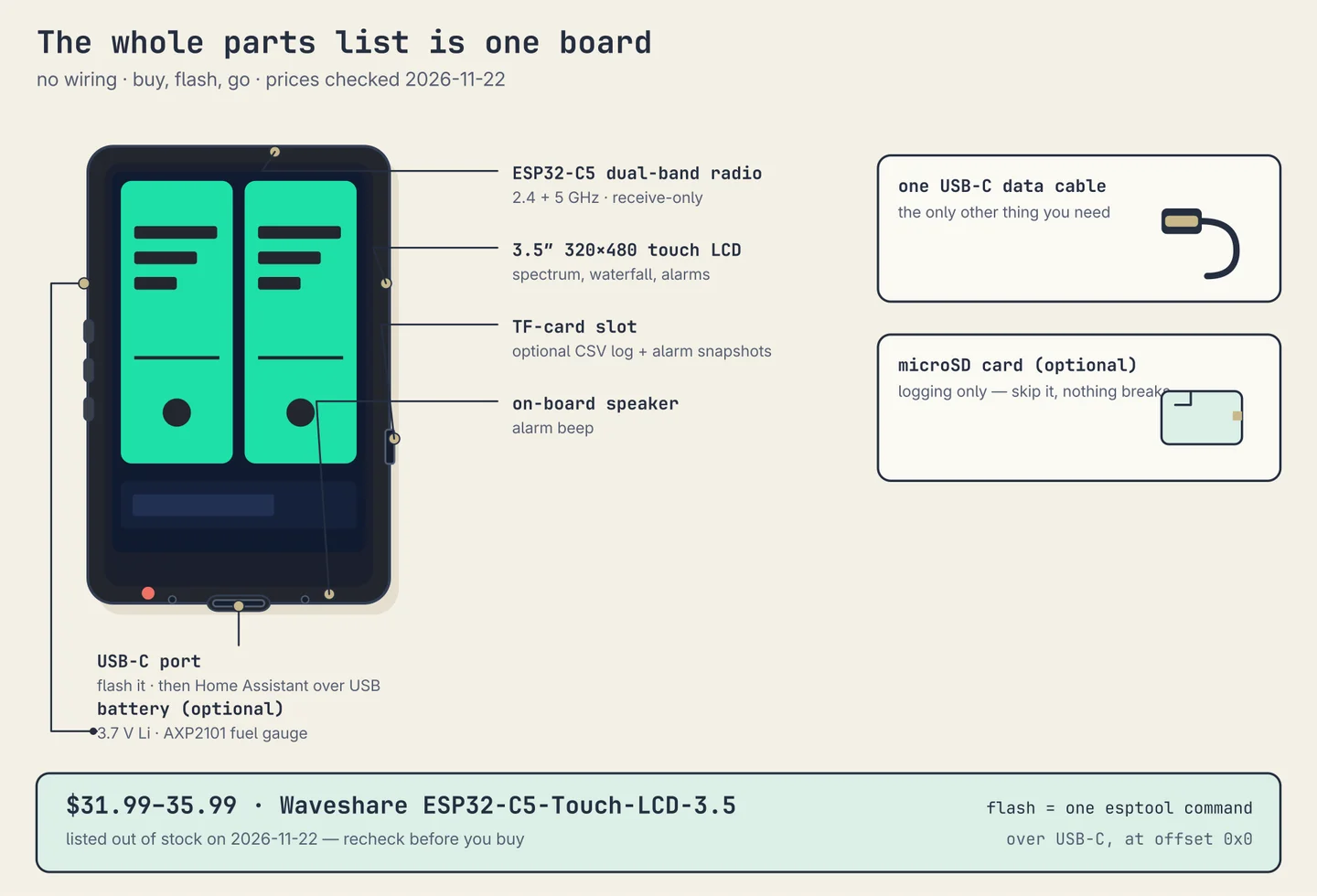
The whole parts list is one board. Prices as checked 22 November 2026. Tap for the full-size vector figure. - 2
Download the prebuilt firmware
Grab the merged binary from the project's Releases page (v1.1.0 is current, released 2026-11-10) and check it against the attached SHA256SUMS. The merged image keeps settings and learned baselines, so reflashing later never loses what the detector learned. Building from source instead is pinned to one exact ESP-IDF commit (a 6.2-dev tree, inherited from the vendored esp-sdr) — casual builders should stick to the binary.
- 3
Flash it over USB-C
Install esptool (pip install esptool), connect the board over USB-C, then flash the merged binary at offset 0: esptool --chip esp32c5 -p /dev/ttyACM0 -b 460800 write-flash 0x0 merged.bin (esptool 5 syntax; swap the port for your COM port on Windows). On Linux, if ModemManager grabs the port, stop it or add a udev rule to ignore Espressif's 303a vendor ID.
- 4
First boot: the 60-second learn
Power it on in the environment you want to monitor and keep the RF environment normal — no new transmitters, no microwave running — while the detector learns its baseline: a 60-second per-bin picture of your normal noise floor, stored in flash and drift-tracked from then on. After moving the device to another room, re-learn the baseline; the old one describes a different environment.
- 5
Read the screen
Status tiles report NORMAL, SUSPECT or ALARM per band; the spectrum view runs at about 10 fps with max-hold and the learned baseline drawn in; a waterfall shows history; an alarm flashes red and beeps on the built-in speaker. Four detectors run against the baseline — wideband floor, narrowband carrier, swept signal, pulsed energy — so a leaky microwave, a persistent carrier or a hopping jammer each read differently. Remember the honest physics: it captures snapshots, not continuous stream, so low-duty events between snapshots can be missed, and the dB scale is relative to your baseline, not absolute dBm.
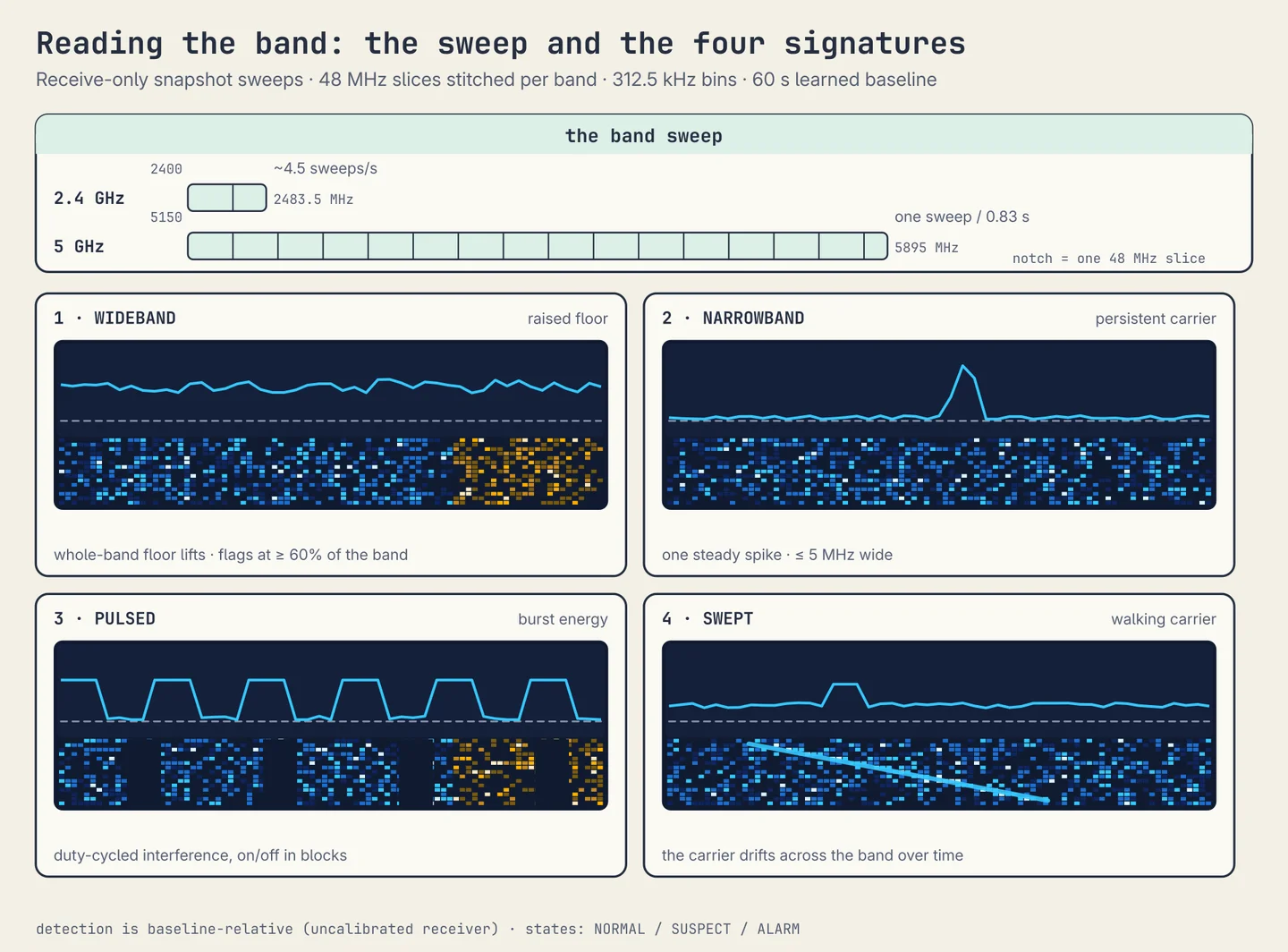
The band sweep and the four signatures it classifies. Tap for the full-size vector figure. - 6
Optional: microSD logging and Home Assistant
With a microSD card in (DIP switch JP8 pin 2 on), every state change logs to CSV and each alarm saves a waterfall snapshot — logged alarm times are uptime, not wall clock. For Home Assistant (firmware 1.1.0 or later): connect the board over the same USB-C cable, add the project's repo as a Home Assistant add-on repository, install the Jammer Detector Bridge add-on, and pick the detector on its Configuration tab. With an MQTT broker such as Mosquitto, entities appear via MQTT discovery — no YAML — and the detector itself still never uses Wi-Fi.
Bill of Materials
Parts list
4 parts · 1 linked
Heads up: some Buy links are affiliate links. If you buy through one, MCU Atlas may earn a small commission at no extra cost to you. It never changes which parts we list. How this works
1× Waveshare ESP32-C5-Touch-LCD-3.5
Listed Out of Stock at Waveshare on 2026-11-22 — re-check before ordering; price checked the same day.
1× 3.7 V Li battery
Not included: No SDR dongle, antenna kit or host computer — the board's own Wi-Fi radio is the receiver
Learn
Docs & guides
Read these before you buy. These pages explain things; they don't sell anything.
Related Projects