Yes — you can use Meshtastic with no phone attached, and it's one of the best parts of the whole idea. Devices like the LilyGO T-Deck and T-Lora Pager are pocket radios with their own screen and keyboard: they send and receive mesh messages entirely on their own. The phone most beginners start with is just one way to control a radio — not a requirement. This guide explains what Meshtastic and LoRa are, the cheapest way to get your first node on the air, and every no-phone option we've covered in our projects.
What is Meshtastic, and what is LoRa?
LoRa (short for "long range") is a radio technology that trades speed for distance. It sends small amounts of data — text messages, not video — several kilometers between devices while sipping battery power. A LoRa node is any small device with a LoRa radio in it, usually a circuit board the size of a matchbox with a chip, a battery connector, and an antenna port.
Meshtastic is free, open-source firmware you flash onto those boards so they form a mesh: instead of every radio needing to reach every other radio directly, each node passes messages along to its neighbors. Your text hop, hop, hops across the neighborhood until it arrives. That's how a few cheap boards scattered around a town can create a network that doesn't need cell towers, Wi-Fi, or an internet provider at all.
A few terms you'll see everywhere in this world:
Node — one device on the mesh (a board, a handheld, a solar-powered unit on a roof).
Mesh — the network those devices form by relaying for each other.
Channel — a named conversation on the mesh, protected by an encryption key you share with the people you want to talk to.
Telemetry — machine-generated status data nodes share about themselves: battery voltage, position, and signal readings, sent automatically rather than typed.
Meshtastic isn't alone. MeshCore, the off-grid mesh with repeaters and room servers, is a sibling project with a similar spirit and its own firmware, and RNode firmware, which turns a LoRa board into a Reticulum radio, opens the door to a whole different networking stack. We have full project write-ups on both, and this guide sticks to what they share: cheap LoRa radios talking to each other without any carrier in the middle.
One thing a mesh is not: an emergency service. It's a hobby network run on hobby hardware — build it for fun and resilience, not as your lifeline.
How a LoRa mesh actually works
Imagine five nodes spread across a valley, each a kilometer or two from the next. Node A can't reach node E directly — but it can reach B, B can reach C, and so on. When you send a message, each node that hears it re-transmits it a fixed number of times (a setting called "hop limit"), so your message flows across every node in range of the chain. The mesh heals itself, too: if node C goes offline, messages simply route around it through whoever else is in range.
The practical consequences are what make this fun for beginners:
Every node somebody else adds makes your node more useful. One board alone is a novelty; ten spread around town are a network.
Nodes are cheap and idle power is low, so people leave them running 24/7 on windowsills and rooftops — those are the repeaters that give a mesh its reach.
A node reports its own position and battery over telemetry, so you can watch the mesh's shape on a map.
Here's the punchline for this guide: nowhere in that picture is a phone required. A node is a radio with a brain. The phone app most people start with is just a client — a screen and keyboard borrowed from your pocket. Swap that borrowed screen for one built into the device, and the phone goes home.
Your first node: the cheapest way in
The classic starter path is one cheap LoRa board plus the phone you already own. Boards like the Heltec WiFi LoRa series or a LilyGO T-Beam (ESP32 + LoRa + GPS) are single-matchbox devices that pair to your phone over Bluetooth; the phone becomes the screen and keyboard, and the board becomes the radio. It's the least expensive, best-documented way to get on the air — and the exact path our full beginner walkthrough of Meshtastic on ESP32 and nRF52 boards covers step by step, from flashing firmware to your first encrypted message. If your first node will live somewhere a charger can't reach, look at the Nordic side of the shortlist too: our RAK4631 part page covers the nRF52840 board that sips microamps in sleep, the WisBlock base board it snaps onto, and the first flash. Current board prices change constantly, so check the part page for the board you're eyeing rather than any number quoted in a forum.
One safety rule before anything else, and it is not optional: attach the antenna before applying power. Transmitting with no antenna (or a broken one) can destroy the radio's amplifier in seconds. Antenna first, battery second — every time, no exceptions. And before buying any upgrade antenna, make sure it actually fits your node — connector, band and region all have to match, or you're buying a paperweight.
Starting phone-based is genuinely smart, even if your goal is no-phone. You'll learn how channels, keys, and hop limits work using a screen you're already familiar with, then graduate to a standalone device once you know what you want the mesh to do for you.
Meshtastic without a phone: your options
So what does "no phone" actually look like? Four archetypes cover everything we've built or profiled.
Keyboard handhelds (T-Deck class). The LilyGO T-Deck is a chunky little handheld with a color screen, a mini keyboard, and a trackball — a pocket palmtop that happens to have a LoRa radio inside. Flash it with Meshtastic (or something else — see below) and it texts on the mesh entirely on its own. MatterMesh OS puts MeshCore on the T-Deck Plus and Max — an easy first no-phone build with maps and weather built in. Want to go deeper? Trail Mate turns the T-Deck or T-Lora Pager into an offline handheld with maps, routes, and chat, all with no phone and no internet in sight.
Pager-style handhelds. Not everything needs a keyboard. The T-Lora Pager is exactly what it sounds like — a standalone LoRa pager that texts with no phone paired — and our project page walks through the whole thing. Color screen, little QWERTY, GPS built in, and it runs Meshtastic out of the box.
Standalone always-on nodes. Some no-phone devices aren't handhelds at all. A solar-ready base node that keeps a household text channel alive sits at home (or in a sunny window), runs around the clock, and gives your family a text channel that works when the cell network doesn't. It even arrives pre-flashed — the least assembly of anything on this page.
Single-purpose devices. A no-phone node can also do exactly one job — see the panic button in the next section.
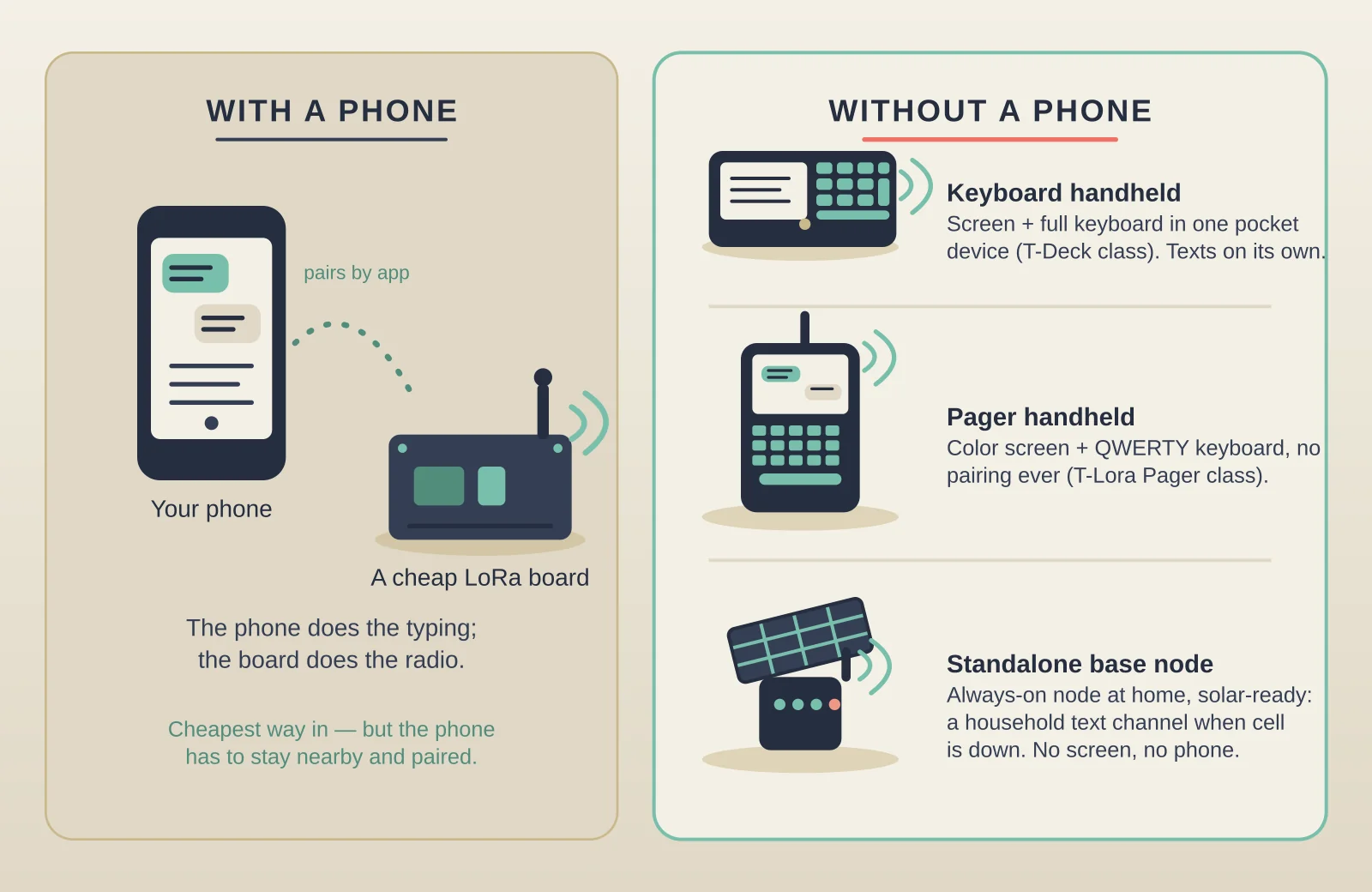
Here's the full no-phone field at a glance:
| Option | What it is | Rough cost | Our project that shows it |
|---|---|---|---|
| LilyGO T-Lora Pager | Pager-style handheld: QWERTY, color screen, GPS, runs Meshtastic standalone | $88 at lilygo.cc (checked 2026-11-15; stock comes and goes — see the part page) | LilyGO T-Lora Pager; Trail Mate also runs on it |
| T-Deck (Plus/Max) | Mini-keyboard handheld: screen, trackball, LoRa variant | See the T-Deck part page above — no verified price on file | Trail Mate (T-Deck); MatterMesh OS (Plus/Max) |
| Solar base node | Matchbox always-on node at home; household text channel when cell is down | See project page | Muzi Works Base Uno |
| Panic button | Single-purpose: one press, one encrypted alert | See project page | LoRa mesh panic button |
| Receive-only scanner | Handheld LoRa-band scanner (no transmitting) | See project page | LakeShark |
Not just texting: trackers, panic buttons, bridges
Once a mesh exists, interesting things can hang off it — none of which need a phone in the loop.
Worried about the dog on acreage? An open-source Meshtastic GPS tracker for your pet's collar reports its position over LoRa on your private channel — a self-contained collar node, no phone riding along. For people rather than pets, a one-press encrypted panic button for your mesh does exactly one thing: press it, and one encrypted alert lands on your channel with no screen, phone, or fumbling in an emergency. (Remember: hobby mesh, not a certified emergency system.)
And if your friends won't leave their phones behind, the mesh can meet them halfway: a bridge that carries Bitchat phone chats onto a LoRa mesh relays messages both ways, so phone people and no-phone people share one conversation.
Watching from the outside: scanners and sniffers
You don't even need to own a node to start exploring. With a cheap RTL-SDR USB stick you can listen to the whole mesh band with one SDR and see every visible Meshtastic channel around you — and with a channel's key, decrypt your own. Prefer something handheld? LakeShark, a LoRa chip turned handheld radio scanner, scans the LoRa band plus police pagers, aircraft, and FM — receive-only, so no license worries and nothing to join.
Sniffing the band first is a genuinely good beginner move: you'll see whether there's active mesh traffic in your area before spending a cent on hardware.
Pick your first build
Every project named in this guide, sorted by how much soldering patience it asks of you:
Beginner (no heavy electronics background needed):
Meshtastic off-grid messaging on ESP32 and nRF52 — the canonical phone-plus-board starter.
LilyGO T-Lora Pager handheld — the no-phone path, out of the box.
MatterMesh OS for T-Deck Plus/Max — keyboard handheld with maps, beginner-friendly flash.
MeshCore LoRa mesh — the sibling firmware, with repeaters and room servers.
Bitchat ↔ MeshCore bridge — connects phone chats to your mesh.
Muzi Works Base Uno solar base node — arrives pre-flashed; just add antenna and sun.
Intermediate:
Trail Mate offline handheld — full offline maps, routes, and chat on T-Deck or Pager.
RNode / Reticulum firmware — your board becomes a general-purpose Reticulum radio.
LoRa mesh panic button — one button, one encrypted alert.
LakeShark handheld scanner — a LoRa chip repurposed as a wideband receiver.
Advanced:
Lia pet-collar GPS tracker — a custom ESP32-S3 + GNSS collar build.
Meshtastic SDR sniffer — full-band monitoring and decrypt-your-own setup.
Where to start? If you learn best by doing, start with #1 to understand the mesh, then pick the no-phone shape that fits your life: a T-Deck or Pager in your pocket, a base node on your windowsill, or a scanner on the desk — no phone required for any of them.
MCU Atlas is an independent educational site. We are not affiliated with or endorsed by Meshtastic, LilyGO, or any manufacturer named here. Prices are approximate and change often — always check the seller's current listing. Mesh networks are hobby systems and should not be relied on as your only means of emergency communication.